SSD1306 OLED display fails for nRF52840 boards using nRF Connect SDK 3.2.1

Hello,

I’ve been using SSD1306 128x64 OLED displays with nRF52840 boards for several years without any issues, building with nRF Connect SDK 2.5.x to 3.1.0. Recently, I've been attempting to move existing NCS 3.1.0 projects over to NCS 3.2.1. However, I’m unable to successfully get the SSD1306 OLED display to work with any of the nRF52840 boards using the latest nRF Connect SDK 3.2.1.

All the nRF52840 boards with SSD1306 display work fine when built with vanilla Zephyr 4.1.x and 4.2.x.

Also, the target for thingy53/nrf5340/cpuapp/ns failed to run successfully with both NCS 3.1.0 and NCS 3.2.1. The target thingy53/nrf5340/cpuapp ran fine with the SSD1306 OLED.

To try to isolate the issue, I’ve taken the Zephyr sample, “/opt/nordic/ncs/v3.2.1/zephyr/samples/subsys/display/cfb_custom_font” and built it for a couple of different nRF52840 boards (e.g. particle_xenon_nrf52840, promicro_nrf52840) plus thingy/nrf5340/cpuapp.

Built exactly the same sample "cfb_custom_font" main.c (modified to display board target and Zephyr version) & used the same devicetree overlays. All the builds compiled and linked without any issues.  However, only particle_xenon/nrf52840 using NCS 3.1.0 and thingy53/nrf5340/cpuapp using NCS 3.2.1 ran successfully with the SSD1306 displays.

I used the below board configuration and the overlays with the ssd1306 devicetree included in the I2C sections of the overlays. Default sysbuild option used from with the nRF Connect SDKs.

I don't see anything that is obvious that may be wrong. I would appreciate if you could determine the cause of the issue with the nRF52840 boards with SSD1306 when using  nRF Connect SDK 3.2.1.

Also, Is there any reason as to why the target for thingy53/nrf5340/ns doesn’t run successfully with the I2C SSD1306 display?

Thank you.

particle_xenon_nrf52840.overlay:

/ {
	chosen {
		zephyr,display = &ssd1306;
		zephyr,console = &uart0;
		zephyr,shell-uart = &uart0;
	};
};

&uart0 {
	compatible = "nordic,nrf-uarte";
	status = "okay";
	current-speed = <115200>;
	pinctrl-0 = <&uart0_default>;
	pinctrl-1 = <&uart0_sleep>;
	pinctrl-names = "default", "sleep";
};

&gpio0{
	status = "okay";
};

&i2c0 {
	compatible = "nordic,nrf-twi";
	status = "okay";
	pinctrl-0 = <&i2c0_default>;
	pinctrl-1 = <&i2c0_sleep>;
    pinctrl-names = "default", "sleep";
	ssd1306: ssd1306@3c {
		compatible = "solomon,ssd1306fb";
		reg = <0x3c>;
		width = <128>;
		height = <64>;
		segment-offset = <0>;
		page-offset = <0>;
		display-offset = <0>;
		multiplex-ratio = <63>;
		segment-remap;
		com-invdir;
		prechargep = <0x22>;
	};
};

thingy53_nrf5340_cpuapp.overlay

/ {
	chosen {
		zephyr,display = &ssd1306;
	};
};

&pinctrl {
	i2c0_default: i2c0_default {
		group1 {
			psels = <NRF_PSEL(TWIM_SDA, 0, 5)>,
				<NRF_PSEL(TWIM_SCL, 0, 4)>;
		};
	};

	i2c0_sleep: i2c0_sleep {
		group1 {
			psels = <NRF_PSEL(TWIM_SDA, 0, 5)>,
				<NRF_PSEL(TWIM_SCL, 0, 4)>;
		};
	};
};

&i2c0 {
	compatible = "nordic,nrf-twim";
	status = "okay";
	clock-frequency = <I2C_BITRATE_FAST>;
	zephyr,concat-buf-size = <4096>;
	pinctrl-0 = <&i2c0_default>;
	pinctrl-1 = <&i2c0_sleep>;
    pinctrl-names = "default", "sleep";
	ssd1306: ssd1306@3c {
		compatible = "solomon,ssd1306fb";
		reg = <0x3c>;
		width = <128>;
		height = <64>;
		segment-offset = <0>;
		page-offset = <0>;
		display-offset = <0>;
		multiplex-ratio = <63>;
		segment-remap;
		com-invdir;
		prechargep = <0x22>;
	};
};

prj.conf:

CONFIG_HEAP_MEM_POOL_SIZE=16384

CONFIG_DISPLAY=y
CONFIG_SSD1306=y

CONFIG_CHARACTER_FRAMEBUFFER=y
CONFIG_CHARACTER_FRAMEBUFFER_USE_DEFAULT_FONTS=n

CONFIG_LOG=y

# Preferred SHELL options
CONFIG_SHELL=y
CONFIG_DEVICE_SHELL=y
CONFIG_INIT_STACKS=y
CONFIG_KERNEL_SHELL=y
CONFIG_SHELL_STATS=n
CONFIG_I2C_SHELL=y

# Enable RTT to replace UART
CONFIG_UART_CONSOLE=y
CONFIG_USE_SEGGER_RTT=n
CONFIG_SHELL_BACKEND_RTT=n

CONFIG_LOG_BACKEND_UART=y
CONFIG_SHELL_LOG_BACKEND=y

Console Output 

NCS 3.2.1 build  - particle_xenon_nrf52840 with  SSD1306 (particle_xenon/nrf52840):

*** Booting nRF Connect SDK v3.2.1-d8887f6f32df ***
*** Using Zephyr OS v4.2.99-ec78104f1569 ***

Display device not ready

Failed to turn off display blanking

NCS 3.1.0 build  - particle_xenon_nrf52840 with  SSD1306 (particle_xenon/nrf52840):

*** Booting nRF Connect SDK v3.1.0-6c6e5b32496e ***
*** Using Zephyr OS v4.1.99-1612683d4010 ***
Zephyr v4.1.99
Board target: particle_xenon/nrf52840
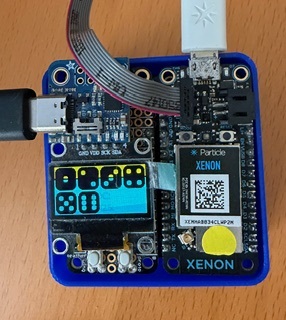
NCS 3.2.1 build  - thingy53_nrf5340_cpuapp with  SSD1306:

*** Booting nRF Connect SDK v3.2.1-d8887f6f32df ***
*** Using Zephyr OS v4.2.99-ec78104f1569 ***
[00:00:00.035,614] <inf> udc_nrf: Initialized
Zephyr v4.2.99
Board target: thingy53/nrf5340/cpuapp
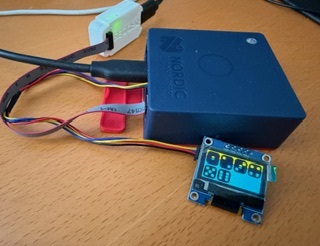
NCS 3.1.0 build  - thingy53_nrf5340_cpuapp with  SSD1306:

[Disconnected]
[Connected]
*** Booting nRF Connect SDK v3.1.0-6c6e5b32496e ***
*** Using Zephyr OS v4.1.99-1612683d4010 ***
Zephyr v4.1.99
Board target: thingy53/nrf5340/cpuapp

Vanilla Zephyr 4.2.x from terminal command line: SSD1306 displays works fine.

*** Booting Zephyr OS build v4.2.0-717-g85e135362445 ***
Zephyr v4.2.99
Board target: particle_xenon/nrf52840
uart:~$ 

Parents
  • Hello,

    There was a major update to the nrfx layer in SDK v3.2.0, which included a switch to standard POSIX error codes. Unfortunately, for the legacy TWI driver, we missed updating the Zephyr integration to handle the new return codes. This was later fixed in Zephyr, and we also added tests to improve the driver’s test coverage, see https://github.com/nrfconnect/sdk-zephyr/pull/3624/changes/1a8ca7c52da4e7b8083a2fe09b61bcd5f819f557

    You could cherry pick this commit, but the best solution is to switch from using TWI to TWIM by selecting "nordic,nrf-twim" binding in your overlay instead of "nordic,nrf-twi". 

    Best regards,

    Vidar

  • Hi Vidar,

    Thank you for your quick response. It's much appreciated.

    After posting the ticket yesterday, I noticed that the Thingy53 device overlay was using TWIM, so I did switch from TWI to TWIM for the nRF52840 boards. This has resolved the SSD1306 issue with Particle Xenon nRF52840 when building the application with NCS 3.2.1.

    However, I'm still having problems with a promicro_nrf52840 board when hooked up to a SSD1306 display.

    When building promicro/nrf52840/uf2 with the default build setting (i.e. sysbuild), the SD1306 doesn't show anything and the USB-C serial console doesn't come up. A no-sysbuild with NCS 3.2.1 works fine with the SSD1306.

    Any thoughts on why the sysbuild doesn't bring up the display & serial console? Thanks.

    Also, the build for target thingy53/nrf5340/ns fails to start successfully. Thanks.


    Best Regards,
    Ravi

  • Hi Vidar,

    I had another look at the Thingy53 NS builds for non-BT applications.

    After making the following Kconfig change, the non-BT applications now run on the Thing53.

    # Set TF-M to share the default console
    CONFIG_TFM_SECURE_UART0=y
    CONFIG_TFM_SECURE_UART_SHARE_INSTANCE=y


    The Thingy53 uses the USB cdc_acm_uart for the application console and UART0 by default is disabled.

    It seems that although UART0 is disabled, TF-M logging still requires UART0 configuration and to share TF-M's UART instance with the NS application.

    Earlier, without the above configuration,  NS applications on Thingy53 worked only if the TF-M logging was disabled via "CONFIG_TFM_LOG_LEVEL_SILENCE=y".

    I've verified the resolution using the Zephyr sample "/zephyr/samples/subsys/display/cfb" with 
    TF-M Configurable builds.

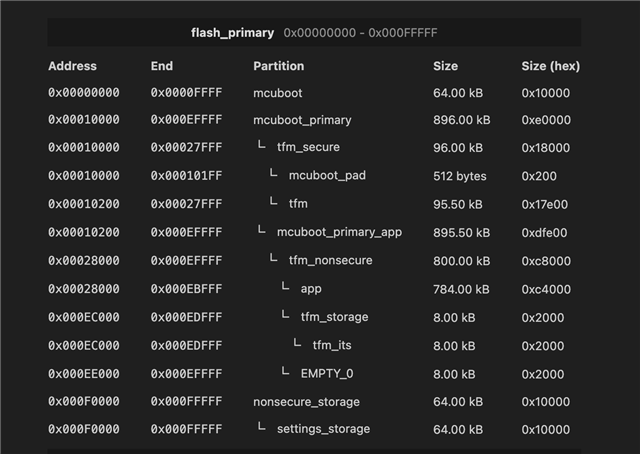
    TF-M size set to 96kB using static partitioning file "pm_static_thingy53_nrf5340_cpuapp_ns.yml" in the project folder.

    thingy53_nrf5340_cpuapp_ns.conf:

    # TF-M profile has to be properly configured to be able to run
    # the Bluetooth stack which uses PSA crypto API.
    # The following configuration is a minimal set of options required.
    CONFIG_TFM_PROFILE_TYPE_NOT_SET=y
    CONFIG_TFM_PARTITION_PLATFORM=y
    CONFIG_TFM_PARTITION_CRYPTO=y
    CONFIG_TFM_PARTITION_INTERNAL_TRUSTED_STORAGE=y
    CONFIG_TFM_PARTITION_PROTECTED_STORAGE=n
    CONFIG_TFM_PARTITION_INITIAL_ATTESTATION=n
    
    # This Board implies building Non-Secure firmware
    CONFIG_TRUSTED_EXECUTION_NONSECURE=y
    
    # Set TF-M to share the default console
    CONFIG_TFM_SECURE_UART0=y
    CONFIG_TFM_SECURE_UART_SHARE_INSTANCE=y

    Console output:

    [Disconnected]
    [Connected]
    Initialized ssd1306@3c
    font width 10, font height 16
    font width 15, font height 24
    font width 20, font height 32
    x_res 128, y_res 64, ppt 8, rows 8, cols 128
    
    [00:00:00.000,885] <inf> udc_nrf: Preinit
    *** Booting nRF Connect SDK v3.2.1-d8887f6f32df ***
    *** Using Zephyr OS v4.2.99-ec78104f1569 ***
    [00:00:00.012,756] <inf> udc_nrf: Initialized
    [00:00:00.013,153] <dbg> cfb: cfb_framebuffer_init: number of fonts 3
    [00:00:00.016,967] <inf> udc_nrf: SUSPEND state detected
    [00:00:00.114,532] <inf> udc_nrf: Reset
    [00:00:00.114,562] <inf> udc: ep 0x80 is not halted|disabled
    [00:00:00.114,593] <inf> udc_nrf: RESUMING from suspend


    Also, I've ran the sample NS  build of sample "tfm_hello_world" on the Thingy53. I noticed an unexpected behaviour.

    Initially, I got the following console output below. Some messages seem to have been dropped for some reason.

    [Connected]
    84--- 16 messages dropped ---
    dfde2b22388088bd36ccfbcdd9aab068e63105303997eb0d5a
    Example finished successfully!
    [00:00:00.005,279] <inf> udc_nrf: SUSPEND state detected
    [00:00:00.103,698] <inf> udc_nrf: Reset
    [00:00:00.103,729] <inf> udc: ep 0x80 is not halted|disabled
    [00:00:00.103,759] <inf> udc_nrf: RESUMING from suspend


    If I set "CONFIG_SHELL=y", then the console output is:

    [Connected]
    *** Booting nRF Connect SDK v3.2.1-d8887f6f32df ***
    *** Using Zephyr OS v4.2.99-ec78104f1569 ***
    Hello World! thingy53/nrf5340/cpuapp/ns
    Reading some secure memory that NS is allowed to read
    Approximate IPC overhead us: 174
    FICR->INFO.FLASH: 0x00000400
    Generating random number
    0xf1663a5d54a3d23924674a231407b1e44908755aad87a0f8a8c364e5986025ca
    Hashing 'Hello World! thingy53/nrf5340/cpuapp/ns'
    SHA256 digest:
    0x8d062694d91c7504ce428d05b015fb1bfcb3437cf5a2fab6ec5db63830751c1e
    Example finished successfully!


    I don't understand why the SHELL configuration resolves the dropped messages.

    Can you please run the "tfm_hello_world" sample on a Thingy53 to see if you get the same behaviour. Thank you.

    Best Regards,
    Ravi

  • HI Vidar,

    I've found out that the TF-M configuration and logging is slightly different on the nRF5340-DK.

    According to log output from TF-M on the nRF5340-DK, one option is to wire the secure and non-secure UART peripherals to the same pins, i.e. physically wire together the pins P0.25 and P0.26 to P0.20 and P0.22, respectively.

    After wiring together P.025 -> P0.20 & P0.26 -> P0.22, plus using the following TF-M configuration (same as what was used on the Thingy53) worked for NS applications.

    # TF-M profile has to be properly configured to be able to run
    # the Bluetooth stack which uses PSA crypto API.
    # The following configuration is a minimal set of options required.
    CONFIG_TFM_PROFILE_TYPE_NOT_SET=y
    CONFIG_TFM_PARTITION_PLATFORM=y
    CONFIG_TFM_PARTITION_CRYPTO=y
    CONFIG_TFM_PARTITION_INTERNAL_TRUSTED_STORAGE=y
    CONFIG_TFM_PARTITION_PROTECTED_STORAGE=n
    CONFIG_TFM_PARTITION_INITIAL_ATTESTATION=n
    
    # This Board implies building Non-Secure firmware
    CONFIG_TRUSTED_EXECUTION_NONSECURE=y
    
    # Set TF-M to share the default console
    CONFIG_TFM_SECURE_UART0=y
    CONFIG_TFM_SECURE_UART_SHARE_INSTANCE=y


    Console output (shared by application and TF-M):

    All pins have been configured as non-secure
    Booting TF-M v2.2.0
    [Sec Thread] Secure image initializing!
    TF-M Float ABI: Hard
    Lazy stacking enabled
    
    *** Booting nRF Connect SDK v3.2.1-d8887f6f32df ***
    *** Using Zephyr OS v4.2.99-ec78104f1569 ***
    [00:00:05.421,661] <inf> app: Board target: nrf5340dk/nrf5340/cpuapp/ns
    
    [00:00:05.421,691] <inf> app: bme688x_iaq_ssd1306 - App started
    [00:00:05.421,691] <inf> app: Init ssd1306
    [00:00:05.421,875] <dbg> cfb: cfb_framebuffer_init: number of fonts 2
    [00:00:05.449,005] <inf> oled: Index[0] font dimensions  5x8
    [00:00:05.449,035] <inf> oled: Index[1] font dimensions  8x8
    [00:00:05.449,035] <inf> oled: Selected font: index[0]
    [00:00:05.449,066] <inf> oled: x_res 128, y_res 64, ppt 8, rows 8, cols 128


    Do you know where it is specified that TF-M uses P.25 & P.26 on the nRF5340DK for logging? I couldn't find any reference to it in the nRF5340-DK Hardware Guide or the nRF5340-DK devicetree.

    Also, What pins are used on the Thingy53 for TF-M logging, as I do not see the shared TF-M / application outputs in the Thing53 console output as in nRF5340-DK?

    Thank you.

    Best Regards,
    Ravi

  • Hi Ravi,

    I have tried with the TF-M hello world sample as well now and I did not manage to reproduce the behaviour you observed. I did however have to  add "k_msleep(1000);" at the beginning of main to allow the USB to attach before the messages were printed. 

    Best regards,

    Vidar

  • HI Vidar,

    I'm a little unclear what you were not able to reproduce.

    Did you try running the sample "cfb" with a SSD1306 & TF-M size 96kB on a Thingy53 (and also a nRF5340-DK),  with the TF-M configuration that I used below?

    I used a Thingy53 and also a nRF4340-DK, sample "cfb" with a SSD1306 & TF-M size  96kB. The NS "cfb" application ran sucessfully provided the following configuration gets used. TF-M logging shared with application console.

    # TF-M profile has to be properly configured to be able to run
    # the Bluetooth stack which uses PSA crypto API.
    # The following configuration is a minimal set of options required.
    CONFIG_TFM_PROFILE_TYPE_NOT_SET=y
    CONFIG_TFM_PARTITION_PLATFORM=y
    CONFIG_TFM_PARTITION_CRYPTO=y
    CONFIG_TFM_PARTITION_INTERNAL_TRUSTED_STORAGE=y
    CONFIG_TFM_PARTITION_PROTECTED_STORAGE=n
    CONFIG_TFM_PARTITION_INITIAL_ATTESTATION=n
    
    # This Board implies building Non-Secure firmware
    CONFIG_TRUSTED_EXECUTION_NONSECURE=y
    
    CONFIG_TFM_SECURE_UART0=y
    CONFIG_TFM_SECURE_UART_SHARE_INSTANCE=y


    Thingy53 console output:

    [Connected]
    Initialized ssd1306@3c
    font width 10, font height 16
    font width 15, font height 24
    font width 20, font height 32
    x_res 128, y_res 64, ppt 8, rows 8, cols 128
    
    [00:00:00.000,885] <inf> udc_nrf: Preinit
    *** Booting nRF Connect SDK v3.2.1-d8887f6f32df ***
    *** Using Zephyr OS v4.2.99-ec78104f1569 ***
    [00:00:00.012,542] <inf> udc_nrf: Initialized
    [00:00:00.012,969] <dbg> cfb: cfb_framebuffer_init: number of fonts 3
    [00:00:00.016,784] <inf> udc_nrf: SUSPEND state detected
    [00:00:00.115,142] <inf> udc_nrf: Reset
    [00:00:00.115,203] <inf> udc: ep 0x80 is not halted|disabled
    [00:00:00.115,203] <inf> udc_nrf: RESUMING from suspend

    nRF4350-DK output:

    Writing random Hardware Unique Keys to the KMU.
    Success
    All pins have been configured as non-secure
    Booting TF-M v2.2.0
    [Sec Thread] Secure image initializing!
    Initialized ssd1306@3c
    
    *** Booting nRF Connect SDK v3.2.1-d8887f6f32df ***
    *** Using Zephyr OS v4.2.99-ec78104f1569 ***
    [00:00:00.412,933] <dbg> cfb: cfb_framebuffer_init: number of fonts 3
    uart:~$ font width 10, font height 16
    font width 15, font height 24
    font width 20, font height 32
    x_res 128, y_res 64, ppt 8, rows 8, cols 128


    If TF-M logging is disabled with "CONFIG_TFM_LOG_LEVEL_SILENCE=y", then the NS applications also run successfully.

    Regarding "tfm_hello_world" sample with Thingy53:

    "k_msleep(1000);" doesn't quite work of rme. Instead, "CONFIG_SHELL=y" worked consistently without the delay.

    Questions:

    1. Why is it that for the Thingy53, we do not observe the "Booting TF-M v2.2.0" TF-M messages similar to what is observed with nRF5340-DK output when both TF-M and application share the same output device?

    Is it because the TF_M logs get output before the Thingy53 USB gets attached?

    How do I get the TF-M messages to show up on the Thingy53?

    2. For the nRF5340-DK v2.0.0 , the TF-M Logging docs state that to get the UART output from the TF-M, one can either physically connect pins P0.25/P0.26 to P0.20/P0.22 or change the pins used by TF-M. 

    Where is it defined that TF-M logging output uses pins P0.25 and P0.26? I cannot find it anywhere, other than the brief mention in the "TF_M Logging" docs. I would like to try using the nRF5340-DK UART1 to output TF-M logs.

    Thank you.

    Best Regards,
    Ravi

  • Hi Ravi,

    I only tried the TF-M Hello World sample. I was looking for one specific sample and exact steps to reproduce the problem.

    "k_msleep(1000);" doesn't quite work of rme. Instead, "CONFIG_SHELL=y" worked consistently without the delay.

    When you enable the logger module with or without the shell, the logs will not be printed immediately (provided LOG_MODE_IMMEDIATE is not selected), but instead placed in a buffer and processed in a separate logger thread that is run once every second. The original sample is only using console output and prints everything immediately.

    1. Why is it that for the Thingy53, we do not observe the "Booting TF-M v2.2.0" TF-M messages similar to what is observed with nRF5340-DK output when both TF-M and application share the same output device?

    Because it does not have UART logging. USB logging is not available in TF-M. Supporting a USB stack in TF-M is entirely different from supporting a UART driver.

    2. For the nRF5340-DK v2.0.0 , the TF-M Logging docs state that to get the UART output from the TF-M, one can either physically connect pins P0.25/P0.26 to P0.20/P0.22 or change the pins used by TF-M. 

    Where is it defined that TF-M logging output uses pins P0.25 and P0.26? I cannot find it anywhere, other than the brief mention in the "TF_M Logging" docs. I would like to try using the nRF5340-DK UART1 to output TF-M logs.

    TF-M is getting the pin assignments from the devicetree except for the nRF5340DK and other nordic boards where it is hardcoded here: https://github.com/nrfconnect/sdk-trusted-firmware-m/commit/70abd66a1225a89312a8e6775c09d18873ff0579. Anyway, logging on the nRF5340 DK is now using UART1. So when you are not using the network core, you will have one com port available just for the TF-M and another for the application so the application and TF-M does not need to share the same uart instance. 

Reply
  • Hi Ravi,

    I only tried the TF-M Hello World sample. I was looking for one specific sample and exact steps to reproduce the problem.

    "k_msleep(1000);" doesn't quite work of rme. Instead, "CONFIG_SHELL=y" worked consistently without the delay.

    When you enable the logger module with or without the shell, the logs will not be printed immediately (provided LOG_MODE_IMMEDIATE is not selected), but instead placed in a buffer and processed in a separate logger thread that is run once every second. The original sample is only using console output and prints everything immediately.

    1. Why is it that for the Thingy53, we do not observe the "Booting TF-M v2.2.0" TF-M messages similar to what is observed with nRF5340-DK output when both TF-M and application share the same output device?

    Because it does not have UART logging. USB logging is not available in TF-M. Supporting a USB stack in TF-M is entirely different from supporting a UART driver.

    2. For the nRF5340-DK v2.0.0 , the TF-M Logging docs state that to get the UART output from the TF-M, one can either physically connect pins P0.25/P0.26 to P0.20/P0.22 or change the pins used by TF-M. 

    Where is it defined that TF-M logging output uses pins P0.25 and P0.26? I cannot find it anywhere, other than the brief mention in the "TF_M Logging" docs. I would like to try using the nRF5340-DK UART1 to output TF-M logs.

    TF-M is getting the pin assignments from the devicetree except for the nRF5340DK and other nordic boards where it is hardcoded here: https://github.com/nrfconnect/sdk-trusted-firmware-m/commit/70abd66a1225a89312a8e6775c09d18873ff0579. Anyway, logging on the nRF5340 DK is now using UART1. So when you are not using the network core, you will have one com port available just for the TF-M and another for the application so the application and TF-M does not need to share the same uart instance. 

Children
  • HI Vidar,

    Thank you for the explanation regarding USB logging being not available in TF-M, and also for the link to the hardcoded TF-M pin assignments for the nRF5340DK. Much appreciated.

    1. The Thingy53 has several GPIO pins on the "Current Measurement & Debug" interface board, including pins that can be used for a UART.

    I would think that 2 of the TRACE pins (TRACE0 - TRACE03, TRACECLK)  could be assigned to UART1 in the Thingy53 overlay to enable TF_M logging. Would that work?

    2. In order to get the NS applications to run successfully, I've had to configure TF-M to share with the application console, otherwise I get bus faults. The other alternative is to simple silence the TF_M log output.


    Best Regards,
    Ravi

  • Hi Vidar,

    I'm getting a little further as to why the NS applications may be bus faulting when a TF-M configurable build is run.

    On Thingy53, as TF-M logging is output to UART0, I'm able to observe the TF-M logs using P0.12 (Tx) and P0.11 on the “Current Measurement & Debug Board” connected to the Thingy53.

    With the "cfb" sample and using the following "thingy53_nrf5340_cpuapp_ns.conf" & TF-M size of 96kB, TF-M throws a BusFault.

    # TF-M profile has to be properly configured to be able to run
    # the Bluetooth stack which uses PSA crypto API.
    # The following configuration is a minimal set of options required.
    CONFIG_TFM_PROFILE_TYPE_NOT_SET=y
    CONFIG_TFM_PARTITION_PLATFORM=y
    CONFIG_TFM_PARTITION_CRYPTO=y
    CONFIG_TFM_PARTITION_INTERNAL_TRUSTED_STORAGE=y
    CONFIG_TFM_PARTITION_PROTECTED_STORAGE=n
    CONFIG_TFM_PARTITION_INITIAL_ATTESTATION=n
    
    # This Board implies building Non-Secure firmware
    CONFIG_TRUSTED_EXECUTION_NONSECURE=y
    
    # Enable TF-M logging on UART0
    CONFIG_TFM_SECURE_UART0=y
    CONFIG_TFM_SECURE_UART_SHARE_INSTANCE=n
    CONFIG_TFM_LOG_LEVEL_SILENCE=n
    CONFIG_TFM_EXCEPTION_INFO_DUMP=y
    CONFIG_TFM_SPM_LOG_LEVEL_DEBUG=y

    Thingy53 Console output:

    Nothing as a BUsFault occurs and the console is not available.

    TF-M Log output on Thingy53 UART0:

    [Disconnected]
    [Connected]
    All pins have been configured as non-secure
    Booting TF-M v2.2.0
    [Sec Thread] Secure image initializing!
    TF-M isolation level is: 0x00000001
    TF-M Float ABI: Hard
    Lazy stacking enabled
    FATAL ERROR: BusFault
    Here is some context for the exception:
        EXC_RETURN (LR): 0xFFFFFFBD
        Exception came from non-secure FW in thread mode.
        xPSR:    0x80000005
        MSP:     0x20002BF8
        PSP:     0x2000AEC8
        MSP_NS:  0x2003F018
        PSP_NS:  0x20040098
        Exception frame at: 0x20040098
           (Note that the exception frame may be corrupted for this type of error.)
            R0:   0x0006A9B4
            R1:   0x00000000
            R2:   0x00072240
            R3:   0x00000008
            R12:  0x00000000
            LR:   0x000649E5
            PC:   0x0004D3F6
            xPSR: 0x81000000
        Callee saved register state:
            R4:   0x00000005
            R5:   0x20032E58
            R6:   0x40008000
            R7:   0x00000000
            R8:   0x0006A9BC
            R9:   0x000001FF
            R10:  0x0006A9B4
            R11:  0xFFFCF0F0
        CFSR:  0x00008200
        BFSR:  0x00000082
        BFAR: 0x4000850C
        MMFSR: 0x00000000
        MMFAR: Not Valid
        UFSR:  0x00000000
        HFSR:  0x00000000
        SFSR:  0x00000000
        SFAR: Not Valid

    The BusFault appears to occur in the pinctrl driver at "/opt/nordic/ncs/v3.2.1/zephyr/drivers/pinctrl/pinctrl_nrf.c:274"

    case NRF_FUN_TWIM_SDA:
    NRF_PSEL_TWIM(reg, SDA) = psel;
    if (drive == NRF_GPIO_PIN_S0S1) {
    drive = NRF_GPIO_PIN_S0D1;
    }
    dir = NRF_GPIO_PIN_DIR_INPUT;
    input = NRF_GPIO_PIN_INPUT_CONNECT;
    break;

    pioneer15@pioneer15 ~ % /opt/nordic/ncs/toolchains/5c0d382932/opt/zephyr-sdk/arm-zephyr-eabi/bin/arm-zephyr-eabi-addr2line  -e /Volumes/PioneerD/2026_dev/2026_zephyr_dev/original/cfb/build/thingy53_nrf5340_cpuapp_ns/cfb/zephyr/zephyr.elf 0x00032462 
    
    /opt/nordic/ncs/v3.2.1/zephyr/drivers/pinctrl/pinctrl_nrf.c:274

    Here is the "thingy53_nrf5340_cpuapp_ns.overlay" overlay being used for the SSD1306.

    / {
    	chosen {
    		zephyr,display = &ssd1306;
    	};
    };
    
    &pinctrl {
    	i2c0_default: i2c0_default {
    		group1 {
    			psels = <NRF_PSEL(TWIM_SDA, 0, 5)>,
    				<NRF_PSEL(TWIM_SCL, 0, 4)>;
    		};
    	};
    
    	i2c0_sleep: i2c0_sleep {
    		group1 {
    			psels = <NRF_PSEL(TWIM_SDA, 0, 5)>,
    				<NRF_PSEL(TWIM_SCL, 0, 4)>;
    		};
    	};
    };
    
    &i2c0 {
    	compatible = "nordic,nrf-twim";
    	status = "okay";
    	clock-frequency = <I2C_BITRATE_FAST>;
    	zephyr,concat-buf-size = <4096>;
    	pinctrl-0 = <&i2c0_default>;
    	pinctrl-1 = <&i2c0_sleep>;
        pinctrl-names = "default", "sleep";
    	ssd1306: ssd1306@3c {
    		compatible = "solomon,ssd1306fb";
    		reg = <0x3c>;
    		width = <128>;
    		height = <64>;
    		segment-offset = <0>;
    		page-offset = <0>;
    		display-offset = <0>;
    		multiplex-ratio = <63>;
    		segment-remap;
    		com-invdir;
    		prechargep = <0x22>;
    	};
    };


    As mentioned before, the "cfb" (and all my other NS applications" run successfully if the TF-M logs are silenced or if I share the TF-M with the application console. Is the latter the same as TF_M silenced since the USB console isn't using UART0 at all?

    Do you mind looking into why the bus fault occurs? Thank you.

    Best Regards,
    Ravi

  • Hi,

    It all makes sense now, and I should have caught it earlier. The issue is exactly the same as the one discussed in the linked ticket below, except that the Thingy is using UART0 instead of UART1. TWIM0(i2c0) is shared with uart0.

    Are you using the same overlay as you were using for your thingy53/nrf5340/cpuapp build? If not, please make sure you are not using the i2c1 instance while also having logging enabled in TF-M: https://devzone.nordicsemi.com/f/nordic-q-a/109959/i2c-problems-in-sdk-v2-6-0-on-nrf5340dk
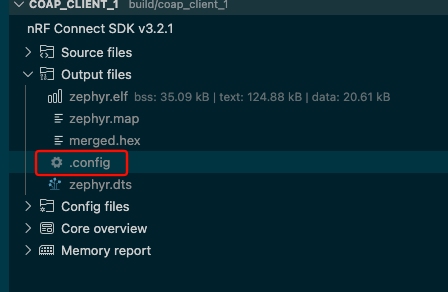
    With CONFIG_TFM_SECURE_UART0=y selected in your case (you can see this in the app's .config build output), the application will trigger a secure fault as soon as it writes the pins to the TWIM0 pin registers since the same registers belong to UART0 reserved to the TF-M image.

    Best regards,

    Vidar

  • Hi Vidar,

    Thank you for the explanation regarding the TWIM0(i2c0) being shared with UART0 on the Thingy53, and that the application will trigger a secure fault on any writes to the shared TWIM0 / UART0 pin registers reserved for the TF-M image. This all makes perfect sense. Thank you.

    On the Thingy53, I'm now using i2c2 for the SSD1306 & BME688 sensor. Now have NS applications, including BT NS applications, running successfully with TF-M logs appearing on P0.12 / P0.11 of the "Current Measurement & Debug" board plugged into the Thingy53.

    As nRF5340DK uses UART1 for TF-M, I've switched over from i2c1 to i2c2 as well. So, no more TF-M bus faults there. Of course, one could if needed silence the TF-M logs and use i2c1.

    One thing I did notice on the nRF54l15DK, with TF-M logging on one of the BT non-secure application, was the appearance of  Crypto Accelerator Engine (CRACEN) in the TF-M logs.

    What's triggering these "Powered on/off CRACEN". I don't see them on the Thingy53 or nRF5340DK for the same application.

    Powered on CRACEN.
    Powered off CRACEN.
    Powered on CRACEN.
    Powered off CRACEN.


     I really appreciate your help on issues related to getting the SSD1306 OLED working (i.e. switch from TWI to TWIM)  and, of course, how to use TF-M logging on Thingy53 / nRF5340DK / nRF54L15DK without the applications triggering secure faults. 

    I plan using security 
    peripherals in a TF-M partition in a few projects soon. So, hopefully this exposure to TF-M will assist.

    I don't know if the DevAcademy Team have a TF-M Services in the works but it would be welcomed as IoT security requirements are gaining considerable attention in the market.

    Best Regards,
    Ravi

  • Hi Ravi,

    Thanks for update. I think this summarises the problems you have experienced.

    zpm1066 said:
    One thing I did notice on the nRF54l15DK, with TF-M logging on one of the BT non-secure application, was the appearance of  Crypto Accelerator Engine (CRACEN) in the TF-M logs.

    The CRACEN is powered off between uses to avoid affecting the idle current. The same is done when using the CC312 crypto accelerator with the nRF5340, but it is simply not logged.

    zpm1066 said:
    I plan using security peripherals in a TF-M partition in a few projects soon. So, hopefully this exposure to TF-M will assist.

    I don't know if the DevAcademy Team have a TF-M Services in the works but it would be welcomed as IoT security requirements are gaining considerable attention in the market.

    I agree, and security in general is also something we are focusing on more now. I will forward your request internally.

    Best regards,

    Vidar

Related