Intermittent TLS socket connection failure over Wi-Fi router (works with mobile hotspot)

Hardware

  • Module: Fanstel WT02P40P (dual-band 2.4 GHz / 5 GHz)

  • SoC: nRF52 + Wi-Fi coprocessor (WT02 series)

Software

  • nRF Connect SDK version: v2.6.2

  • OS: Zephyr (default networking stack)

Problem Description

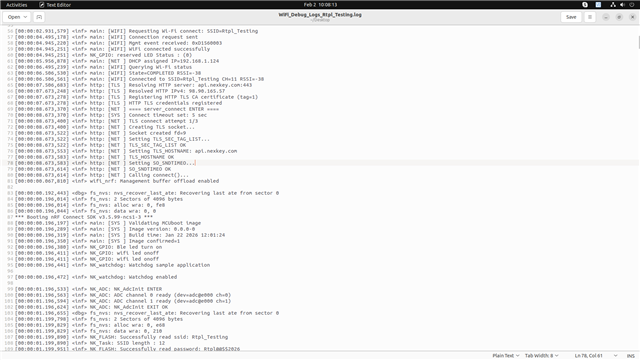
We are facing intermittent issues while establishing a TLS connection to a remote server when the device is connected via a Wi-Fi router network.

The firmware gets stuck at the following API call:

connect(sock, (struct sockaddr *)&server, sizeof(struct sockaddr_in));

In many failure cases, the device reboots unexpectedly while blocked in this call.
Occasionally the connection succeeds, but application-level communication does not occur even after a successful TLS connection.

When using a mobile hotspot, the same firmware works reliably:

  • TLS connection succeeds

  • Data exchange works as expected

  • No unexpected reboots observed


Observed Behavior

  • connect() sometimes blocks indefinitely when using a Wi-Fi router

  • Device reboots during or after the connect() call

  • In some cases, TLS connection is established, but no data is exchanged

  • Behavior is intermittent (sometimes works, often fails)

  • Mobile hotspot works consistently with the same firmware and server


Additional BLE Issue

We are also observing a BLE advertising issue:

  • After long-term operation (approximately 1–2 days powered ON)

  • BLE advertising stops unexpectedly

  • Device remains powered but does not advertise anymore

  • This happens intermittently


Questions / Assistance Needed

  1. Are there any known issues with TLS socket connections over certain Wi-Fi routers in nRF Connect SDK v2.6.2?

  2. Could this be related to Wi-Fi stack timing, memory usage, or TLS configuration?

  3. Are there recommended configurations or patches for improving TLS stability over router networks?

  4. Could the BLE advertising stop be related to power management, Wi-Fi coexistence, or resource exhaustion?

Any guidance, debugging suggestions, or known limitations would be greatly appreciated.
  • Hi,


    Q1: Have you tried to use a newer SDK version, for instance NCS v3.2.1, to see if the issue persists?

    Q2: What is the watchdog timeout configured to?


    Kind regards,

    Håkon

  • Q1: Have you tried to use a newer SDK version, for instance NCS v3.2.1, to see if the issue persists?

    Answer : We have already attempted to migrate the application to NCS v3.2.1. However, with the current state of the port, after flashing the firmware the device does not produce any logs and no application behaviour is observed.

    Q2: What is the watchdog timeout configured to?

    Answer : The watchdog timeout is currently configured to approximately 10 seconds.

  • Hi,


    10 seconds can be low, in cases where you have re-transmits and timeout occurs. For debugging purposes, please either disable watchdog, or increase this timeout so that you get better logs.

    Is the issue related to only one specific access point, or is it the network itself? Ie. can you connect to the same service using a phone or laptop on this wifi network?


    DipeshParikh_ said:

    Q1: Have you tried to use a newer SDK version, for instance NCS v3.2.1, to see if the issue persists?

    Answer : We have already attempted to migrate the application to NCS v3.2.1. However, with the current state of the port, after flashing the firmware the device does not produce any logs and no application behaviour is observed.

    Try entering debug mode, to see where the device is stuck. Alternative is to use ncs/nrf/samples/net/https_client as a template and add your certificate and credentials to that.


    Kind regards,

    Håkon

  • Hello, Thanks for the quick response.

    Actually we are in the production phase thousand board is already with client. we have to resolve this issue as fast as we can.

    Watchdog time is 15 seconds.

    I have test device with watchdog time increase and decrease but still not able to find the root cause of this issue. 

    Q: Is the issue related to only one specific access point, or is it the network itself? Ie. can you connect to the same service using a phone or laptop on this wifi network?

    Answer: The issue is pursuing with router network only client is also facing same issue. yes we are able to connect same Wi-Fi network with our laptop and phone.

    Regards,

    Dipesh

  • Hi Dipesh,


    DipeshParikh_ said:
    Actually we are in the production phase thousand board is already with client. we have to resolve this issue as fast as we can.

    Thank you for this crucial information. 

    DipeshParikh_ said:
    The issue is pursuing with router network only client is also facing same issue. yes we are able to connect same Wi-Fi network with our laptop and phone.

    Q1: Can you please share the AP model number?

    Q2: Is this connect() issue reproducible with other stock examples, like nrf/samples/net/mqtt example?

    This example has not changed certificate for some years, as compared to https_client sample that recently changed. Ie. https_client requires NCS v3.3.0-preview1 to run properly.

    Q3: Do you have a wireshark sniffer trace that shows the issue?


    Kind regards,

    Håkon

Related