Intermittent TLS socket connection failure over Wi-Fi router (works with mobile hotspot)

Hardware

  • Module: Fanstel WT02P40P (dual-band 2.4 GHz / 5 GHz)

  • SoC: nRF52 + Wi-Fi coprocessor (WT02 series)

Software

  • nRF Connect SDK version: v2.6.2

  • OS: Zephyr (default networking stack)

Problem Description

We are facing intermittent issues while establishing a TLS connection to a remote server when the device is connected via a Wi-Fi router network.

The firmware gets stuck at the following API call:

connect(sock, (struct sockaddr *)&server, sizeof(struct sockaddr_in));

In many failure cases, the device reboots unexpectedly while blocked in this call.
Occasionally the connection succeeds, but application-level communication does not occur even after a successful TLS connection.

When using a mobile hotspot, the same firmware works reliably:

  • TLS connection succeeds

  • Data exchange works as expected

  • No unexpected reboots observed


Observed Behavior

  • connect() sometimes blocks indefinitely when using a Wi-Fi router

  • Device reboots during or after the connect() call

  • In some cases, TLS connection is established, but no data is exchanged

  • Behavior is intermittent (sometimes works, often fails)

  • Mobile hotspot works consistently with the same firmware and server


Additional BLE Issue

We are also observing a BLE advertising issue:

  • After long-term operation (approximately 1–2 days powered ON)

  • BLE advertising stops unexpectedly

  • Device remains powered but does not advertise anymore

  • This happens intermittently


Questions / Assistance Needed

  1. Are there any known issues with TLS socket connections over certain Wi-Fi routers in nRF Connect SDK v2.6.2?

  2. Could this be related to Wi-Fi stack timing, memory usage, or TLS configuration?

  3. Are there recommended configurations or patches for improving TLS stability over router networks?

  4. Could the BLE advertising stop be related to power management, Wi-Fi coexistence, or resource exhaustion?

Any guidance, debugging suggestions, or known limitations would be greatly appreciated.
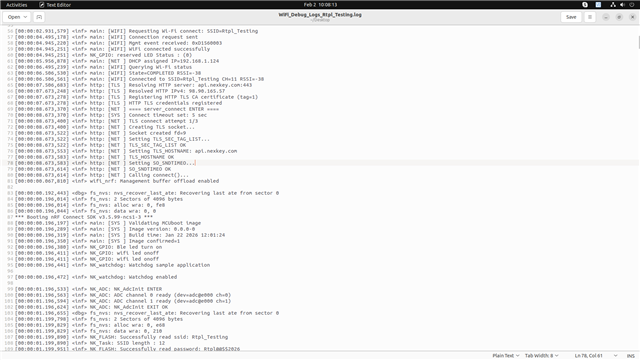
Parents
  • Hi,


    Q1: Have you tried to use a newer SDK version, for instance NCS v3.2.1, to see if the issue persists?

    Q2: What is the watchdog timeout configured to?


    Kind regards,

    Håkon

  • Q1: Have you tried to use a newer SDK version, for instance NCS v3.2.1, to see if the issue persists?

    Answer : We have already attempted to migrate the application to NCS v3.2.1. However, with the current state of the port, after flashing the firmware the device does not produce any logs and no application behaviour is observed.

    Q2: What is the watchdog timeout configured to?

    Answer : The watchdog timeout is currently configured to approximately 10 seconds.

  • Hi,


    10 seconds can be low, in cases where you have re-transmits and timeout occurs. For debugging purposes, please either disable watchdog, or increase this timeout so that you get better logs.

    Is the issue related to only one specific access point, or is it the network itself? Ie. can you connect to the same service using a phone or laptop on this wifi network?


    DipeshParikh_ said:

    Q1: Have you tried to use a newer SDK version, for instance NCS v3.2.1, to see if the issue persists?

    Answer : We have already attempted to migrate the application to NCS v3.2.1. However, with the current state of the port, after flashing the firmware the device does not produce any logs and no application behaviour is observed.

    Try entering debug mode, to see where the device is stuck. Alternative is to use ncs/nrf/samples/net/https_client as a template and add your certificate and credentials to that.


    Kind regards,

    Håkon

  • Hello, Thanks for the quick response.

    Actually we are in the production phase thousand board is already with client. we have to resolve this issue as fast as we can.

    Watchdog time is 15 seconds.

    I have test device with watchdog time increase and decrease but still not able to find the root cause of this issue. 

    Q: Is the issue related to only one specific access point, or is it the network itself? Ie. can you connect to the same service using a phone or laptop on this wifi network?

    Answer: The issue is pursuing with router network only client is also facing same issue. yes we are able to connect same Wi-Fi network with our laptop and phone.

    Regards,

    Dipesh

Reply
  • Hello, Thanks for the quick response.

    Actually we are in the production phase thousand board is already with client. we have to resolve this issue as fast as we can.

    Watchdog time is 15 seconds.

    I have test device with watchdog time increase and decrease but still not able to find the root cause of this issue. 

    Q: Is the issue related to only one specific access point, or is it the network itself? Ie. can you connect to the same service using a phone or laptop on this wifi network?

    Answer: The issue is pursuing with router network only client is also facing same issue. yes we are able to connect same Wi-Fi network with our laptop and phone.

    Regards,

    Dipesh

Children
  • Hi Dipesh,


    DipeshParikh_ said:
    Actually we are in the production phase thousand board is already with client. we have to resolve this issue as fast as we can.

    Thank you for this crucial information. 

    DipeshParikh_ said:
    The issue is pursuing with router network only client is also facing same issue. yes we are able to connect same Wi-Fi network with our laptop and phone.

    Q1: Can you please share the AP model number?

    Q2: Is this connect() issue reproducible with other stock examples, like nrf/samples/net/mqtt example?

    This example has not changed certificate for some years, as compared to https_client sample that recently changed. Ie. https_client requires NCS v3.3.0-preview1 to run properly.

    Q3: Do you have a wireshark sniffer trace that shows the issue?


    Kind regards,

    Håkon

  • Hi Håkon, Thank you for your response.

    The earlier issue has been resolved by ensuring proper handling of socket open/close operations.

    However, we are currently encountering a new problem related to system stability over extended up-time:

    • After approximately 1–2 days of operation, the controller becomes unresponsive in terms of network communication.

    • At this stage:

      • Wi-Fi remains connected

      • BLE advertising is initially active

    • When attempting to connect over BLE:

      • The connection attempt fails

      • After this failure, BLE advertising stops completely

    • The device does not recover from this state unless a manual power cycle is performed.

    Observations:

    • Initial RAM usage was around 95%, which seemed high.

    • After optimisation, RAM usage was reduced to approximately 87%.

    • With this improvement, device stability increased, and the issue now appears after 6–7 days instead of 1–2 days.

    • Current RAM usage is 77% after more RAM optimisation and this is currently under testing.

    Suspected Cause:

    This behaviour appears to be related to memory/resource exhaustion over time, possibly due to:

    • Memory leaks

    • Improper resource reallocation (e.g., sockets, buffers, BLE stack resources)

    • Fragmentation or heap exhaustion

    Request:

    Could you please provide guidance on:

    • Any known issues related to BLE stack or Wi-Fi coexistence under high memory utilisation

    • How can we resolve this issue.

    Project config file : 

    ############################################
    # Logging
    ############################################
    # CONFIG_LOG=y
    # CONFIG_LOG_BACKEND_RTT=y
    # CONFIG_USE_SEGGER_RTT=y
    # CONFIG_SEGGER_RTT_BUFFER_SIZE_UP=2048
    # CONFIG_LOG_MODE_DEFERRED=y
    # CONFIG_LOG_MODE_IMMEDIATE=n
    # CONFIG_CBPRINTF_FP_SUPPORT=n

    ############################################
    # DK (LED / Button)
    ############################################
    CONFIG_DK_LIBRARY=y

    ############################################
    # Hardware Drivers
    ############################################
    CONFIG_I2C=y
    CONFIG_ADC=y
    CONFIG_FLASH=y
    CONFIG_FLASH_PAGE_LAYOUT=y
    CONFIG_NVS=y
    # CONFIG_NVS_LOG_LEVEL_DBG=y
    CONFIG_NVS_LOG_LEVEL_INF=y

    ############################################
    # Watchdog
    ############################################
    CONFIG_WATCHDOG=y
    CONFIG_WDT_LOG_LEVEL_DBG=y
    CONFIG_WDT_DISABLE_AT_BOOT=n

    ############################################
    # Bootloader / OTA (MCUBoot)
    ############################################
    CONFIG_BOOTLOADER_MCUBOOT=y
    CONFIG_NCS_SAMPLE_MCUMGR_BT_OTA_DFU=y

    # MCUBoot image manager API
    CONFIG_IMG_MANAGER=y
    CONFIG_MCUBOOT_IMG_MANAGER=y

    CONFIG_IMG_ERASE_PROGRESSIVELY=y
    CONFIG_PM_SINGLE_IMAGE=n

    ############################################
    # Wi-Fi
    ############################################
    CONFIG_WIFI=y
    CONFIG_WIFI_NRF700X=y
    CONFIG_WPA_SUPP=y

    CONFIG_WIFI_CREDENTIALS=y
    CONFIG_WIFI_CREDENTIALS_STATIC=n
    CONFIG_WIFI_CREDENTIALS_BACKEND_SETTINGS=y
    CONFIG_WIFI_MGMT_EXT=y

    CONFIG_NET_CONNECTION_MANAGER=y
    CONFIG_L2_WIFI_CONNECTIVITY=y

    CONFIG_NRF700X_MAX_TX_AGGREGATION=2

    ############################################
    # Networking Stack
    ############################################
    CONFIG_NETWORKING=y
    CONFIG_NET_NATIVE=y
    CONFIG_NET_SOCKETS=y
    CONFIG_NET_SOCKETS_POSIX_NAMES=y
    CONFIG_POSIX_MAX_FDS=16
    CONFIG_NET_SOCKETS_POLL_MAX=6

    CONFIG_NET_L2_ETHERNET=y
    CONFIG_NET_IPV4=y
    CONFIG_NET_IPV6=y
    CONFIG_NET_TCP=y
    CONFIG_NET_DHCPV4=y
    CONFIG_DNS_RESOLVER=y
    CONFIG_NET_CONFIG_NEED_IPV4=y

    ############################################
    # TLS / Security
    ############################################
    CONFIG_NET_SOCKETS_SOCKOPT_TLS=y
    CONFIG_TLS_CREDENTIALS=y

    CONFIG_NRF_SECURITY=y
    CONFIG_MBEDTLS=y
    CONFIG_MBEDTLS_TLS_LIBRARY=y
    CONFIG_MBEDTLS_ENABLE_HEAP=y
    CONFIG_MBEDTLS_HEAP_SIZE=57344

    CONFIG_MBEDTLS_RSA_C=y
    CONFIG_MBEDTLS_DHM_C=y
    CONFIG_MBEDTLS_SSL_SERVER_NAME_INDICATION=y

    CONFIG_PSA_WANT_KEY_TYPE_RSA_PUBLIC_KEY=y
    CONFIG_PSA_WANT_RSA_KEY_SIZE_2048=y

    CONFIG_NET_SOCKETS_ENABLE_DTLS=n
    CONFIG_NET_SOCKETS_TLS_MAX_CONTEXTS=1

    ############################################
    # HTTP / WebSocket
    ############################################
    CONFIG_HTTP_CLIENT=y
    CONFIG_WEBSOCKET_CLIENT=y

    ############################################
    # JSON
    ############################################
    CONFIG_CJSON_LIB=y

    ############################################
    # C Library
    ############################################
    CONFIG_NEWLIB_LIBC=y
    CONFIG_NEWLIB_LIBC_NANO=y
    CONFIG_NEWLIB_LIBC_FLOAT_PRINTF=y

    ############################################
    # Memory / Stacks
    ############################################
    CONFIG_MAIN_STACK_SIZE=6144
    CONFIG_SYSTEM_WORKQUEUE_STACK_SIZE=4096
    CONFIG_HEAP_MEM_POOL_SIZE=131072

    CONFIG_NET_TCP_WORKQ_STACK_SIZE=2048
    CONFIG_NET_TX_STACK_SIZE=2048
    CONFIG_NET_RX_STACK_SIZE=1536

    CONFIG_NET_BUF_RX_COUNT=8
    CONFIG_NET_BUF_TX_COUNT=8
    CONFIG_NET_BUF_DATA_SIZE=512
    CONFIG_NET_TC_TX_COUNT=0

    CONFIG_WIFI_INIT_PRIORITY=50

    ############################################
    # Flash / Settings
    ############################################
    CONFIG_FLASH_MAP=y
    CONFIG_SETTINGS=y
    CONFIG_SETTINGS_NVS=y
    CONFIG_SETTINGS_NVS_SECTOR_COUNT=2
    CONFIG_PM_PARTITION_SIZE_NVS_STORAGE=0x2000
    CONFIG_MPU_ALLOW_FLASH_WRITE=y

    ############################################
    # Bluetooth
    ############################################
    CONFIG_BT=y
    CONFIG_BT_PERIPHERAL=y
    CONFIG_BT_GATT_CLIENT=y
    CONFIG_BT_SMP=n

    CONFIG_BT_DEVICE_NAME="NKEY eLatch"

    CONFIG_BT_USER_PHY_UPDATE=y
    CONFIG_BT_USER_DATA_LEN_UPDATE=y

    CONFIG_BT_PERIPHERAL_PREF_MIN_INT=15
    CONFIG_BT_PERIPHERAL_PREF_MAX_INT=30
    CONFIG_BT_PERIPHERAL_PREF_LATENCY=0
    CONFIG_BT_PERIPHERAL_PREF_TIMEOUT=3200
    CONFIG_BT_GAP_AUTO_UPDATE_CONN_PARAMS=y

    # MTU / Data length
    CONFIG_BT_CTLR_DATA_LENGTH_MAX=27
    CONFIG_BT_BUF_ACL_RX_SIZE=251
    CONFIG_BT_BUF_ACL_TX_SIZE=27
    CONFIG_BT_L2CAP_TX_MTU=27

    # Device Information Service
    CONFIG_BT_DIS=y
    CONFIG_BT_DIS_PNP=n
    CONFIG_BT_DIS_MANUF="Nexkey"
    CONFIG_BT_DIS_FW_REV=y

    CONFIG_BT_DIS_FW_REV_STR="EB.05.0C"

    Q1. This is my current project config file can we still optimise RAM memory ? 
    Q2. Sometimes logs showing below error : 

    wifi_nrf: nrf_wifi_fmac_rx_cmd_send: No space for allocating RX buffer
    wifi_nrf: nrf_wifi_fmac_rx_event_process: nrf_wifi_fmac_rx_cmd_send failed
    wifi_nrf: nrf_wifi_fmac_data_event_process: Failed for event = 3
    wifi_nrf: nrf_wifi_fmac_data_events_process: umac_process_data_event failed
    wifi_nrf: hal_rpu_eventq_process: Interrupt callback failed


    How we can resolve this ?

    Please let me know if additional logs, configuration details, or memory profiling data would help in further analysis.

    Kind regards,
    Dipesh

  • Hi Dipesh,


    DipeshParikh_ said:

    The earlier issue has been resolved by ensuring proper handling of socket open/close operations.

    Great to hear that this was solved.


    DipeshParikh_ said:

    However, we are currently encountering a new problem related to system stability over extended up-time:

    • After approximately 1–2 days of operation, the controller becomes unresponsive in terms of network communication.

    • At this stage:

      • Wi-Fi remains connected

      • BLE advertising is initially active

    • When attempting to connect over BLE:

      • The connection attempt fails

      • After this failure, BLE advertising stops completely

    • The device does not recover from this state unless a manual power cycle is performed.

    Do you have any added information, in terms of logs or similar, that can help pin-point what has gone wrong in this case?

    DipeshParikh_ said:

    Q1. This is my current project config file can we still optimise RAM memory ? 

    I believe it is better to focus on trapping the issue, ie. recreating the scenario and see if one can work around that or fix it.

    DipeshParikh_ said:

    Q2. Sometimes logs showing below error : 

    wifi_nrf: nrf_wifi_fmac_rx_cmd_send: No space for allocating RX buffer
    wifi_nrf: nrf_wifi_fmac_rx_event_process: nrf_wifi_fmac_rx_cmd_send failed
    wifi_nrf: nrf_wifi_fmac_data_event_process: Failed for event = 3
    wifi_nrf: nrf_wifi_fmac_data_events_process: umac_process_data_event failed
    wifi_nrf: hal_rpu_eventq_process: Interrupt callback failed


    How we can resolve this ?

    Please let me know if additional logs, configuration details, or memory profiling data would help in further analysis.

    This is a allocation issue, usually related to the heap.

    DipeshParikh_ said:
    CONFIG_HEAP_MEM_POOL_SIZE=131072


    What ncs version are you currently running?

    If still on v2.6.2, could you please update to the latest v2.6.5, to see if the issue still persists?


    Kind regards,

    Håkon

  • Hi Håkon, Thank you for quick response.

    I'm using ncs v2.6.2, i there any known issue with this version ?

  • Yes, there are a couple of fixes wrt. Wi-Fi:

    https://github.com/nrfconnect/sdk-nrf/commits/v2.6-branch/


    Do you have any logs to share, as per my previous questions?


    Kind regards,

    Håkon

Related