52833 Issue when actively connecting to Bluetooth devices appears rf noise

I am adding a feature to our device to actively connect to a Bluetooth printer and send data to it, but I am now encountering an issue that I cannot solve.

I currently have three Bluetooth printers, which I refer to as a, b, and c. a and b are the same model, while c is from a different brand. When connecting these printers using our developed 52833 device, connecting a is very stable, almost without any RF noise issues. Connecting b has lower stability and occurs more frequently with this problem. However, connecting c has never succeeded; as soon as the connection starts, it gets disconnected immediately. The disconnection reason is 0x3e, which is BLE_HCI_CONN_FAILED_TO_BE_ESTABLISHED

These three printers should all be working properly. I connect them with my phone, and there won't be any issues; they can all be used normally

So how should this problem be solved?

Parents
  • Hi, 

    The disconnection reason 0x3E (BLE_HCI_CONN_FAILED_TO_BE_ESTABLISHED) is the HCI “Connection Failed to be Established” error. It means the link was started but never completed successfully, so the controller reports a failed connection instead of a normal disconnect. It just tells you that the connection setup did not complete (often due to RF issues, timing/parameter problems, or peer-side rejection), and you need to inspect the detailed HCI/BT logs around the connection attempt to see what went wrong.

    I would suggest you enable full Bluetooth debug logging, such as CONFIG_BT_DEBUG_LOG=y (and, if available, CONFIG_BT_HCI_CORE_DEBUG, CONFIG_BT_CONN_DEBUG, CONFIG_BT_L2CAP_DEBUG, CONFIG_BT_ATT_DEBUG). Capture logs from the moment you start scanning/connecting until the 0x3e disconnect. You can also use nRF Sniffer for Bluetooth LE to capture logs to compare their behaviors in the air. 

    Regards,
    Amanda H.

  • I noticed an issue in the log: after the device starts searching for a characteristic UUID, the connection is disconnected first, and then the printer replies with the search UUID packet. I compared the log of a normal connection and can confirm that this order is problematic, but it seems to be caused by another issue due to 0x3e, rather than the cause of the 0x3e issue

  • llly said:
    My operation is to have the 54l10 chip connect to this Bluetooth printer.

    From your logs:

    [00:52:47.073,111] <dbg> bt_hci_core: hci_disconn_complete_prio: status 0x00 handle 0 reason 0x3e
    [00:52:47.073,121] <dbg> bt_conn: bt_conn_ref: handle 0 ref 2 -> 3
    [00:52:47.073,138] <dbg> bt_conn: bt_conn_set_state: connected -> disconnect-complete
    [00:52:47.073,146] <wrn> bt_conn: conn 0x2000db60 failed to establish. RF noise?

    It seems the warning log comes from here https://github.com/nrfconnect/sdk-zephyr/blob/ncs-v3.2.1/subsys/bluetooth/host/conn.c#L1354. You can take a look at the comments for the reason. It usually means the controller did not receive packets from the peer within the supervision timeout period during connection establishment. Also see my colleague's explanation in this post

    And this log:

    [00:52:46.461,210] <dbg> bt_hci_core: hci_core_send_cmd: Sending command 0x200c (buf 0xPrinter disconnected (reason 0x3e )

    It also shows scanning activity before the failed connection attempt. If the Central is trying to scan and connect simultaneously with aggressive timings, it might miss the first connection anchor point. To rule out scheduling conflicts in the BLE controller, temporarily disable scan during connection. 

  • hi

    We just finished the Chinese New Year, so sorry for not replying for so long

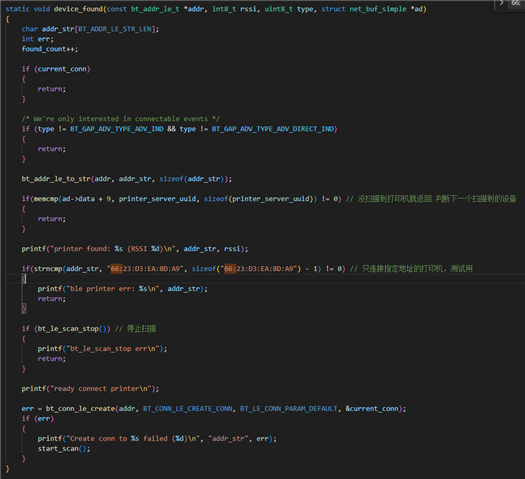
    This is the code I used for testing. In this callback for scanning devices, if the target device is scanned, it will first stop scanning and then connect, which is the same process as in the example.

  • I feel like the problem shouldn't be with my code, because I have two identical printers, connect them separately with the same device, and the success rate of connecting one printer is very high and the other is very low. But when I connect these two printers separately with my mobile phone, the connection success rate of both printers is 100%

Reply Children
Related