Unable to flash custom nRF52840 board using nRF52840dk - Device error: Setting the debug port SELECT register failed while powering up sys and debug regions (Unknown error in the J-Link DLL (error code =-1)).

I am using nRF Connect SDK 3.2.1 and Toolchain 3.2.1. The hardware I am using is the nRF52840DK and a custom board with the Raytac MDBT50Q-P1MV2 - which contains the nRF52840. I created a custom board in the SDK and built a program that blinks an onboard LED on the custom board. The program builds without error, but when I try to flash the code to the custom board I get the following error - Device error: Setting the debug port SELECT register failed while powering up sys and debug regions (Unknown error in the J-Link DLL (error code =-1)). I saw a similar question 4 months ago, but no solution was ever obtained (or if it was the developer never replied). My custom board is powered by a 3.3V LDO regulator that is powered by a 3.8V power supply. The SWD setup uses a 10 pin connector with with pinout: 1: VCC= 3.3V supplied from LDO regulator, 2: SWDIO, 3: GND, 4: SWCLK, 5: GND, 6:SWO, 7: GND, 8: N/C, 9: GND. 10: nRESET. I use a ribbon cable with connectors purchased from Adafruit for the J-Link edu mini to connect my board to the DK Debug Out port P19. When I power my board and connect it to the DK, I see the following voltages on some pins I can access: On SCL and SDA pins I see 2.3V; On SDIO I see 3V. On SWCLK I see 0V. (One odd thing is if I power my board and do not connect it to the DK, I see a 1.6V, 260uS pulse every 34mS on the SWDIO line - so about 30Hz)

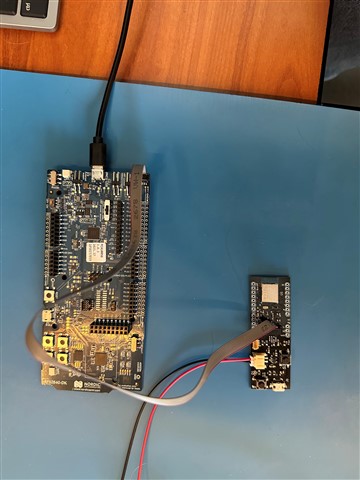
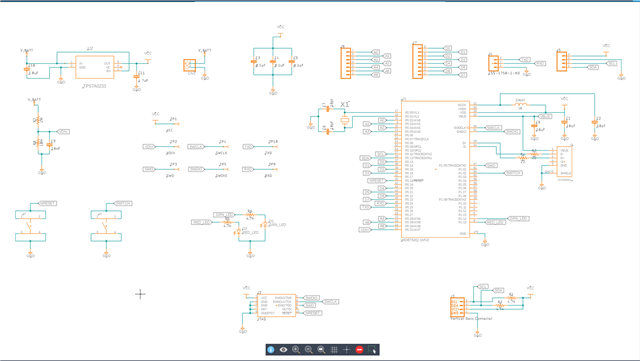
I designed the board (based on the Adafruit nRF52840 feather and assembled it myself. This is the first time I've used the Raytac module, so I don't know exactly how to prove it is working correctly before flashing it. I have attached a picture of the flashing setup - my board and the SDK with ribbon connector, and a picture of my schematic for reference. Here is the text from the Output and Terminal windows in nRF Connect extension for VS Code: 

Output
[13:47:34] build --build-dir c:/myfw/protoboard/button/build --domain button
[13:47:36] Success.
[13:47:40] flash -d c:\myfw\protoboard\button\build --domain button --dev-id 1050257059
[13:47:42] Failure (code 1).


Terminal

 *  Executing task: nRF Connect: Build [incremental]: button/build/button

Building button
west build --build-dir c:/myfw/protoboard/button/build --domain button
-- west build: building domain(s): button
ninja: no work to do.
 *  Terminal will be reused by tasks, press any key to close it.

 *  Executing task: nRF Connect: Flash: button/build/button

Flashing button to nRF52840 DK
west flash -d c:\myfw\protoboard\button\build --domain button --dev-id 1050257059
-- west flash: rebuilding
[0/5] Performing build step for 'button'
ninja: no work to do.
[4/5] cmd.exe /C "cd /D C:\myfw\protoboard\button\build\_sysbuild && C:\ncs\toolchains\66cdf9b75e\opt\bin\cmake.exe -E true"
-- west flash: using runner nrfutil
-- runners.nrfutil: reset after flashing requested
-- runners.nrfutil: Flashing file: C:\myfw\protoboard\button\build\merged.hex
-- runners.nrfutil: Connecting to probe
Error: One or more batch tasks failed:
 * 1050257059: Device error: Setting the debug port SELECT register failed while powering up sys and debug regions (Unknown Error in J-Link DLL (error code =-1)).
   
   This might indicate that the debug port is unavailable. Please double-check device power sFATAL ERROR: command exited with status 1: nrfutil --json device x-execute-batch --batch-path 'C:\myfw\protoboard\button\build\button\zephyr\generated_nrfutil_batch.json' --serial-number 1050257059

 *  The terminal process terminated with exit code: 1.
 *  Terminal will be reused by tasks, press any key to close it. 

Appreciate your expert review and advice,

Lonnie
Parents
  • Hi Lonnie

    Are you able to do other nrfutil commands with the custom board connected to your DK, like nrfutil device recover for example. If that fails it might be worth a shot to test with the 3.0V, but I think it should work with 3.3V.

    Other than that I don't really see what else could be wrong. If you'd like we could do a full HW review if you share your PCB layout files (preferably gerber format).

    Best regards,

    Simon

Reply
  • Hi Lonnie

    Are you able to do other nrfutil commands with the custom board connected to your DK, like nrfutil device recover for example. If that fails it might be worth a shot to test with the 3.0V, but I think it should work with 3.3V.

    Other than that I don't really see what else could be wrong. If you'd like we could do a full HW review if you share your PCB layout files (preferably gerber format).

    Best regards,

    Simon

Children
  • Simon,

    I've not installed the nrfutil package yet - but I did try the "recover board" command from within the connected devices menu in nrf connect for VS Code. I get the same results. Here is what I have done since our last communication:

    1) I rang out the SWD connector signals (that I could reach) from my custom board to the DK to ensure they were as I conceived. They are as shown in the schematic.

    2) I powered the custom board at the VCC rail to 3.0V. I noted that the board consumed 5 mA vs 1 mA when I powered it through the regulator. So either back feeding the regulator consumed 4mA or the regulator wasn't working correctly and it couldn't supply 5 mA. So I connected a 270 ohm resistor to VCC and GND and powered the board through the regulator; it provided 13 mA as expected - so the regulator works well and it consumes 4 mA when back-fed - so I'm not entirely sure I want to power the board this way unless I have to.

    3) I connected the board to power and to a Segger J-Link EDU mini, just to see if it would work. I received a connection error for the J-Link as well - it is suspiciously like the nrf connect error: 

    SEGGER J-Link Commander V9.12 (Compiled Jan 21 2026 12:09:03)
    DLL version V9.12, compiled Jan 21 2026 12:08:09

    Connecting to J-Link via USB...O.K.
    Firmware: J-Link EDU Mini V2 compiled Dec 10 2025 15:50:17
    Hardware version: V2.00
    J-Link uptime (since boot): 0d 00h 03m 04s
    S/N: 802003272
    License(s): FlashBP, GDB
    USB speed mode: Full speed (12 MBit/s)
    VTref=3.301V


    Type "connect" to establish a target connection, '?' for help
    J-Link>connect
    Please specify device / core. <Default>: NRF52840_XXAA
    Type '?' for selection dialog
    Device>?
    Please specify target interface:
      J) JTAG (Default)
      S) SWD
      T) cJTAG
    TIF>s
    Specify target interface speed [kHz]. <Default>: 4000 kHz
    Speed>1000
    Device "NRF52840_XXAA" selected.


    Connecting to target via SWD
    InitTarget() start
    InitTarget() end - Took 13.0ms
    InitTarget() start
    InitTarget() end - Took 6.79ms
    Error occurred: Could not connect to the target device.
    For troubleshooting steps visit: https://kb.segger.com/J-Link_Troubleshooting

    4) I also assembled another board - in case I did something wrong on the first one (and I also wondered if I didn't give enough "soak" time in the reflow process to heat the Raytac module). The 2nd board - with more soak time - has exactly the same output on the exposed pins, and gives the same errors on nrf connect and J-link as the first board.

    5) I then contacted Raytac for tech support but they are celebrating the New Year in Taiwan - so tech support will have to wait with them until next week.

    6) Finally, I though I found a problem in my schematic - I did not connect VDDH to 3.3V. I changed the power scheme several times, and I must have forgotten to short it to VDD. However, in searching the Dev Zone I found a reply from you several years ago that says you don't need to short VDD and VDDH - at least to program the board - Here is an  excerpt:

    ***************

    Hi

    I have checked with my colleagues, and there shouldn't be any problem of letting VDDH float while powering the chip in normal voltage mode while you program it. It is just not recommended to leave it floating over time, which is why the PS tells you to short them. Sorry for the confusion.

    Best regards,

    Simon

    ********************

    So I'll try to load "nrfutil" and see if I get anything different there. So at this point I would appreciate a full HW review - I have included a zip file of the PCB gerbers.

    Thanks so much for your advice and  time,

    Lonnie

    nRF52840_test_board_2025-12-08.zip

Related