Unable to load certificates through certificate manager on my custom 9151 board

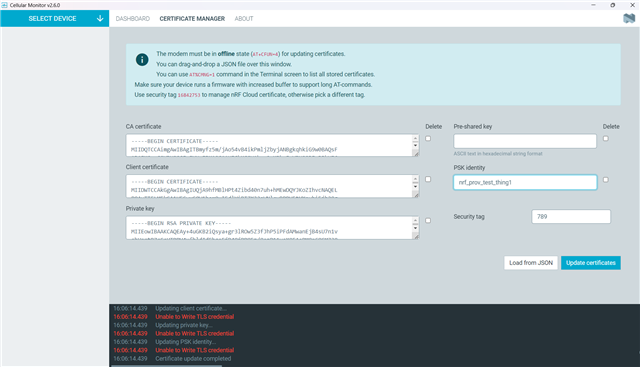
Hi I am able to load the nrf9151dk_at_client example hex on my custom dev board . I try accessing the AT commands and I can very easily get the responses. I want to install custom certificates & priv keys through Certificate Manager But as soon as I try to load it, I get Unable to Write TLS Credential. I did try updating the CERTS through AT%CMNG command and they too keep giving me some errors or are hanging. Not sure why it perfectly works on a dk but not on my custom board.
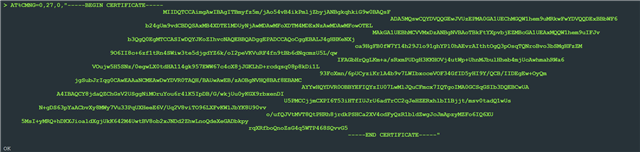
  • this is how certificate manager conditions the certs into the modem

    not sure what those characters are in between

  • Hi,

    Thanks for the update. The characters you see between the certificate lines are standard line endings that Certificate Manager adds automatically which I think should not be the issue.

    However since basic AT commands work fine on your custom board but the large AT%CMNG command fails, we suspect this may be related to how you are physically connecting to the board. On the DK, Cellular Monitor uses the onboard J-Link USB CDC which handles large transfers reliably. On a custom board with a USB-to-UART adapter, if RTS/CTS hardware flow control is not wired, bytes can be silently dropped.

    So could you confirm:
    1. Are you using a USB-to-UART adapter to connect to the custom board? Is RTS/CTS wired and enabled?
    2. Please run AT+CGMR on both the DK and custom board and share the output so we can compare modem firmware versions also.

    Best Regards,
    Syed Maysum

  • I believe the modem expects those line endings CR/LF , and that's the reason its working. 

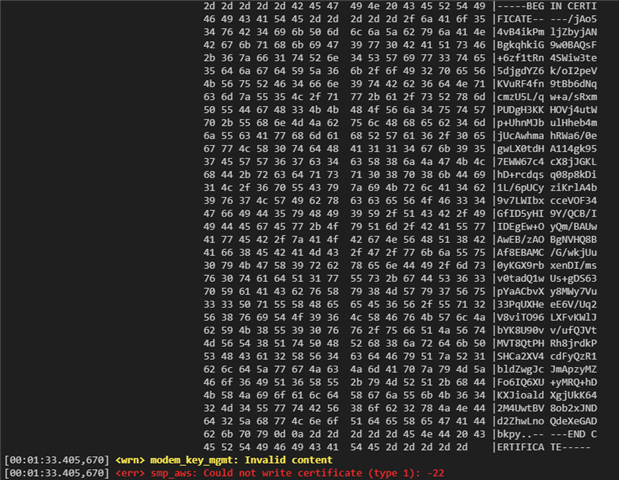
    I did some hexdump before I try flashing it in the modem and the modem returns -22 [Invalid Content].

    regarding your questions,

    1.No Adapter, we have a seperate data path that is responsible to get the data to the modem, but we are confident that the large data reaches the 9151 modem as shown in the screenshot above. I just suspect the modem wants it to be formatted in a very particular way. 

    LOG_HEXDUMP_INF((const uint8_t *)write_ptr, write_len, "modem_key_mgmt_write write_ptr");
    
        ret = modem_key_mgmt_write(CONFIG_AWS_IOT_SEC_TAG,
                                   cred_type,
                                   write_ptr,
                                   write_len);

    2. modem fw: mfw_nrf91x1_2.0.2 for both

  • Parth Sagar0 said:
    I did some hexdump before I try flashing it in the modem and the modem returns -22 [Invalid Content].

    It looks like the certificate is being cut short somehow in the hex dump. But it's hard to say for sure what is going on without the full code.

    Parth Sagar0 said:
    I just suspect the modem wants it to be formatted in a very particular way. 

    Yes, but as you said it also works on the DK. The modem on the DK should take the same format as the one on the custom board I would imagine. So you should try to check what is different in those two cases.

  • Hi parth,

    I have faced same problem on my custom 9151 board , if you goal is to load certificate CA, Client and Private key , i suggest you to claim your device through ( AT%ATTESTTOKEN )

                  Step 1: Get the Attestation Token from the Device
    1. Connect the board over USB and open the Serial Terminal app.
    2. Put the modem offline:
      AT+CFUN=4
    3. Generate the attestation token:
      AT%ATTESTTOKEN
      Step 2: Claim the Device on nRF Cloud
      1. Log in to nrfcloud.com.
      2. Go to Security Services → Claimed Devices.
      3. Click Claim Device.
      4. Paste the attestation token into the Claim token field.
      5. Set the rule to nRF Cloud Onboarding and click Claim Device.

      than in step 3 , flash 

      nRF Device Provisioning Sample  with adding ( CONFIG_NRF_CLOUD_CLIENT_ID_SRC_INTERNAL_UUID=y ) , and wait for sometime ,  the certificate will be load successfully , yu can check under  claimed device .

Related