Segger Embedded Studio and Mac Tahoe using nRF5_SDK_for_Thread_and_Zigbee_v4

I'm kind of stuck here. I was using SES v3.52 on Mac OS Sequoia and everything worked fine. I upgraded my MacBook to Tahoe and all of the fonts were messed up making it un-usable. I went to Tools->Options to change them but when I press the Font button SES crashes.
So I put a message out on the Segger Forum for help, and they said they don't back-port any fixes and re-releasing older versions is not an option. Instead they suggested that I update to the latest SES version (8.26a at that time). I did this and it did indeed fix the font problem. Unfortunately my nRF52840 application will now crash every 40-60 seconds.
So I searched the Nordic DevZone site and found that the SDK that I'm using (nRF5_SDK_for_Thread_and_Zigbee_v4) was only tested against SES version 5.42a. So I loaded this version of SES, and I bet you can guess what happened...the fonts were messed up again and SES crashes when I try to change the font.
So now I'm stuck. My only option is to backup my computer, reload Mac OS Sequoia and forgo any Mac OS updates from here on out.
Can someone answer these questions:
A) Why does the exact same source code compile and run fine using SES v3.52 but crashes after compiled using SES v8.26a?
B) And is there any plan to support SES 8.26a with nRF5_SDK_for_Thread_and_Zigbee_v4?
Parents
  • Hi,

    First, I want to start by mentioning that the SDK you are using is very old. So I assume this is for maintaining an old product. If not, I strongly advice moving to nRF Connect SDK as that is the SDK that is currently being maintained.

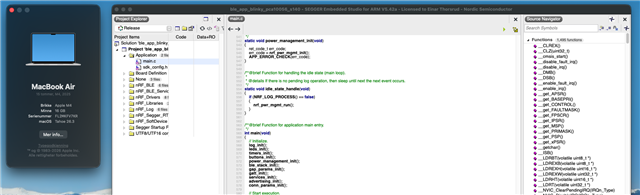
    I wonder if there is something with your configuration that cause problems? I have not found any other reports of this issue with SES fonts being unreadable, other than this which I suspect is also from you? For reference, I am using SES 5.42a on my end on MacOS Tahoe (26.3) without any issues:

    As I am not able to reproduce this is just an idea, but could it be worth deleting all SES configuration files (probably under "~/Library/SEGGER/SEGGER\ Embedded\ Studio"), and see if that helps?

    A) Why does the exact same source code compile and run fine using SES v3.52 but crashes after compiled using SES v8.26a?

    The SDK was never tested with that version and the toolchain is much newer, so there can be a number of explanations. But instead of digging into that, I strongly advice you stick with an older tested version (either by fixing the issue or using another older computer when working on this I assume legacy product).

    B) And is there any plan to support SES 8.26a with nRF5_SDK_for_Thread_and_Zigbee_v4?
    No. That SDK is old and there will be no updates or support for newer tools.

    Best regards,

    Einar

  • Einar,

    Thanks for the reply! That link from the Segger site is indeed mine.
    I'm curious why your SES v5.42a works while mine doesn't. If you go to Tools->Options then select Text Editor, and under Visual Appearance click the "..." button next to Font, does your SES crash? Mine does.

    Let me know. Thanks,

    John

  • Hi John,

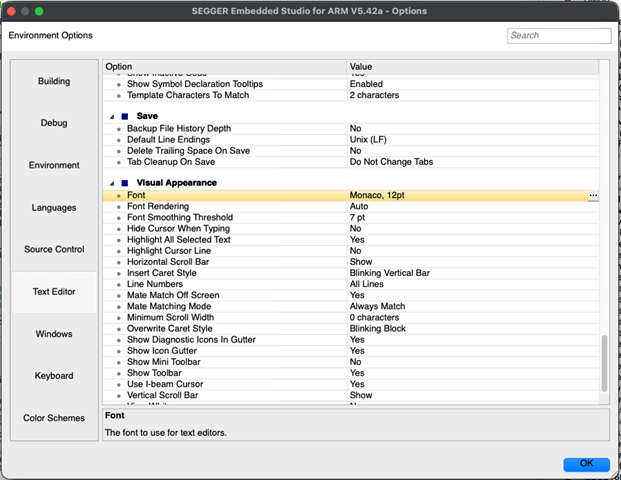
    Yes, it crashes on my Mac as well if I click the "..." button. So I am stuck with the existing font it seems, but that is OK in my case, not sure why there is a difference there. For ref, this is the font I am using:

  • My font says "Monospace, 11pt". And though Monospace is supposed to be a constant width font, my code windows are all messed up. Do you know of any way for me to change the font without using their Options window?

  • Hi,

    The settings is in an XML file, so it should be OK to modify that. Typically that would be under ~/Library/SEGGER/SEGGER\ Embedded\ Studiov3/settings.xml, where the font is set in settings name "Text Editor/Font".

    I have one machine where it is set like this (here the font size is larger than in the screenshot in my previous post):

      <setting name="Text Editor/Font">Monaco,14,-1,5,50,0,0,0,0,0</setting>

Reply
  • Hi,

    The settings is in an XML file, so it should be OK to modify that. Typically that would be under ~/Library/SEGGER/SEGGER\ Embedded\ Studiov3/settings.xml, where the font is set in settings name "Text Editor/Font".

    I have one machine where it is set like this (here the font size is larger than in the screenshot in my previous post):

      <setting name="Text Editor/Font">Monaco,14,-1,5,50,0,0,0,0,0</setting>

Children
No Data
Related