cellular iot fundamentals- lesson4 / exercise 1 (build failed)

Hi,

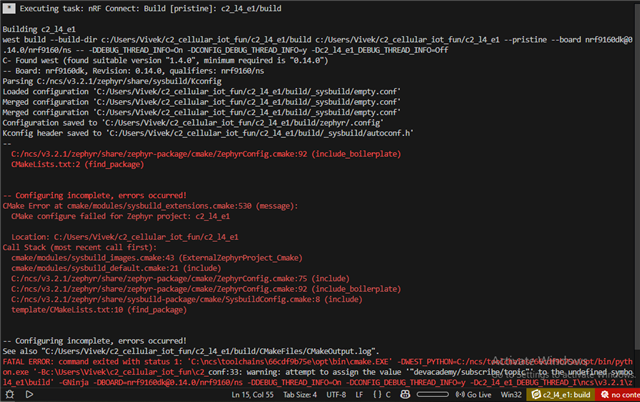
i'm learning l4/e1 and i'm trying to buid the process after finishing step 10 but the build didn't goes through successfully. i got this errors
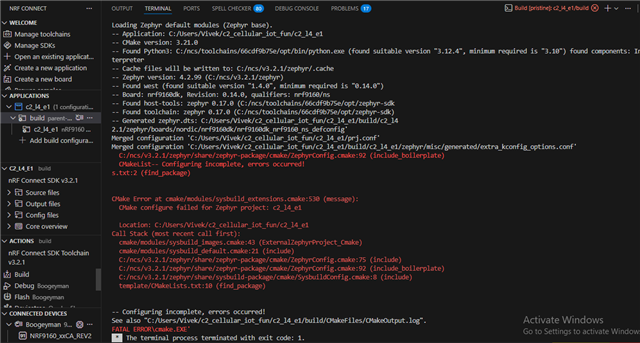
my SDK & toolchain version is 3.2.1. i'm using nrf9160dk rev2. please can anyone tell me the solution for this error. 

thanks

Parents Reply Children
  • Hi Vivek,

    When checking for errors, and there is nothing relevent in the Build terminal, I would recommand to do a pristine build. That way, It is more likely to get a proper error log.

    In your case, if you pristine build you can see :

    ...
    
    -- Found devicetree overlay: /home/sido/ncs/v3.2.2/zephyr/boards/nordic/nrf9160dk/nrf9160dk_nrf9160_ns_0_14_0.overlay
    -- Generated zephyr.dts: /home/sido/Downloads/c2_l4_e1/build/c2_l4_e1/zephyr/zephyr.dts
    -- Generated pickled edt: /home/sido/Downloads/c2_l4_e1/build/c2_l4_e1/zephyr/edt.pickle
    -- Generated devicetree_generated.h: /home/sido/Downloads/c2_l4_e1/build/c2_l4_e1/zephyr/include/generated/zephyr/devicetree_generated.h
    
    /home/sido/Downloads/c2_l4_e1/prj.conf:32: warning: attempt to assign the value '"devacademy/publish/topic"' to the undefined symbol MQTT_SAMPLE_PUB_TOPIC
    
    /home/sido/Downloads/c2_l4_e1/prj.conf:33: warning: attempt to assign the value '"devacademy/subscribe/topic"' to the undefined symbol MQTT_SAMPLE_SUB_TOPIC
    Parsing /home/sido/ncs/v3.2.2/zephyr/Kconfig
    Loaded configuration '/home/sido/ncs/v3.2.2/zephyr/boards/nordic/nrf9160dk/nrf9160dk_nrf9160_ns_defconfig'
    Merged configuration '/home/sido/Downloads/c2_l4_e1/prj.conf'
    Merged configuration '/home/sido/Downloads/c2_l4_e1/build/c2_l4_e1/zephyr/misc/generated/extra_kconfig_options.conf'
    Merged configuration '/home/sido/Downloads/c2_l4_e1/build/c2_l4_e1/zephyr/.config.sysbuild'
    
    error: Aborting due to Kconfig warnings
    
    ...

    This error tells us that some of the Kconfig that you tried to set are not defined anywhere.

    And if you check at the source project for this lesson, you can see that there is a file called "Kconfig" that you are missing.

    This "Kconfig" file is a file that allows the user to have some custom Kconfig configuration for the project. In this lesson, it has been used to add the two configs that are creating errors.

    If you add that Kconfig file to your project, it should be able to build fine.

    Best regards,

    Simon D-M

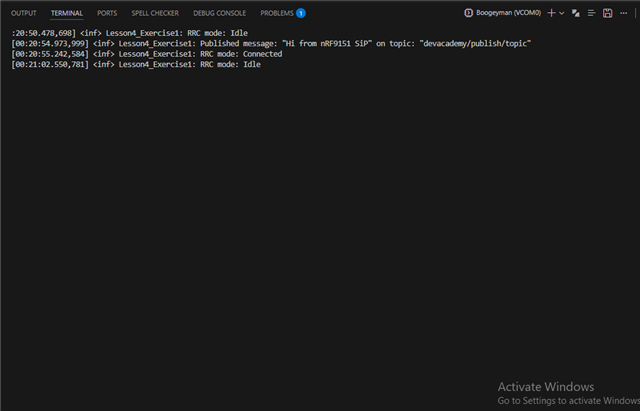
  • ohh i see thanks, now it works perfectly but i can't see the lesson's output like this one

     *** Booting nRF Connect SDK ***

    [00:00:00.407,379] <inf> Lesson4_Exercise2: Initializing modem library

    [00:00:00.773,895] <inf> Lesson4_Exercise2: Connecting to LTE network

    [00:00:02.101,654] <inf> Lesson4_Exercise2: RRC mode: Connected

    [00:00:03.817,840] <inf> Lesson4_Exercise2: Network registration status: Connected - roaming [00:00:03.817,932] <inf> Lesson4_Exercise2: Connected to LTE network

    [00:00:06.305,725] <inf> Lesson4_Exercise2: Connected to MQTT broker

    [00:00:06.305,755] <inf> Lesson4_Exercise2: Hostname: mqtt.nordicsemi.academy

    [00:00:06.305,786] <inf> Lesson4_Exercise2: Client ID: nrf-355025930008030

    [00:00:06.305,786] <inf> Lesson4_Exercise2: Port: 8883

    [00:00:06.305,816] <inf> Lesson4_Exercise2: TLS: Yes

    [00:00:06.305,847] <inf> Lesson4_Exercise2: Subscribing to devacademy/subscribe/topic [00:00:06.421,722] <inf> Lesson4_Exercise2: Subscribed to devacademy/subscribe/topic with QoS 0 [00:00:09.013,061] <inf> Lesson4_Exercise2: RRC mode: Idle 

    i only can see this screenshot output.

  • Hi Vivek,

    I believe that what you are seeing is what comes after the logs that you want to see. The Serial port doesn't wait for you to connect, if nothing is connected to the port, it will just get forgotten.

    So if you keep the serial connection connected and reset the board by pressing the reset button, you should be able to see the logs you want to see.

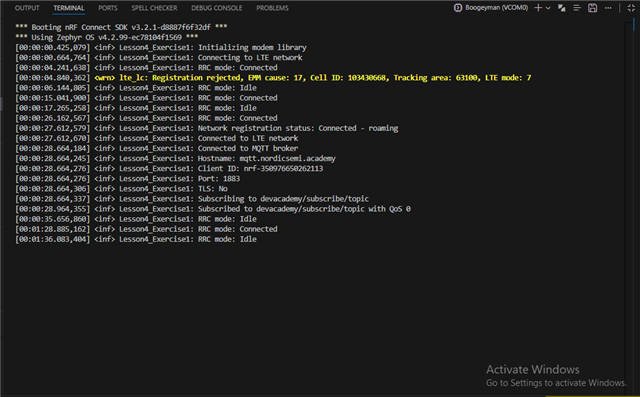
    Another thing that you can see, is the time code in front of the logs. These are the up-time of the chip at the moment of the log. In the example you can see that it all happens in the first 10 seconds, but in your case you are already past 20 minutes.

    I hope I was able to help you!

    Best regards,

    Simon D-M

  • hi, 

    i got the output that i want. yes, you're right i can see that in the first 10 seconds.


    i really appreciate you to help me and solve the issue that i had.

    thanks 

    vivek

Related