nRF9151 SMA DK + CMW500: How to run NB-IoT NTN and do IP connectivity test (ping/iperf)

Hello,

I want to validate NB-IoT NTN connectivity using an nRF9151 SMA DK connected directly to an R&S CMW500 emulator.

Goal:

  • Connect to the CMW500 in NB-IoT NTN (band 256)
  • Verify IP connectivity using ping and iperf

Current status:

  • I installed nRF Connect for Desktop apps: Cellular Monitor, Serial Terminal, Programmer, and I have J-Link OB.
  • I flashed this application firmware successfully and can send AT commands from Serial Terminal: nrf9151dk_at_client_2025-08-14_6c6e5b32.hex (AT client is working; AT returns OK.) 

Problem:

  1. I do not know which firmware/application combination is required for NB-IoT NTN on the nRF9151 SMA DK, and how to apply them using Programmer.
  2. I do not know the correct AT command sequence to bring up NB-IoT NTN (band 256) and then run ping/iperf for end-to-end connectivity testing.
  3. I tried to flash NTN modem firmware but it did not work: I tried mfw_nrf9151-ntn_1.0.0-1.alpha and could not get it working. The download page shows the NTN modem firmware as mfw_nrf9151-ntn_1.0.0-1.alpha.zip. What is the correct flashing procedure and prerequisites for NTN modem firmware on the SMA DK? 

Additional context:

  • The CMW500 side can provide a destination server for ping/iperf testing.
  • I was also told that UE latitude/longitude must be set on the UE side (via AT commands or similar), otherwise NTN testing may not work.

Request: Please provide either:

  • a step-by-step guide (which application firmware + which modem firmware, how to flash with Programmer, and which AT commands in what order), or
  • a link to an official guide/tutorial that explains the exact procedure for NB-IoT NTN testing with nRF9151 SMA DK.

Thank you.


Parents
  • Hello,

    Let me check internally and get back to you. May take a few days.

    Kenneth

  • Hello,

    The feedback I received:

    nRF9151 SMA DK - Evaluate NTN - nordicsemi.com

    You will need to follow the guides in the above webpage. Recommend to use Serial Modem add-on, ICMP AT commands and more generic info in Serial Modem.

    NTN evaluation guide indicates Serial Modem 0.3.0, but there’s also now 1.0.0 so either will work.

    AT%xsystemmode=0,0,0,0,1 - sets system mode to NB NTN

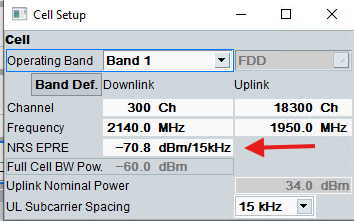
    AT%xbandlock=2,,"255" - sets bandlock for example to band 255

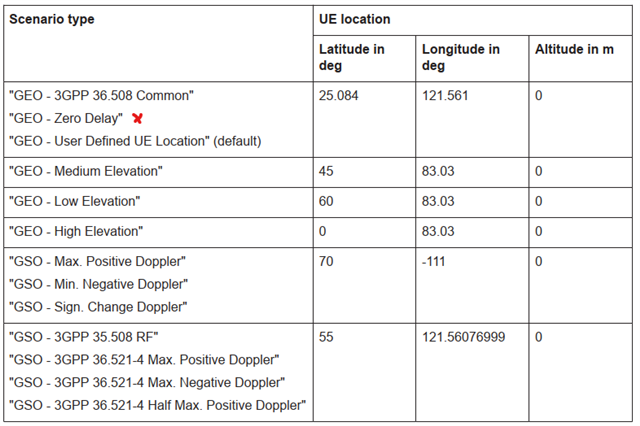
    at%location=2,"25.08439333","121.56076999","0",0,0 - sets UE location (default 3GPP GSO location specified in 3GPP 36.508 chapter 4.13).

    AT%XLABAPP=12,1 - deactivates UE prediction of satellite trajectory if required.

    The team have tested CMW500 NBIOT FW version 4.0.250 which has support for NTN. It has many satellite scenarios for NTN:

    x For “GEO - Zero Delay” location needs to be Lat-"0.0" Long-"121.561" Alt-"35785998.3"

    For RF-related testing I have used scenario “GSO - RF”.

    Hope this helps,
    Kenneth

  • Thank you for the guidance. With the steps you shared, I successfully established connectivity with the CMW500 emulator and verified end‑to‑end communication.

    I have a few follow‑up questions.
    ・TX output power always at maximum and preventing idle disconnect
    Is my understanding correct that there is no UE‑side setting to force the terminal to always transmit at maximum output power, or to prevent the connection from being released even in idle conditions?
    Do I have to adjust the network side settings?
    ・Cellular Monitor shows everything as Unknown
    In my setup, the Cellular Monitor app shows all fields as Unknown, which makes debugging difficult.
    Could this be due to the NTN modem firmware being an alpha release?
    For example, even with a combination such as "mfw_nrf9151-ntn_1.0.0-1.alpha.zip" and
    "serial_modem_v0.3.0_nrf9151dk_ppp_cmux_mtrace.hex", is it possible to see logs in Cellular Monitor if the firmware is rebuilt with the required settings enabled in nRF Connect SDK (VS Code)?
    This point is not clear to me.
    ・Measured C/N threshold difference between attach and maintain
    I measured the minimum C/N for attach to be around −2 dB, while the minimum C/N to keep the connection stable was around −5 dB
    The troubleshooting material I found does not provide specific numeric thresholds, so I want to confirm whether a ~3 dB gap between “attach” and “maintain” is a normal/expected behavior for NB‑IoT NTN testing in this type of setup
    Thank you in advance.
    yuki
  • Hello,

    yuki said:
    ・TX output power always at maximum and preventing idle disconnect
    Is my understanding correct that there is no UE‑side setting to force the terminal to always transmit at maximum output power, or to prevent the connection from being released even in idle conditions?
    Do I have to adjust the network side settings?

    As default in NB1-mode the DL power level received by the UE affects its UL power level.

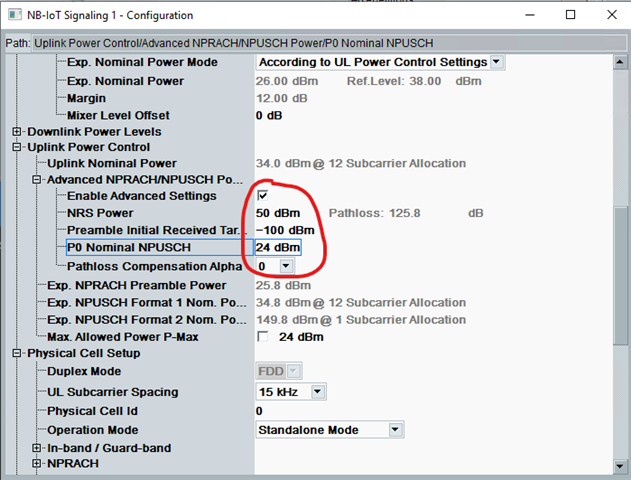
    One way to force DUT to use max Pout level is to LOWER DL level ~10dB AFTER establishing a call.

    Another way is to “decouple” UL and DL power levels in CMW settings by enabling Advanced Power Control and setting pathloss compensation to zero.

    For max UL Pout the settings can be something like this:

    Waiting for feedback on your other questions.
    Kenneth
  • Sorry for the late response.
    Thanks for your guidance. I was able to resolve the TX output power issue using the settings you suggested.
     
    I would appreciate your comments on the remaining questions as well when you have time.
Reply Children
Related