Hello Nordic Team,
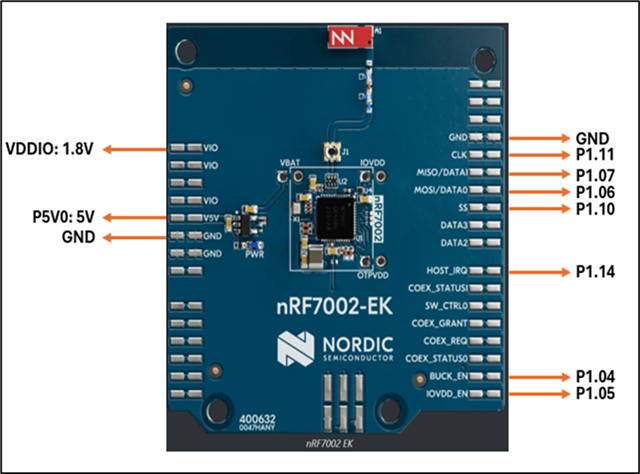
I am working with nRF Connect SDK v3.2.2 on the nRF54L15 DK (cpuapp) and trying to bring up WiFi using the nRF7002 together with the nRF7002-EK connected over SPI. I have created a custom devicetree overlay to connect the nRF7002 to SPI22.
I am trying to bring up Wi-Fi in STA mode, but during runtime I receive the following error:
*** Booting nRF Connect SDK v3.2.2-74845e169be2 ***
*** Using Zephyr OS v4.2.99-fe4f0106803e ***
[00:00:00.010,049] <inf> sta: Starting nrf54l15dk with CPU frequency: 128 MHz
[00:00:00.010,172] <inf> wifi_supplicant: wpa_supplicant initialized
[00:00:01.010,135] <err> sta: Failed to get Wi-Fi interface
Hardware Setup
-
Host MCU: nRF54L15-DK
-
Wi-Fi device: nRF7002-EK
-
Interface: SPI
-
SDK: nRF Connect SDK v3.2.2
I have few questions:
Is the devicetree configuration for nRF7002 over SPI correct for the nRF54L15-DK?
What conditions must be met for enabling Wi-Fi driver for SPI automatically?
Could the runtime error “Failed to get Wi-Fi interface” indicate that the Wi-Fi driver is not being instantiated even though the devicetree node exists?
Are there any additional configuration steps required when using the nRF7002-EK with the nRF54L15-DK?
Any guidance on the correct configuration for bringing up the nRF7002-EK with nRF54L15-DK would be greatly appreciated.
Thank you.
Attched are prj.conf and overlay files.
Attaching CONFIG_NETWORKING=y
CONFIG_WIFI=y
CONFIG_NRF_WIFI=y
CONFIG_WIFI_NRF70=y
CONFIG_NET_L2_ETHERNET=y
# WPA supplicant (STA)
CONFIG_WIFI_NM_WPA_SUPPLICANT=y
CONFIG_WIFI_READY_LIB=y
# Disable heavy recovery feature (saves RAM)
CONFIG_NRF_WIFI_RPU_RECOVERY=n
CONFIG_WIFI_CREDENTIALS=y
CONFIG_WIFI_CREDENTIALS_STATIC=y
CONFIG_WIFI_CREDENTIALS_STATIC_SSID="KiranF19"
CONFIG_WIFI_CREDENTIALS_STATIC_PASSWORD="kiran@8695"
CONFIG_NET_SOCKETS=y
CONFIG_NET_IPV4=y
CONFIG_NET_UDP=y
CONFIG_NET_TCP=y
CONFIG_NET_DHCPV4=y
# CRITICAL RAM REDUCTIONS (was too large)
CONFIG_NET_PKT_RX_COUNT=4
CONFIG_NET_PKT_TX_COUNT=4
CONFIG_NET_BUF_RX_COUNT=6
CONFIG_NET_BUF_TX_COUNT=6
CONFIG_NRF70_RX_NUM_BUFS=6
# WiFi heap tuning for nRF54L15 (VERY IMPORTANT)
CONFIG_HEAP_MEM_POOL_SIZE=16384
CONFIG_HEAP_MEM_POOL_IGNORE_MIN=y
CONFIG_NRF_WIFI_CTRL_HEAP_SIZE=8192
CONFIG_NRF_WIFI_DATA_HEAP_SIZE=16384
CONFIG_NET_TC_TX_COUNT=1
CONFIG_NET_IF_UNICAST_IPV4_ADDR_COUNT=1
CONFIG_NET_MAX_CONTEXTS=2
CONFIG_NET_CONTEXT_SYNC_RECV=y
# Smaller stacks (your values are oversized)
CONFIG_MAIN_STACK_SIZE=4096
CONFIG_NET_TX_STACK_SIZE=2048
CONFIG_NET_RX_STACK_SIZE=2048
CONFIG_STA_SAMPLE_START_WIFI_THREAD_STACK_SIZE=4096
# Disable heavy debug features (BIG RAM SAVERS)
CONFIG_INIT_STACKS=n
CONFIG_STACK_SENTINEL=n
CONFIG_DEBUG_COREDUMP=n
CONFIG_DEBUG_COREDUMP_BACKEND_LOGGING=n
CONFIG_DEBUG_COREDUMP_MEMORY_DUMP_MIN=n
# Logging reduction (very important)
CONFIG_LOG=y
CONFIG_LOG_BUFFER_SIZE=1024
CONFIG_NET_LOG=n
CONFIG_NET_CONFIG_SETTINGS=y
CONFIG_NET_CONFIG_INIT_TIMEOUT=0
CONFIG_NET_SOCKETS_POLL_MAX=4
CONFIG_ENTROPY_GENERATOR=y
CONFIG_POSIX_TIMERS=y
CONFIG_NET_CONFIG_MY_IPV4_ADDR="192.168.1.99"
CONFIG_NET_CONFIG_MY_IPV4_NETMASK="255.255.255.0"
CONFIG_NET_CONFIG_MY_IPV4_GW="192.168.1.1"
CONFIG_NET_MGMT_EVENT_QUEUE_TIMEOUT=5000
CONFIG_LOG=y
CONFIG_LOG_DEFAULT_LEVEL=3
CONFIG_LOG_MODE_DEFERRED=y
CONFIG_LOG_BUFFER_SIZE=32768
/*
 * Copyright (c) 2024 Nordic Semiconductor ASA
 *
 * SPDX-License-Identifier: LicenseRef-Nordic-5-Clause
 */

#include <freq.h>

/ {
	chosen {
		zephyr,wifi = &wlan0;

	};
};

&button0{
	status= "disabled";
};
&button1{
	status= "disabled";
};
&button2{
	status= "disabled";
};
&led1{
	status= "disabled";
};
&led3{
	status= "disabled";
};
&spi00{
	status= "disabled";
};
&pinctrl {
	spi22_default: spi22_default {
		group1 {
			psels = <NRF_PSEL(SPIM_SCK, 1, 11)>,
				<NRF_PSEL(SPIM_MISO, 1, 9)>,
				<NRF_PSEL(SPIM_MOSI, 1, 10)>;
		};
	};

	spi22_sleep: spi22_sleep {
		group1 {
			psels = <NRF_PSEL(SPIM_SCK, 1, 11)>,
				<NRF_PSEL(SPIM_MISO, 1, 9)>,
				<NRF_PSEL(SPIM_MOSI, 1, 10)>;
			low-power-enable;
		};
	};
};

&spi22
{
	compatible = "nordic,nrf-spim";
	status = "okay";
	cs-gpios = < &gpio1 8 GPIO_ACTIVE_LOW >;
	pinctrl-0 = < &spi22_default >;
	pinctrl-1 = < &spi22_sleep >;
	pinctrl-names = "default", "sleep";

	nrf70: nrf7002@0
	{
		compatible = "nordic,nrf7002-spi";
		status = "okay";
		reg = <0>;
		label = "nrf7002_wlan";
		spi-max-frequency = <DT_FREQ_M(4)>;

		iovdd-ctrl-gpios = <&gpio1 12 (GPIO_ACTIVE_HIGH | GPIO_PULL_DOWN)>;
		bucken-gpios = <&gpio1 13 (GPIO_ACTIVE_HIGH | GPIO_PULL_DOWN)>;
		host-irq-gpios = <&gpio1 14 GPIO_ACTIVE_HIGH>;

		/* Maximum TX power limits for 2.4 GHz */
		wifi-max-tx-pwr-2g-dsss = <21>;
		wifi-max-tx-pwr-2g-mcs0 = <16>;
		wifi-max-tx-pwr-2g-mcs7 = <16>;
		/* Maximum TX power limits for 5 GHz */
		wifi-max-tx-pwr-5g-low-mcs0 = <13>;
		wifi-max-tx-pwr-5g-low-mcs7 = <13>;
		wifi-max-tx-pwr-5g-mid-mcs0 = <13>;
		wifi-max-tx-pwr-5g-mid-mcs7 = <13>;
		wifi-max-tx-pwr-5g-high-mcs0 = <12>;
		wifi-max-tx-pwr-5g-high-mcs7 = <12>;

        wlan0: wlan0
		{
            compatible = "nordic,wlan";
			status = "okay";
        };
	};
};