Difficulty while implementing STA example for nRF7002 using nRF54L15 (SPI WiFi Driver Issue)

Hello Nordic Team,

I am working with nRF Connect SDK v3.2.2 on the nRF54L15 DK (cpuapp) and trying to bring up WiFi using the nRF7002 together with the nRF7002-EK connected over SPI. I have created a custom devicetree overlay to connect the nRF7002 to SPI22. 

I am trying to bring up Wi-Fi in STA mode, but during runtime I receive the following error:

*** Booting nRF Connect SDK v3.2.2-74845e169be2 ***
*** Using Zephyr OS v4.2.99-fe4f0106803e ***
[00:00:00.010,049] <inf> sta: Starting nrf54l15dk with CPU frequency: 128 MHz
[00:00:00.010,172] <inf> wifi_supplicant: wpa_supplicant initialized
[00:00:01.010,135] <err> sta: Failed to get Wi-Fi interface

Hardware Setup

  1. Host MCU: nRF54L15-DK

  2. Wi-Fi device: nRF7002-EK

  3. Interface: SPI

  4. SDK: nRF Connect SDK v3.2.2

    I have few questions:

    Is the devicetree configuration for nRF7002 over SPI correct for the nRF54L15-DK?

    What conditions must be met for enabling Wi-Fi driver for SPI automatically?

    Could the runtime error “Failed to get Wi-Fi interface” indicate that the Wi-Fi driver is not being instantiated even though the devicetree node exists?

    Are there any additional configuration steps required when using the nRF7002-EK with the nRF54L15-DK?

    Any guidance on the correct configuration for bringing up the nRF7002-EK with nRF54L15-DK would be greatly appreciated.

    Thank you.

Attched are prj.conf and overlay files.

Attaching 

CONFIG_NETWORKING=y
CONFIG_WIFI=y
CONFIG_NRF_WIFI=y
CONFIG_WIFI_NRF70=y
CONFIG_NET_L2_ETHERNET=y


# WPA supplicant (STA)
CONFIG_WIFI_NM_WPA_SUPPLICANT=y
CONFIG_WIFI_READY_LIB=y

# Disable heavy recovery feature (saves RAM)
CONFIG_NRF_WIFI_RPU_RECOVERY=n

CONFIG_WIFI_CREDENTIALS=y
CONFIG_WIFI_CREDENTIALS_STATIC=y
CONFIG_WIFI_CREDENTIALS_STATIC_SSID="KiranF19"
CONFIG_WIFI_CREDENTIALS_STATIC_PASSWORD="kiran@8695"


CONFIG_NET_SOCKETS=y
CONFIG_NET_IPV4=y
CONFIG_NET_UDP=y
CONFIG_NET_TCP=y
CONFIG_NET_DHCPV4=y

# CRITICAL RAM REDUCTIONS (was too large)
CONFIG_NET_PKT_RX_COUNT=4
CONFIG_NET_PKT_TX_COUNT=4
CONFIG_NET_BUF_RX_COUNT=6
CONFIG_NET_BUF_TX_COUNT=6
CONFIG_NRF70_RX_NUM_BUFS=6

# WiFi heap tuning for nRF54L15 (VERY IMPORTANT)
CONFIG_HEAP_MEM_POOL_SIZE=16384
CONFIG_HEAP_MEM_POOL_IGNORE_MIN=y
CONFIG_NRF_WIFI_CTRL_HEAP_SIZE=8192
CONFIG_NRF_WIFI_DATA_HEAP_SIZE=16384

CONFIG_NET_TC_TX_COUNT=1
CONFIG_NET_IF_UNICAST_IPV4_ADDR_COUNT=1
CONFIG_NET_MAX_CONTEXTS=2
CONFIG_NET_CONTEXT_SYNC_RECV=y

# Smaller stacks (your values are oversized)
CONFIG_MAIN_STACK_SIZE=4096
CONFIG_NET_TX_STACK_SIZE=2048
CONFIG_NET_RX_STACK_SIZE=2048
CONFIG_STA_SAMPLE_START_WIFI_THREAD_STACK_SIZE=4096

# Disable heavy debug features (BIG RAM SAVERS)
CONFIG_INIT_STACKS=n
CONFIG_STACK_SENTINEL=n
CONFIG_DEBUG_COREDUMP=n
CONFIG_DEBUG_COREDUMP_BACKEND_LOGGING=n
CONFIG_DEBUG_COREDUMP_MEMORY_DUMP_MIN=n

# Logging reduction (very important)
CONFIG_LOG=y
CONFIG_LOG_BUFFER_SIZE=1024
CONFIG_NET_LOG=n

CONFIG_NET_CONFIG_SETTINGS=y
CONFIG_NET_CONFIG_INIT_TIMEOUT=0

CONFIG_NET_SOCKETS_POLL_MAX=4
CONFIG_ENTROPY_GENERATOR=y
CONFIG_POSIX_TIMERS=y

CONFIG_NET_CONFIG_MY_IPV4_ADDR="192.168.1.99"
CONFIG_NET_CONFIG_MY_IPV4_NETMASK="255.255.255.0"
CONFIG_NET_CONFIG_MY_IPV4_GW="192.168.1.1"

CONFIG_NET_MGMT_EVENT_QUEUE_TIMEOUT=5000

CONFIG_LOG=y
CONFIG_LOG_DEFAULT_LEVEL=3
CONFIG_LOG_MODE_DEFERRED=y
CONFIG_LOG_BUFFER_SIZE=32768

/*
 * Copyright (c) 2024 Nordic Semiconductor ASA
 *
 * SPDX-License-Identifier: LicenseRef-Nordic-5-Clause
 */

#include <freq.h>

/ {
	chosen {
		zephyr,wifi = &wlan0;
		
	};
};

&button0{
	status= "disabled";
};
&button1{
	status= "disabled";
};
&button2{
	status= "disabled";
};
&led1{
	status= "disabled";
};
&led3{
	status= "disabled";
};
&spi00{
	status= "disabled";
};
&pinctrl {
	spi22_default: spi22_default {
		group1 {
			psels = <NRF_PSEL(SPIM_SCK, 1, 11)>,
				<NRF_PSEL(SPIM_MISO, 1, 9)>,
				<NRF_PSEL(SPIM_MOSI, 1, 10)>;
		};
	};

	spi22_sleep: spi22_sleep {
		group1 {
			psels = <NRF_PSEL(SPIM_SCK, 1, 11)>,
				<NRF_PSEL(SPIM_MISO, 1, 9)>,
				<NRF_PSEL(SPIM_MOSI, 1, 10)>;
			low-power-enable;
		};
	};
};

&spi22 
{
	compatible = "nordic,nrf-spim";
	status = "okay";
	cs-gpios = < &gpio1 8 GPIO_ACTIVE_LOW >;
	pinctrl-0 = < &spi22_default >;
	pinctrl-1 = < &spi22_sleep >;
	pinctrl-names = "default", "sleep";

	nrf70: nrf7002@0 
	{
		compatible = "nordic,nrf7002-spi";
		status = "okay";
		reg = <0>;
		label = "nrf7002_wlan";
		spi-max-frequency = <DT_FREQ_M(4)>;

		iovdd-ctrl-gpios = <&gpio1 12 (GPIO_ACTIVE_HIGH | GPIO_PULL_DOWN)>;
		bucken-gpios = <&gpio1 13 (GPIO_ACTIVE_HIGH | GPIO_PULL_DOWN)>;
		host-irq-gpios = <&gpio1 14 GPIO_ACTIVE_HIGH>;
		
		/* Maximum TX power limits for 2.4 GHz */
		wifi-max-tx-pwr-2g-dsss = <21>;
		wifi-max-tx-pwr-2g-mcs0 = <16>;
		wifi-max-tx-pwr-2g-mcs7 = <16>;
		/* Maximum TX power limits for 5 GHz */
		wifi-max-tx-pwr-5g-low-mcs0 = <13>;
		wifi-max-tx-pwr-5g-low-mcs7 = <13>;
		wifi-max-tx-pwr-5g-mid-mcs0 = <13>;
		wifi-max-tx-pwr-5g-mid-mcs7 = <13>;
		wifi-max-tx-pwr-5g-high-mcs0 = <12>;
		wifi-max-tx-pwr-5g-high-mcs7 = <12>;

        wlan0: wlan0 
		{
            compatible = "nordic,wlan";
			status = "okay";
        };
	};
};

Parents
  • Thank you for reply, Amanda H.

    Thank you for your reply.

    I will follow the suggestions you provided.

    However, I would like to clarify one of the main questions along withe other questions from my previous message. Is it not possible to use the nRF7002 together with the nRF54L15? I have already designed a custom board using these two chips.and will get PCBs soon.

    Also, could you please explain why it is necessary to purchase the nRF7002 EB II?

    Thank you for your guidance.

    Kind regards,


    KIran

  • So if we would like to plug&play, we'll go for the nRF7002 EB II. If we want to write your own dts overlay and Kconfig, nRF7002-EK works just fine though.

  • Thank you Ibrahim and Amanda.

    I was able to successfully run and validate the STA (station) example provided in the nRF Connect SDK.

    For my setup, I am using the nRF7002-EK in combination with the nRF54L15-DK over an SPI interface. To get the example working correctly, I had to make a few minor modifications and configuration adjustments, outlined below:

    1. MAC Address Update
      I replaced the default MAC address in the app.overlay file with the correct MAC ID corresponding to my nRF7002-EK module.

    2. Memory Configuration Adjustments
      I modified the following parameters in the prj.conf file to better fit the available memory constraints:
      • CONFIG_HEAP_MEM_POOL_SIZE=32000 (reduced from 37000)
      • CONFIG_NRF_WIFI_CTRL_HEAP_SIZE=16000 (reduced from 20000)
      • CONFIG_NRF_WIFI_DATA_HEAP_SIZE=32000 (reduced from 40000)

    3. CMake Argument Addition
      I added an extra CMake argument to specify the correct shield:
      • -DSHIELD=nrf7002eb2

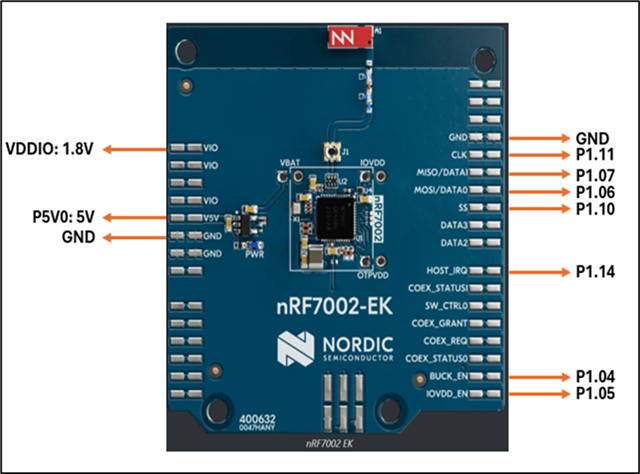
    4. Hardware Connections
      The physical wiring between the boards was completed according to the provided diagram.


    5. Program Output
        The system runs successfully, and the output is as follows:

    [00:00:07.008,131] <inf> sta: ==================
    [00:00:07.008,145] <inf> sta: State: SCANNING
    [00:00:07.308,244] <inf> sta: ==================
    [00:00:07.308,260] <inf> sta: State: SCANNING
    [00:00:07.608,364] <inf> sta: ==================
    [00:00:07.608,383] <inf> sta: State: SCANNING
    [00:00:07.908,503] <inf> sta: ==================
    [00:00:07.908,517] <inf> sta: State: SCANNING
    [00:00:08.208,625] <inf> sta: ==================
    [00:00:08.208,638] <inf> sta: State: SCANNING
    [00:00:08.508,757] <inf> sta: ==================
    [00:00:08.508,773] <inf> sta: State: AUTHENTICATING
    [00:00:08.702,108] <wrn> net_if: iface 1 pkt 0x2002a0d0 send failure status -1
    [00:00:08.734,335] <inf> sta: Connected
    [00:00:08.813,571] <inf> sta: ==================
    [00:00:08.813,587] <inf> sta: State: COMPLETED
    [00:00:08.813,599] <inf> sta: Interface Mode: STATION
    [00:00:08.813,610] <inf> sta: Link Mode: WIFI 5 (802.11ac/VHT)
    [00:00:08.813,623] <inf> sta: SSID: ISPL
    [00:00:08.813,639] <inf> sta: BSSID: 90:4C:81:DA:17:50
    [00:00:08.813,649] <inf> sta: Band: 5GHz
    [00:00:08.813,653] <inf> sta: Channel: 149
    [00:00:08.813,668] <inf> sta: Security: WPA2-PSK
    [00:00:08.813,678] <inf> sta: MFP: Optional
    [00:00:08.813,681] <inf> sta: RSSI: -69
    [00:00:10.473,288] <inf> net_dhcpv4: Received: 192.168.1.148
    [00:00:10.473,407] <inf> net_config: IPv4 address: 192.168.1.148
    [00:00:10.473,412] <inf> net_config: Lease time: 86400 seconds
    [00:00:10.473,435] <inf> net_config: Subnet: 255.255.255.0

Reply
  • Thank you Ibrahim and Amanda.

    I was able to successfully run and validate the STA (station) example provided in the nRF Connect SDK.

    For my setup, I am using the nRF7002-EK in combination with the nRF54L15-DK over an SPI interface. To get the example working correctly, I had to make a few minor modifications and configuration adjustments, outlined below:

    1. MAC Address Update
      I replaced the default MAC address in the app.overlay file with the correct MAC ID corresponding to my nRF7002-EK module.

    2. Memory Configuration Adjustments
      I modified the following parameters in the prj.conf file to better fit the available memory constraints:
      • CONFIG_HEAP_MEM_POOL_SIZE=32000 (reduced from 37000)
      • CONFIG_NRF_WIFI_CTRL_HEAP_SIZE=16000 (reduced from 20000)
      • CONFIG_NRF_WIFI_DATA_HEAP_SIZE=32000 (reduced from 40000)

    3. CMake Argument Addition
      I added an extra CMake argument to specify the correct shield:
      • -DSHIELD=nrf7002eb2

    4. Hardware Connections
      The physical wiring between the boards was completed according to the provided diagram.


    5. Program Output
        The system runs successfully, and the output is as follows:

    [00:00:07.008,131] <inf> sta: ==================
    [00:00:07.008,145] <inf> sta: State: SCANNING
    [00:00:07.308,244] <inf> sta: ==================
    [00:00:07.308,260] <inf> sta: State: SCANNING
    [00:00:07.608,364] <inf> sta: ==================
    [00:00:07.608,383] <inf> sta: State: SCANNING
    [00:00:07.908,503] <inf> sta: ==================
    [00:00:07.908,517] <inf> sta: State: SCANNING
    [00:00:08.208,625] <inf> sta: ==================
    [00:00:08.208,638] <inf> sta: State: SCANNING
    [00:00:08.508,757] <inf> sta: ==================
    [00:00:08.508,773] <inf> sta: State: AUTHENTICATING
    [00:00:08.702,108] <wrn> net_if: iface 1 pkt 0x2002a0d0 send failure status -1
    [00:00:08.734,335] <inf> sta: Connected
    [00:00:08.813,571] <inf> sta: ==================
    [00:00:08.813,587] <inf> sta: State: COMPLETED
    [00:00:08.813,599] <inf> sta: Interface Mode: STATION
    [00:00:08.813,610] <inf> sta: Link Mode: WIFI 5 (802.11ac/VHT)
    [00:00:08.813,623] <inf> sta: SSID: ISPL
    [00:00:08.813,639] <inf> sta: BSSID: 90:4C:81:DA:17:50
    [00:00:08.813,649] <inf> sta: Band: 5GHz
    [00:00:08.813,653] <inf> sta: Channel: 149
    [00:00:08.813,668] <inf> sta: Security: WPA2-PSK
    [00:00:08.813,678] <inf> sta: MFP: Optional
    [00:00:08.813,681] <inf> sta: RSSI: -69
    [00:00:10.473,288] <inf> net_dhcpv4: Received: 192.168.1.148
    [00:00:10.473,407] <inf> net_config: IPv4 address: 192.168.1.148
    [00:00:10.473,412] <inf> net_config: Lease time: 86400 seconds
    [00:00:10.473,435] <inf> net_config: Subnet: 255.255.255.0

Children
Related