Custom Board not transmitting

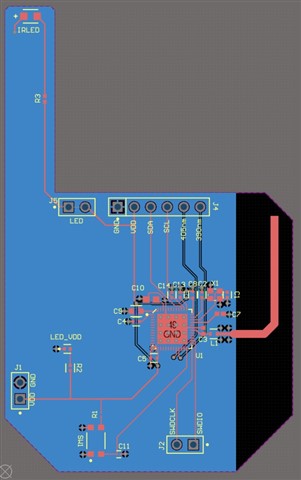
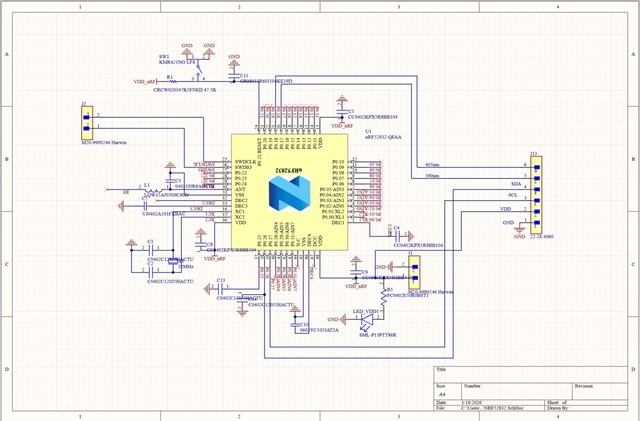
I've recently received a custom board I've designed and am programming with the nRF52DK, following the procedure in L3 E1 of the SDK intermediate course. I've flashed the Zephyr Beacon example successfully to the board and have tried analysing with the nRF connect app on my phone. I'm unable to see my device with the phone but can see when using the development kit. I've uploaded screenshots of the schematic and design, along with the terminal output from visual studio.
Executing task: nRF Connect: Build [incremental]: beacon_2/build 

Building beacon_2
west build --build-dir c:/Users/S3872174/Workstation/beacon_2/build c:/Users/S3872174/Workstation/beacon_2

[0/1] Re-running CMake...
Loading Zephyr default modules (Zephyr base (cached)).
-- Application: C:/Users/S3872174/Workstation/beacon_2
-- CMake version: 3.21.0
-- Cache files will be written to: C:/Users/S3872174/Workstation/zephyr/.cache
-- Zephyr version: 3.5.99 (C:/Users/S3872174/Workstation/zephyr)
-- Found west (found suitable version "1.4.0", minimum required is "0.14.0")
-- Board: BTNRF52832
-- Found host-tools: zephyr 0.17.0 (C:/ncs/toolchains/66cdf9b75e/opt/zephyr-sdk)
-- Found toolchain: zephyr 0.17.0 (C:/ncs/toolchains/66cdf9b75e/opt/zephyr-sdk)
-- Found BOARD.dts: C:/Users/S3872174/Workstation/CustomBoards/boards/arm/BTNRF52832/BTNRF52832.dts
-- Generated zephyr.dts: C:/Users/S3872174/Workstation/beacon_2/build/zephyr/zephyr.dts
-- Generated devicetree_generated.h: C:/Users/S3872174/Workstation/beacon_2/build/zephyr/include/generated/devicetree_generated.h
-- Including generated dts.cmake file: C:/Users/S3872174/Workstation/beacon_2/build/zephyr/dts.cmake

warning: UART_CONSOLE (defined at drivers/console/Kconfig:43) was assigned the value 'y' but got the
value 'n'. Check these unsatisfied dependencies: SERIAL (=n), SERIAL_HAS_DRIVER (=n). See
http://docs.zephyrproject.org/latest/kconfig.html#CONFIG_UART_CONSOLE and/or look up UART_CONSOLE in
the menuconfig/guiconfig interface. The Application Development Primer, Setting Configuration
Values, and Kconfig - Tips and Best Practices sections of the manual might be helpful too.

Parsing C:/Users/S3872174/Workstation/zephyr/Kconfig
Loaded configuration 'C:/Users/S3872174/Workstation/CustomBoards/boards/arm/BTNRF52832/BTNRF52832_defconfig'
Merged configuration 'C:/Users/S3872174/Workstation/beacon_2/prj.conf'
Merged configuration 'C:/Users/S3872174/Workstation/beacon_2/build/zephyr/misc/generated/extra_kconfig_options.conf'
Configuration saved to 'C:/Users/S3872174/Workstation/beacon_2/build/zephyr/.config'
Kconfig header saved to 'C:/Users/S3872174/Workstation/beacon_2/build/zephyr/include/generated/autoconf.h'
CMake Warning at C:/Users/S3872174/Workstation/zephyr/CMakeLists.txt:862 (message):
  No SOURCES given to Zephyr library: drivers__console

  Excluding target from build.


-- Configuring done
-- Generating done
-- Build files have been written to: C:/Users/S3872174/Workstation/beacon_2/build
[167/167] Linking C executable zephyr\zephyr.elf
Memory region         Used Size  Region Size  %age Used
           FLASH:       84312 B       512 KB     16.08%
             RAM:       21424 B        64 KB     32.69%
        IDT_LIST:          0 GB        32 KB      0.00%
 *  Terminal will be reused by tasks, press any key to close it. 

 *  Executing task: nRF Connect: Flash: beacon_2/build 

Flashing build to nRF52 DK
west flash -d c:\Users\S3872174\Workstation\beacon_2\build --dev-id 1050325190

-- west flash: rebuilding
ninja: no work to do.
-- west flash: using runner nrfjprog
-- runners.nrfjprog: reset after flashing requested
-- runners.nrfjprog: Flashing file: c:\Users\S3872174\Workstation\beacon_2\build\zephyr\zephyr.hex
[ ######               ]   0.000s | Erase file - Check image                                                           
[ #####                ]   0.000s | Check image validity - Initialize device info                                      
[ ##########           ]   0.000s | Check image validity - Check region 0 settings                                     
[ ###############      ]   0.000s | Check image validity - block 1 of 2                                                
[ #################### ]   0.014s | Check image validity - Finished                                                    
[ #############        ]   0.000s | Erase file - Erasing                                                               
[ ##########           ]   0.000s | Erasing non-volatile memory - block 1 of 1                                         
[ #################### ]   0.000s | Erasing non-volatile memory - Erase successful                                     
[ #################### ]   0.868s | Erase file - Done erasing                                                          
[ ######               ]   0.000s | Program file - Checking image                                                      
[ #####                ]   0.000s | Check image validity - Initialize device info                                      
[ ##########           ]   0.000s | Check image validity - Check region 0 settings                                     
[ ###############      ]   0.357s | Check image validity - block 1 of 2                                                
[ #################### ]   0.005s | Check image validity - Finished                                                    
[ #############        ]   0.000s | Program file - Programming                                                         
[ ##########           ]   0.000s | Programming image - block 1 of 1                                                   
[ #################### ]   0.000s | Programming image - Write successful                                               
[ #################### ]   1.533s | Program file - Done programming                                                    
[ ######               ]   0.000s | Verify file - Check image                                                          
[ #####                ]   0.000s | Check image validity - Initialize device info                                      
[ ##########           ]   0.000s | Check image validity - Check region 0 settings                                     
[ ###############      ]   0.908s | Check image validity - block 1 of 2                                                
[ #################### ]   0.009s | Check image validity - Finished                                                    
[ #############        ]   0.000s | Verify file - Verifying                                                            
[ ##########           ]   0.000s | Verifying image - block 1 of 1                                                     
[ #################### ]   0.000s | Verifying image - Verify successful                                                
[ #################### ]   0.571s | Verify file - Done verifying                                                       
Enabling pin reset.
Applying pin reset.
-- runners.nrfjprog: Board with serial number 1050325190 flashed successfully.
 *  Terminal will be reused by tasks, press any key to close it. 
Parents
  • Hi,

    So you are able to program the custom board so that is a good first step. It could be good to test with some other non radio applications as well to see that the device behaves normally, but you do not have the DCDC components so be carefull not to flash anything that has DCDC enabled. This will lock up the device and without the correct voltages on some DCC pins it will not boot. 

    We have a guide on the basics of the design here https://devzone.nordicsemi.com/guides/hardware-design-test-and-measuring/b/nrf5x/posts/general-pcb-design-guidelines-for-nrf52-series there is also one for the nRF52832 with some extra details. 

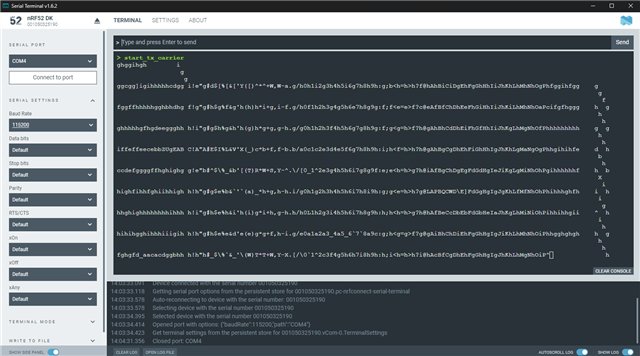
    You could use the radio test sample to set the custom board up with single chennal TX unmodulated at max power to make it simple, but you also use a normal sample like the one u have but know that the singal will jump from channels when advertising. 


    https://docs.nordicsemi.com/bundle/ncs-latest/page/nrf/samples/peripheral/radio_test/README.html#testing 
    https://docs.nordicsemi.com/bundle/nrf-connect-rssi-viewer/page/index.html#rssi-viewer-app 

    Also if you need any more electrification on something or something is unclear then feel free to ask for more details or anything else.


    Something that can be an issue is that the load cap values for the crystal is not correct, offsetting the RF signal so much that the phone can not "see" the custom board. 

    Do you have the datasheet of the 32MHz crystal ?


    Regards,
    Jonathan

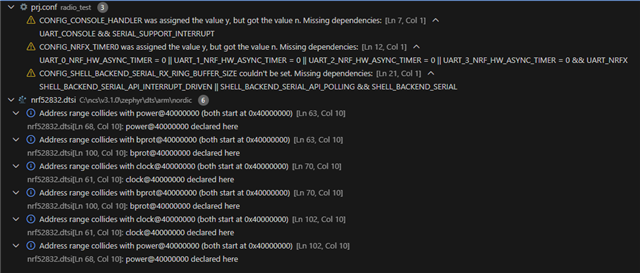
  • I've tried using the radio_test example. It uploaded but I received the following errors and still cannot see my board on the nrf connect app.

    I've also added the following the dts to ensure the dcdc is not used. Will this be ok?

    &reg {
        regulator-initial-mode = <NRF5X_REG_MODE_LDO>;
    };
    [54/54] Linking C executable zephyr\zephyr.elf
    Memory region         Used Size  Region Size  %age Used
               FLASH:       63168 B       512 KB     12.05%
                 RAM:       14656 B        64 KB     22.36%
            IDT_LIST:          0 GB        32 KB      0.00%
    Generating files from C:/Workspace/Nordic/radio_test/build/radio_test/zephyr/zephyr.elf for board: BenchtopNRF52832
    [2/3] No install step for 'radio_test'
    [3/3] Completed 'radio_test'
    -- west flash: using runner nrfjprog
    -- runners.nrfjprog: reset after flashing requested
    -- runners.nrfjprog: Flashing file: C:\Workspace\Nordic\radio_test\build\radio_test\zephyr\zephyr.hex
    [error] [SeggerBackend] - JLinkARM.dll reported error -256 at line 736.
    [error] [SeggerBackend] - JLinkARM.dll reported error -256 at line 629.
    [error] [SeggerBackend] - JLinkARM.dll reported error -256 at line 3139.
    [error] [SeggerBackend] - JLinkARM.dll reported error -256 at line 911.
    [error] [SeggerBackend] - JLinkARM.dll reported error -256 at line 3139.
    [error] [SeggerBackend] - JLinkARM.dll reported error -256 at line 3139.
    [error] [SeggerBackend] - JLinkARM.dll reported error -256 at line 3139.
    [error] [SeggerBackend] - JLinkARM.dll reported error -256 at line 3087.
    [error] [SeggerBackend] - JLinkARM.dll reported error -256 at line 3112.
    [error] [SeggerBackend] - JLinkARM.dll reported error -256 at line 3349.
    [error] [SeggerBackend] - JLinkARM.dll reported error -256 at line 3160.
    [error] [SeggerBackend] - JLinkARM.dll reported error -256 at line 3176.
    [ ######               ]   0.000s | Erase file - Check image                                                           
    [ ###                  ]   0.000s | Check image validity - Initialize device info                                      
    [ ######               ]   0.000s | Check image validity - Check region 0 settings                                     
    [ ##########           ]   0.000s | Check image validity - block 1 of 4                                                
    [ #############        ]   0.006s | Check image validity - block 2 of 4                                                
    [ ################     ]   0.004s | Check image validity - block 3 of 4                                                
    [ #################### ]   0.029s | Check image validity - Finished                                                    
    [ #############        ]   0.000s | Erase file - Erasing                                                               
    [ #####                ]   0.000s | Erasing non-volatile memory - block 1 of 3                                         
    [ ##########           ]   0.036s | Erasing non-volatile memory - block 2 of 3                                         
    [ ###############      ]   0.210s | Erasing non-volatile memory - block 3 of 3                                         
    [ #################### ]   0.000s | Erasing non-volatile memory - Erase successful                                     
    [ #################### ]   0.667s | Erase file - Done erasing                                                          
    [ ######               ]   0.000s | Program file - Checking image                                                      
    [ ###                  ]   0.000s | Check image validity - Initialize device info                                      
    [ ######               ]   0.000s | Check image validity - Check region 0 settings                                     
    [ ##########           ]   0.790s | Check image validity - block 1 of 4                                                
    [ #############        ]   0.411s | Check image validity - block 2 of 4                                                
    [ ################     ]   0.165s | Check image validity - block 3 of 4                                                
    [ #################### ]   0.023s | Check image validity - Finished                                                    
    [ #############        ]   0.000s | Program file - Programming                                                         
    [ #####                ]   0.000s | Programming image - block 1 of 3                                                   
    [ ##########           ]   0.008s | Programming image - block 2 of 3                                                   
    [ ###############      ]   0.379s | Programming image - block 3 of 3                                                   
    [ #################### ]   0.000s | Programming image - Write successful                                               
    [ #################### ]   1.156s | Program file - Done programming                                                    
    [ ######               ]   0.000s | Verify file - Check image                                                          
    [ ###                  ]   0.000s | Check image validity - Initialize device info                                      
    [ ######               ]   0.000s | Check image validity - Check region 0 settings                                     
    [ ##########           ]   2.070s | Check image validity - block 1 of 4                                                
    [ #############        ]   1.070s | Check image validity - block 2 of 4                                                
    [ ################     ]   0.427s | Check image validity - block 3 of 4                                                
    [ #################### ]   0.026s | Check image validity - Finished                                                    
    [ #############        ]   0.000s | Verify file - Verifying                                                            
    [ #####                ]   0.000s | Verifying image - block 1 of 3                                                     
    [ ##########           ]   0.002s | Verifying image - block 2 of 3                                                     
    [ ###############      ]   0.143s | Verifying image - block 3 of 3                                                     
    [ #################### ]   0.000s | Verifying image - Verify successful                                                
    [ #################### ]   0.437s | Verify file - Done verifying                                                       
    [error] [SeggerBackend] - JLinkARM.dll reported error -256 at line 736.
    [error] [SeggerBackend] - JLinkARM.dll reported error -256 at line 629.
    [error] [SeggerBackend] - JLinkARM.dll reported error -256 at line 3139.
    [error] [SeggerBackend] - JLinkARM.dll reported error -256 at line 911.
    [error] [SeggerBackend] - JLinkARM.dll reported error -256 at line 3139.
    [error] [SeggerBackend] - JLinkARM.dll reported error -256 at line 3139.
    [error] [SeggerBackend] - JLinkARM.dll reported error -256 at line 3139.
    [error] [SeggerBackend] - JLinkARM.dll reported error -256 at line 3087.
    [error] [SeggerBackend] - JLinkARM.dll reported error -256 at line 3112.
    [error] [SeggerBackend] - JLinkARM.dll reported error -256 at line 3349.
    [error] [SeggerBackend] - JLinkARM.dll reported error -256 at line 3160.
    [error] [SeggerBackend] - JLinkARM.dll reported error -256 at line 3176.
    Applying system reset.
    Run.
    -- runners.nrfjprog: Board(s) with serial number(s) 1050325190 flashed successfully.
     *  Terminal will be reused by tasks, press any key to close it.
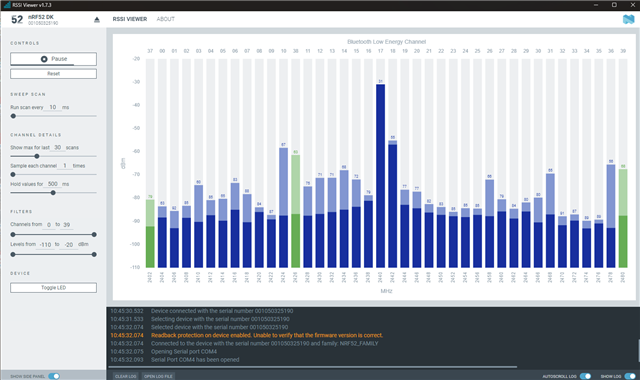
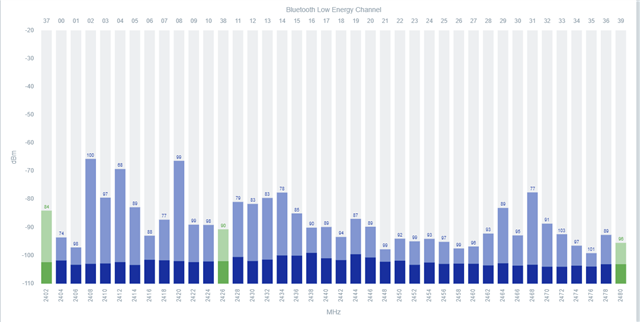
  • Setup is ok and crystal cap seems ok as well, but for the radio test sample, it will not show up in the app, you will need to use the DK you have connected to you computer running the RSSI viewer app. 

    You should see a "spike" on the channel you output on on the custom board. 

    Its to see if there is any life in the radio part of your custom board. 

    Regards,

    Jonathan

Reply
  • Setup is ok and crystal cap seems ok as well, but for the radio test sample, it will not show up in the app, you will need to use the DK you have connected to you computer running the RSSI viewer app. 

    You should see a "spike" on the channel you output on on the custom board. 

    Its to see if there is any life in the radio part of your custom board. 

    Regards,

    Jonathan

Children
Related