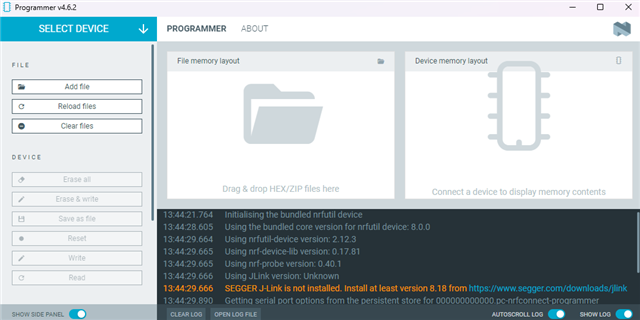
Programmer can't read the SEGGER JLINK version.

Hi Sir,
I am developing with the nRF52840.

I installed nRFConnect 5.2.1 and the programmer (version 4.6.2), Following the programmer’s prompts, I installed SEGGER J-Link v8.18 and updated the nRF Command Line Tools to v10.24.2, and added the J-Link executable to the system path (environment variables), but the programmer still cannot detect the J-Link version.

Could you please help me resolve this issue? Thank you.
Parents
  • Hi,

    How did you install the Segger software pack? It is odd that it is not installed automatically. Can you try again, downloading the latest Segger software pack (currently V9.34) from here, installing and rebooting, and then see if it works?

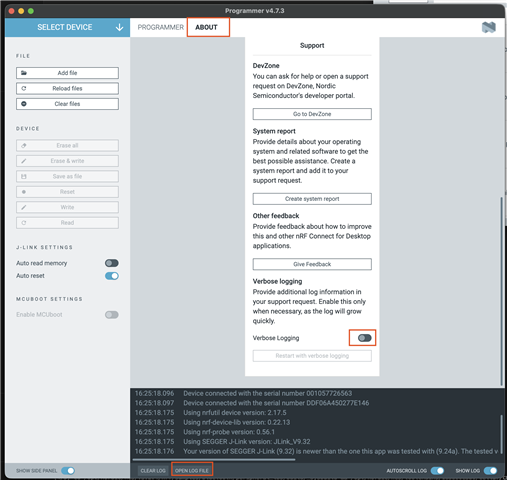
    If it does not work, can you open the full log file and upload it (or copy the content) here? To open the full file, click this button in the bottom of the window:

  • Hi,

    I’ve tried version 4.7.3 of the programmer and installed both Segger Software Pack V9.32 and V9.24a, but neither was recognized.
    So I asked a colleague, and he said the version of the programmer that currently works for him is v4.6.2 paired with the Segger Software Pack v8.18. I updated to the same versions as him, but it still didn’t work.

    I was previously using a very old version of nRFConnect, probably v3.6.x, paired with the Segger Software Pack v6.8.8a. I accidentally clicked the nRFConnect update button, so nRFConnect was updated to v5.2.1, and only then did I realize that the programmer wouldn’t work.

    I also tried completely uninstalling both SEGGER J-Link and nRFConnect, rebooting the system, and reinstalling them, but the programmer still couldn’t detect the J-Link version.

    Below is the log from using the programmer v4.6.2 with Segger v8.18:

    2026-04-09T06:43:35.534Z INFO Initialising the bundled nrfutil device
    2026-04-09T06:43:35.588Z DEBUG Application data folder: D:\Users\erinchen\AppData\Roaming\nrfconnect\pc-nrfconnect-programmer
    2026-04-09T06:43:35.622Z DEBUG App pc-nrfconnect-programmer v4.6.2 (official)
    2026-04-09T06:43:35.622Z DEBUG App path: D:\Users\erinchen\.nrfconnect-apps\node_modules\pc-nrfconnect-programmer
    2026-04-09T06:43:35.622Z DEBUG nRFConnect 5.2.1, required by the app is (>=5.2.0)
    2026-04-09T06:43:35.622Z DEBUG nRFConnect path: D:\Users\erinchen\AppData\Local\Programs\nrfconnect\resources\app.asar
    2026-04-09T06:43:35.622Z DEBUG HomeDir: D:\Users\erinchen
    2026-04-09T06:43:35.622Z DEBUG TmpDir: D:\Users\erinchen\AppData\Local\Temp
    2026-04-09T06:43:36.891Z INFO Using the bundled core version for nrfutil device: 8.0.0
    2026-04-09T06:43:37.133Z INFO Using nrfutil-device version: 2.12.3
    2026-04-09T06:43:37.133Z INFO Using nrf-device-lib version: 0.17.81
    2026-04-09T06:43:37.133Z INFO Using nrf-probe version: 0.40.1
    2026-04-09T06:43:37.133Z INFO Using JLink version: Unknown
    2026-04-09T06:43:37.133Z WARN SEGGER J-Link is not installed. Install at least version 8.18 from www.segger.com/.../jlink
    2026-04-09T06:43:37.210Z INFO Getting serial port options from the persistent store for 000000000000.pc-nrfconnect-programmer
    2026-04-09T06:43:37.215Z INFO Getting serial port options from the persistent store for 001050241194.pc-nrfconnect-programmer
    2026-04-09T06:43:37.220Z INFO Device connected with the serial number 000000000000
    2026-04-09T06:43:37.224Z INFO Device connected with the serial number 001050241194

  • Hi,

    I see. I assume you have verified that J-Link is properly installed and can be used from elsewhere? For instance using J-Link Commander directly?

    Which operating system (including version) are you using? Are there anything else that is worth mentioning about your system that sticks out?

    Also, while I have no specific reason to suspect it being the cause here, I suggest updating nRF Connect for Desktop and the programmer app as well to the latest version in case there are some combinations that are problematic. The latest version of nRf Connect for Desktop is v5.2.1 and the latest version of the Programmer app is v4.7.3.

  • Hi,

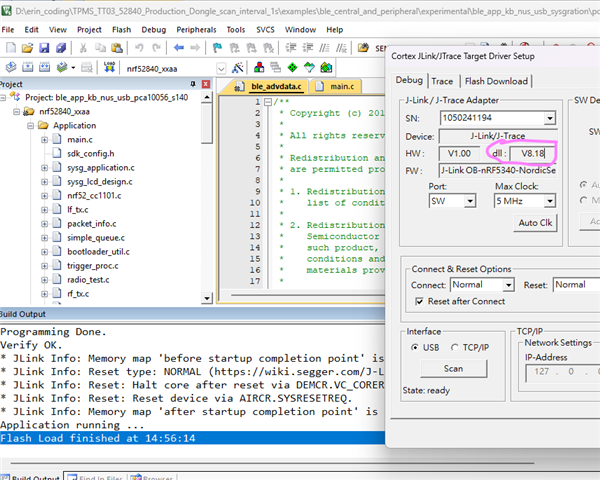
    J-LINK V8.18 can flash the nRF52840 firmware in Keil, but it doesn't work in Programmer.

  • Hi,

    I also tried using Programer v4.7.3 with the recommended Segger Software Pack v9.24a, but it still couldn't read the J-LINK version.

Reply Children
  • Hi,

    I see. nRF Connect for Desktop use nrfutil under the hood, so I wonder if you can run this from the command line and share the output?

    nrfutil device list --log-level trace

    Also, can you check if Computer\HKEY_CURRENT_USER\SOFTWARE\SEGGER\J-Link exists in the Windows registry (using regedit or similar)? This should have been configured by the J-Link installer.

    Edit: Can you also test with verbose logging enabled in the Programmer app and upload the log file here? (Also, if you can do with the latest version again instead of the old that would be good). Enable verbose logging like this:

Related