Hi,
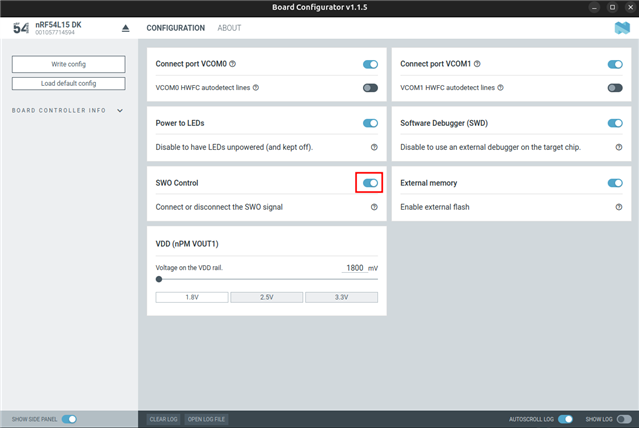
I am trying to configure SWO logging in a sample project based on zephyr/samples/hello_world (source and config at the end).
I run this application on two targets: nRF54L15-DK and nRF52-DK.
On nRF54L15-DK: I cannot see any logs when using SEGGER J-Link SWO Viewer but I can see the logs via cortex-debug extension for vscode.
On nRF52-DK: I can see logs when using SEGGER J-Link SWO Viewer but I cannot see any logs via cortex-debug extension for vscode.
Do you know why it works that way?
Another question is about the SWO frequency. In case of nRF54L15-DK and vscode I need to configure the SWO receiver to half of the frequency configured in the application. In case of nRF52-DK and SEGGER J-Link SWO Viewer I can choose whatever frequency I want.
How to properly set the SWO frequency for nRF54L15?
Application code:
#include <zephyr/kernel.h>
#include <zephyr/sys/printk.h>

int main(void)
{
	while (1) {
		printk("Hello World! %s\n", CONFIG_BOARD_TARGET);
		k_msleep(1000);
	}

	return 0;
}
prj.conf file:
CONFIG_LOG=y
CONFIG_LOG_MODE_MINIMAL=n
CONFIG_LOG_MODE_IMMEDIATE=y
CONFIG_LOG_BACKEND_SWO=y
CONFIG_LOG_BACKEND_SWO_FREQ_HZ=2000000
launch.json file for vscode:
{
    "version": "0.2.0",
    "configurations": [
        {
            "name": "hello nrf54",
            "cwd": "${workspaceFolder}",
            "executable": "${workspaceFolder}/build/merged.hex",
            "symbolFiles": [
                "${workspaceFolder}/build/hello_world/zephyr/zephyr.elf",
            ],
            "request": "launch",
            "type": "cortex-debug",
            "runToEntryPoint": "main",
            "servertype": "jlink",
            "device": "NRF54L15_M33",
            "interface": "swd",
            "showDevDebugOutput": "raw",
            "swoConfig": {
                "enabled": true,
                "source": "probe",
                "swoFrequency": 1000000,
                "cpuFrequency": 128000000,
                "decoders": [
                    {
                        "port": 0,
                        "type": "console",
                        "label": "hello",
                        "encoding":"ascii"
                    }
                ]
            },
            "ipAddress": "192.168.100.20:19020",
        },
        {
            "name": "hello nrf52",
            "cwd": "${workspaceFolder}",
            "executable": "${workspaceFolder}/build/merged.hex",
            "symbolFiles": [
                "${workspaceFolder}/build/hello_world/zephyr/zephyr.elf",
            ],
            "request": "launch",
            "type": "cortex-debug",
            "runToEntryPoint": "main",
            "servertype": "jlink",
            "device": "NRF52832_xxAA",
            "interface": "swd",
            "showDevDebugOutput": "raw",
            "swoConfig": {
                "enabled": true,
                "source": "probe",
                "swoFrequency": 1000000,
                "cpuFrequency": 64000000,
                "decoders": [
                    {
                        "port": 0,
                        "type": "console",
                        "label": "hello",
                        "encoding":"ascii"
                    }
                ]
            },
            "ipAddress": "192.168.100.20:19020",
        },
    ]
}
Cheers,
Damian