

Hi,
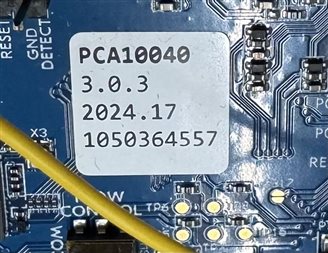
I had some issue with my nRF52 DK PCA10040 v3.0.3, The programmer was totally unreachable also with the simplest terminal command
nrfjprog --recover --coprocessor CP_NETWORK --family NRF53
so I tried to reprogram it trough hidden J13 Tag-Connect TC2050 just under the "PCA10040 v3.0.3" lable.
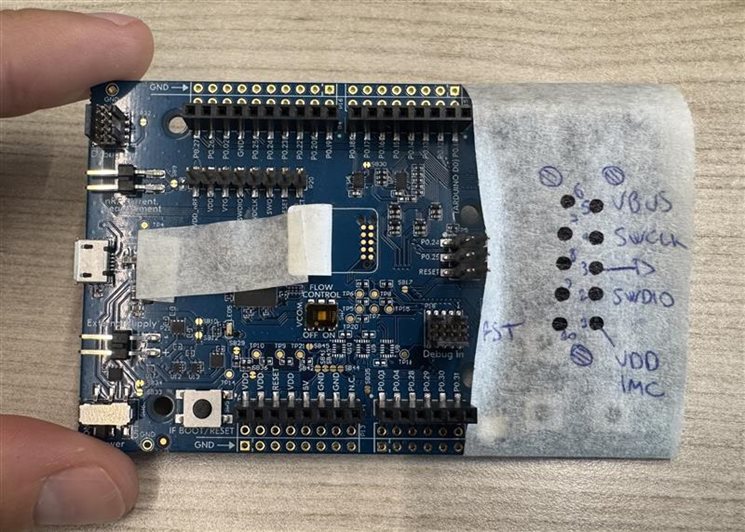
I was able to flash the programmer firmware trough these commands:
C:\Users\[...]> nrfjprog --recover --family NRF53 --snr 506004777
Recovering device. This operation might take 30s.
Erasing user code and UICR flash areas.
Writing image to disable ap protect.
PS C:\Users\[...]> nrfjprog --program "C:\Program Files (x86)\SEGGER\JLink\Firmwares\JLink_OB_nRF5340_NordicSemi.bin" --family NRF53 --snr 506004777 --sectorerase --verify
[ ######               ]   0.000s | Erase file - Check image                                                        [ #####                ]   0.000s | Check image validity - Initialize device info                                   [ ##########           ]   0.000s | Check image validity - Check region 0 settings                                  [ ###############      ]   0.000s | Check image validity - block 1 of 2                                             [ #################### ]   0.025s | Check image validity - Finished                                                 [ #############        ]   0.000s | Erase file - Erasing                                                            [ ##########           ]   0.000s | Erasing non-volatile memory - block 1 of 1                                      [ #################### ]   0.000s | Erasing non-volatile memory - Erase successful                                  [ #################### ]   0.124s | Erase file - Done erasing
[ ######               ]   0.000s | Program file - Checking image                                                   [ #####                ]   0.000s | Check image validity - Initialize device info                                   [ ##########           ]   0.000s | Check image validity - Check region 0 settings                                  [ ###############      ]   0.072s | Check image validity - block 1 of 2                                             [ #################### ]   0.001s | Check image validity - Finished                                                 [ #############        ]   0.000s | Program file - Programming                                                      [ ##########           ]   0.000s | Programming image - block 1 of 1                                                [ #################### ]   0.000s | Programming image - Write successful                                            [ #################### ]   0.019s | Program file - Done programming
[ ######               ]   0.000s | Verify file - Check image                                                       [ #####                ]   0.000s | Check image validity - Initialize device info                                   [ ##########           ]   0.000s | Check image validity - Check region 0 settings                                  [ ###############      ]   0.104s | Check image validity - block 1 of 2                                             [ #################### ]   0.003s | Check image validity - Finished                                                 [ #############        ]   0.000s | Verify file - Verifying                                                         [ ##########           ]   0.000s | Verifying image - block 1 of 1                                                  [ #################### ]   0.000s | Verifying image - Verify successful                                             [ #################### ]   0.006s | Verify file - Done verifying
PS C:\Users\[...]> nrfjprog --reset --family NRF53 --snr 506004777
Applying system reset.
Run.
Firmware and stack pointer seem ok:
J-Link>mem 0x00000000 0x20
00000000 = 00 00 04 20 8D 07 00 00  B5 07 00 00 B7 07 00 00  ... ............
00000010 = B9 07 00 00 BB 07 00 00  BD 07 00 00 BF 07 00 00  ................
J-Link>mem 0x00010000 0x20
00010000 = FF FF FF FF FF FF FF FF  FF FF FF FF FF FF FF FF  ................
00010010 = FF FF FF FF FF FF FF FF  FF FF FF FF FF FF FF FF  ................
J-Link>mem 0x00040000 0x20
00040000 = FF FF FF FF FF FF FF FF  FF FF FF FF FF FF FF FF  ................
00040010 = FF FF FF FF FF FF FF FF  FF FF FF FF FF FF FF FF  ................
Also UICR "0x50FA50FA " seem ok with APPROTECT disabled:
J-Link>mem 0x00FF8000 0x40
00FF8000 = FA 50 FA 50 FF FF FF FF  FF FF FF FF FF FF FF FF  .P.P............
00FF8010 = FF FF FF FF FF FF FF FF  FF FF FF FF FA 50 FA 50  .............P.P
00FF8020 = FF FF FF FF FF FF FF FF  FF FF FF FF FF FF FF FF  ................
00FF8030 = FF FF FF FF FF FF FF FF  FF FF FF FF FF FF FF FF  ................
But the Programmer still continue not to show up.
I double checked that everything worked fine, but at the end this thread came out stating that I need production files
(https://devzone.nordicsemi.com/f/nordic-q-a/105606/how-to-burn-j-linkob-firmware-jlink_ob_nrf5340_nordicsemi-bin-on-top-of-nrf5340 )
How can I move forward?
Thank You

