How to run west commands on a VS Code project?

I have a very complex nRF project inside VS Code using the nRF Connect extension(s). Frequently while trying to troubleshoot things I will run across instructions along the lines of "run 'west build ...'" which seem promising but I cannot figure out how to do this in a manner compatible with VS Code.  I've tried entering them into the Powershell terminal VS Code presents and get errors like


usage: west [-h] [-z ZEPHYR_BASE] [-v] [-q] [-V] <command> ...
west: unknown command "build"; do you need to run this inside a workspace?

How do I safely (so as not to screw up the fragile VS Code project) run raw west commands on an existing project?

Parents
  • Hi,

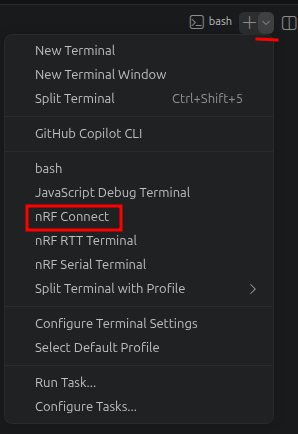
    The environment will be set up correctly and let you build using the command line if you use the nRF Connect terminal in VS Code. In the terminal in VS Code, click on the arrow to get a list of terminals and select nRF Connect.

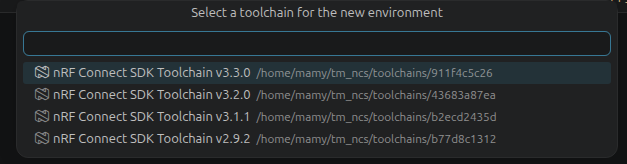
    You should see a pop-up asking you to select a toolchain.

    The nRF Connect terminal should look something like this:

    Best regards,
    Marte

Reply
  • Hi,

    The environment will be set up correctly and let you build using the command line if you use the nRF Connect terminal in VS Code. In the terminal in VS Code, click on the arrow to get a list of terminals and select nRF Connect.

    You should see a pop-up asking you to select a toolchain.

    The nRF Connect terminal should look something like this:

    Best regards,
    Marte

Children
Related