[MCUBOOT + FIRMWARE LOADER/BLE_MCUMGR] Handling of two slot application

Hi,

we are developing on nRF54L15 using NCS v3.2.3, and evaluating a DFU architecture based on:

  • MCUboot
  • firmware_loader
  • main application

using the BLE MCU Manager firmware loader sample as a reference:
github.com/.../ble_mcumgr

Question: application rollback with multiple slots

Our goal is to increase robustness against failed application updates by supporting a rollback mechanism.

Ideally, we would like to have the following layout managed by MCUboot:

  • Slot 0: firmware_loader
  • Slot 1: running application (active image)
  • Slot 2: download slot for a new application image

With this setup, in case the update of the application fails or the new image is not confirmed, MCUboot should be able to roll back to the previous application image.

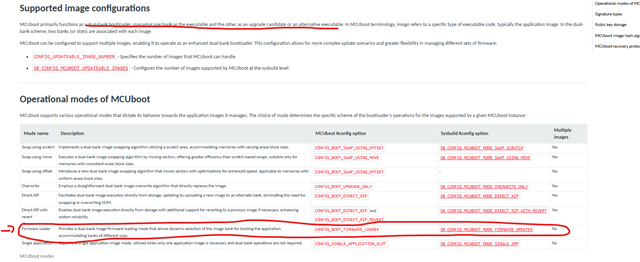
From the MCUboot documentation, it seems that this kind of 3-slot configuration (with rollback for the application) is not currently supported out of the box:
https://docs.nordicsemi.com/bundle/ncs-3.2.3/page/nrf/app_dev/bootloaders_dfu/mcuboot_nsib/bootloader_main_config.html#supported_image_configurations

In particular, MCUboot appears to support:

  • single-image or multi-image configurations
  • but not a setup where the application itself has two slots managed independently of the firmware loader.

Here's my questions:

  • Is it currently possible (or planned) to implement application rollback with MCUboot + firmware_loader on nRF54 devices?
  • If not supported, is the recommended approach to integrate the firmware loader into the application image itself (classic MCUboot primary/secondary slots)?
  • Are there any patterns or reference designs recommended by Nordic to safely achieve application rollback when using firmware_loader?

Thanks!

  • Hi, 

    You can take a look at the NCS v3.3.0 Firmware loader entrance, which uses the boot mode entrance method, in which MCUboot checks the boot mode using the retention subsystem to determine whether to boot the main application or the firmware loader application.

    Regards,
    Amanda H.

    • Which is the difference of your linked sample with the one I provided samples/dfu/single_slot?
    • The sample you suggest still uses mcuboot with two slots: one for main application and the other for firmware loader. I would like to use three slots, the additional slot is used for rollback main application to previous version.
  • longo92 said:
    Which is the difference of your linked sample with the one I provided samples/dfu/single_slot?

    Both samples use MCUboot's firmware loader mode, but they serve different primary purposes.

    The Firmware loader entrance sample demonstrates how to enter the firmware loader application from a running main application. The main application is a minimal Bluetooth LE peripheral that advertises using the MCUmgr service UUID. It demonstrates the boot mode entrance method, where MCUboot checks the boot mode via the retention subsystem to decide whether to boot the main app or the firmware loader app. It also supports the GPIO entrance (hold Button 0 during reset).

    The Single-slot DFU with MCUboot sample demonstrates how to maximize available flash space for the application using the firmware loader mode (single-slot layout). The main application has no firmware update capabilities itself — DFU is entirely handled by the separate firmware loader image. Both MCUboot and the firmware loader are configured for minimal size, leaving more space for the application. It also demonstrates buttonless DFU, where the application can trigger firmware loader entry without holding a button during reset.

    longo92 said:
    I would like to use three slots, the additional slot is used for rollback main application to previous version.

    I think you can use the mcuboot default Swap mode.  The new image is uploaded to the secondary slot, then swapped into the primary slot. The old image is preserved in the secondary slot during the swap, enabling automatic rollback if the new image fails to confirm. See the DevAcademy course MCUboot, and relevant libraries

  • I think you can use the mcuboot default Swap mode.  The new image is uploaded to the secondary slot, then swapped into the primary slot. The old image is preserved in the secondary slot during the swap, enabling automatic rollback if the new image fails to confirm. See the DevAcademy course MCUboot, and relevant libraries

    Unfortunally the swap mechaninsm is mutually exculsive with firmware loader:

    github.com/.../Kconfig

  • longo92 said:
    Unfortunally the swap mechaninsm is mutually exculsive with firmware loader:

    That's true. Since the firmware loader mode is a single-application-slot design focused on maximizing application flash space, it trades away the rollback capability in exchange for that larger application footprint. If rollback/revert is a requirement for your design, you would need to use one of the swap-based MCUboot modes instead.

Related