how to config NCS + VS code + openOCD + cortex-debug ?

As mentioned in subject,I try to study course with CMSIS-DAP,now, chip recove and flash is OK,but blocked at debug step for 2 days now.

Maybe I made some wrong config some where,current error is so obvious: NCS try to flash with nrfutil after "debug" pressed though launch.jos has been binded.

I have looked through whole project space, can't figure it out.

VS code : 1.118.1

nrf Connect: most updated(auto update )

cortex-debug: most updated

openOCD:most updated

debug launch.json(don't care the contents):

{
  "version": "0.2.0",
  "configurations": [
    {
      "cwd": "${workspaceRoot}",
      "executable": "./bin/executable.elf",
      "name": "Debug with OpenOCD",
      "request": "launch",
      "type": "cortex-debug",
      "servertype": "openocd",
      "configFiles": [
        "cmsis-dap.cfg",
        "nrf52.cfg"
      ],
      "searchDir": [],
      "runToEntryPoint": "main",
      "showDevDebugOutput": "none"
    },

    {
      "name": "nRF52 cortex-debug",
      "type": "cortex-debug",
      "request": "launch",
      "servertype": "openocd",
      //"debugServer": 4711,
      "openOCDPreConfigLaunchCommands": [
        "-c", "gdb port 4444",
        "-c", "tcl port 4445",
        "-c", "telnet port 4446"
      ],
      "cwd":"${workspaceFolder}", 
      "configFiles": [
        "cmsis-dap.cfg",
        "nrf52.cfg"
      ],
      "device": "nRF52810",
      "svdFile": "nrf52810.svd",
      "executable": "build/merged.hex",
      "preLaunchCommands": [
        "monitor program ${executable}",  // 烧录ELF文件
        "monitor verify",                 // 验证烧录内容
        "monitor reset"                   // 复位芯片
      ],
      "armToolchainPath": "d:/ncs/arm-gnu-toolchain-15/bin",
      "gdbPath": "d:/ncs/arm-gnu-toolchain-15/bin/arm-none-eabi-gdb",
      "gdbTarget": "localhost:4444",
      "showDevDebugOutput": "both"
    }
  ]
}

NCS created binds:

{
/*
    "cortex-debug.liveWatchRefreshRate": 300,
    "cortex-debug.armToolchainPath": "D:/ncs/arm-gnu-toolchain-15/bin",
    "cortex-debug.gdbPath": "D:/ncs/arm-gnu-toolchain-15/bin",
    "cortex-debug.openocdPath": "D:/ncs/openocd/bin",
*/
    "nrf-connect.flashOnDebug": false,

    "nrf-connect.taskBindings": {   
        "flash": [
            {
                "taskName": "flash merged firmware",
                "buildConfigs": [
                    "${workspaceFolder}\\build"
                ]
            }
        ]
    },
    "nrf-connect.debugging.bindings": {
        "${workspaceFolder}/build": "Debug with OpenOCD"
    }
}

After pressed the "debug"(insert does not work,so, plain text):

* Executing task: nRF Connect: Flash: l1_e2/build/l1_e2

Flashing l1_e2 to B001A000000
west flash -d d:\ncs\myfw\ncsfund\l1_e2\build --domain l1_e2 --no-reset --dev-id B001A000000

-- west flash: rebuilding
[0/5] Performing build step for 'l1_e2'
ninja: no work to do.
[2/5] No install step for 'l1_e2'
[3/5] Completed 'l1_e2'
[4/5] C:\WINDOWS\system32\cmd.exe /C "cd /D D:\ncs\myfw\ncsfund\l1_e2\build\_sysbuild && D:\ncs\toolchains\936afb6332\opt\bin\cmake.exe -E true"
-- west flash: using runner nrfutil
-- runners.nrfutil: Flashing file: D:\ncs\myfw\ncsfund\l1_e2\build\merged.hex
Error: No devices with requested serial number(s) or trait(s) found
FATAL ERROR: command exited with status 1: nrfutil --json device x-execute-batch --batch-path 'D:\ncs\myfw\ncsfund\l1_e2\build\l1_e2\zephyr\generated_nrfutil_batch.json' --serial-number B001A000000

* The terminal process terminated with exit code: 1.
* Terminal will be reused by tasks, press any key to close it.
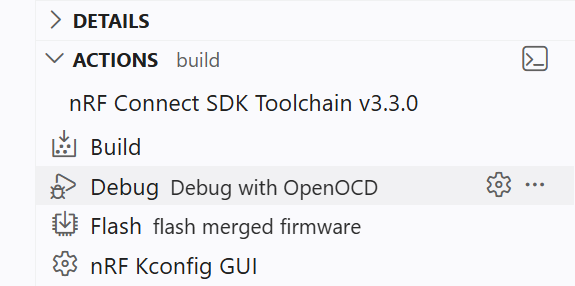
the launch name has been displayed beside the "debug", the launch.json will displayed if you press the gear button。

It worked once before: the script runs if debug button pressed, though did not success,but now it completely ignore the launch.json.

The base target: debug with CMSIS-DAP .

It will be very helpful to provide guides on configuration.

Thank you.

Parents
  • As reference for beginner,this is what I have done:

    1)install arm-gnu-toolchain : get arm-none-eabi-gdb.exe;

    2)install vs code;

    3)install nrf connect extensions in VS code;

    4)install cortex-debug extension in VS code;

    4.5)install openOCD;(update)

      Add path to PATH(windows) or set in scripts.

    5)burn chip with task:

    create task:

    {
        // See https://go.microsoft.com/fwlink/?LinkId=733558
        // for the documentation about the tasks.json format
        "version": "2.0.0",
        "tasks": [
         {
    		"label": "recover nrf52 chips",
    		"group": "none",
    		"type": "shell",
            "command": "openocd",
            "args": [
                "-s", "d:/ncs/openocd/openocd/scripts/",
                "-f", "interface/cmsis-dap.cfg",    // 适配器驱动配置
                "-c", "transport select swd",       // 传输协议选择
                "-f", "target/nordic/nrf52.cfg",    // 目标芯片配置
                "-c", "init",
                "-c", "nrf52_recover" ,
                "-c", "reset",
                "-c", "exit 0"
            ]
        },
        {
    		"label": "flash merged firmware",
    		"group": "none",
    		"type": "shell",
            "command": "openocd",
            "args": [
                "-s", "d:/ncs/openocd/openocd/scripts/",
                "-f", "interface/cmsis-dap.cfg",    // 适配器驱动配置
                "-c", "transport select swd",       // 传输协议选择
                "-f", "target/nordic/nrf52.cfg",    // 目标芯片配置
                "-c", "program build/merged.hex preverify verify reset exit 0"
            ]
        }
    ]
    }

    bind Actions->flash with this task. 

    you can recover the chip with first task.

    6)create debug launch.json:

    {
    	"version": "0.2.0",
    	"configurations": [
    		{
    			"cwd": "${workspaceRoot}",
    			"executable": "./build/blinky/zephyr/zephyr.elf",
    			"name": "Debug with OpenOCD",
    			"request": "launch",
    			"type": "cortex-debug",
    			"servertype": "openocd",
    			"configFiles": ["./dapNrf52.cfg"],
    			"searchDir": ["d:/ncs/openocd/openocd/scripts/"],
    
    			"serverArgs": [
    				"-s",				"d:/ncs/openocd/openocd/scripts/",
    				//"-f","interface/cmsis-dap.cfg",
    				//"-c",				"set TRANSPORT swd",
    				//"-f","target/nordic/nrf52.cfg",
    				//"-c", "gdb port 3333",
    				"-c","telnet port 4444",
    				"-c","tcl port 6666",
    				"-c",				"adapter speed 4000",
    				"-c","init"
    				
    			],
    
    			"gdbPath": "D:\\ncs\\arm-gnu-toolchain-15\\bin\\arm-none-eabi-gdb",
    			//"gdbTarget": "localhost:3333",
    
    			"runToEntryPoint": "main",
    			"showDevDebugOutput": "both"
    		}
    	]
    }

    You can change your port number if it will not trigger "50000" error.

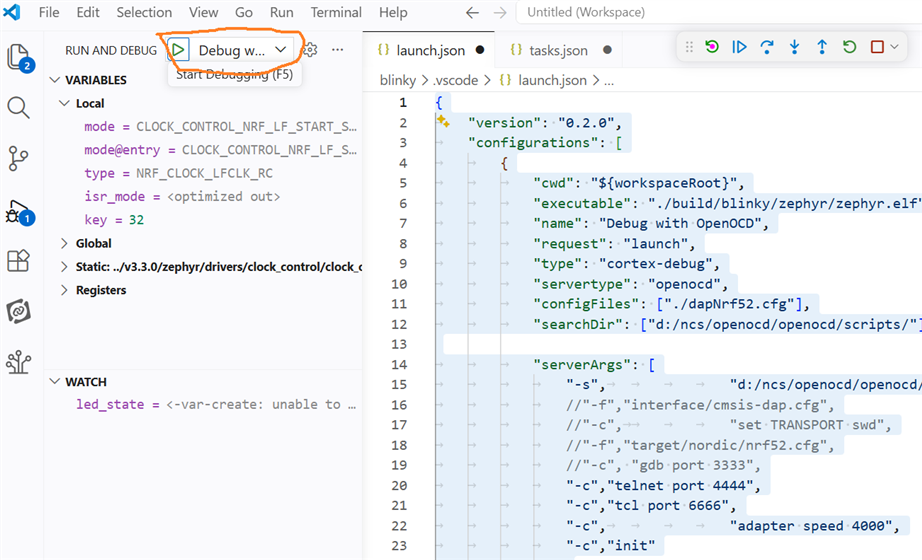
    7)bind Actions->debug to launch(Debug with OpenOCD,in this example);

    8)clik Actions->debug;

    The nrf connect extention will shift to debug GUI, and it maybe still try to use nrf tool and trigger error,

    Just ignore them,In debug GUI:

    You should select the right option in the drop down menu and then click the arrow button.

    Now you can see the log in debug console and TERMINAL(right bottom of the GUI,default).

    If anyone know how to deal with "5000" error, post here pls.

    Thanks.

Reply
  • As reference for beginner,this is what I have done:

    1)install arm-gnu-toolchain : get arm-none-eabi-gdb.exe;

    2)install vs code;

    3)install nrf connect extensions in VS code;

    4)install cortex-debug extension in VS code;

    4.5)install openOCD;(update)

      Add path to PATH(windows) or set in scripts.

    5)burn chip with task:

    create task:

    {
        // See https://go.microsoft.com/fwlink/?LinkId=733558
        // for the documentation about the tasks.json format
        "version": "2.0.0",
        "tasks": [
         {
    		"label": "recover nrf52 chips",
    		"group": "none",
    		"type": "shell",
            "command": "openocd",
            "args": [
                "-s", "d:/ncs/openocd/openocd/scripts/",
                "-f", "interface/cmsis-dap.cfg",    // 适配器驱动配置
                "-c", "transport select swd",       // 传输协议选择
                "-f", "target/nordic/nrf52.cfg",    // 目标芯片配置
                "-c", "init",
                "-c", "nrf52_recover" ,
                "-c", "reset",
                "-c", "exit 0"
            ]
        },
        {
    		"label": "flash merged firmware",
    		"group": "none",
    		"type": "shell",
            "command": "openocd",
            "args": [
                "-s", "d:/ncs/openocd/openocd/scripts/",
                "-f", "interface/cmsis-dap.cfg",    // 适配器驱动配置
                "-c", "transport select swd",       // 传输协议选择
                "-f", "target/nordic/nrf52.cfg",    // 目标芯片配置
                "-c", "program build/merged.hex preverify verify reset exit 0"
            ]
        }
    ]
    }

    bind Actions->flash with this task. 

    you can recover the chip with first task.

    6)create debug launch.json:

    {
    	"version": "0.2.0",
    	"configurations": [
    		{
    			"cwd": "${workspaceRoot}",
    			"executable": "./build/blinky/zephyr/zephyr.elf",
    			"name": "Debug with OpenOCD",
    			"request": "launch",
    			"type": "cortex-debug",
    			"servertype": "openocd",
    			"configFiles": ["./dapNrf52.cfg"],
    			"searchDir": ["d:/ncs/openocd/openocd/scripts/"],
    
    			"serverArgs": [
    				"-s",				"d:/ncs/openocd/openocd/scripts/",
    				//"-f","interface/cmsis-dap.cfg",
    				//"-c",				"set TRANSPORT swd",
    				//"-f","target/nordic/nrf52.cfg",
    				//"-c", "gdb port 3333",
    				"-c","telnet port 4444",
    				"-c","tcl port 6666",
    				"-c",				"adapter speed 4000",
    				"-c","init"
    				
    			],
    
    			"gdbPath": "D:\\ncs\\arm-gnu-toolchain-15\\bin\\arm-none-eabi-gdb",
    			//"gdbTarget": "localhost:3333",
    
    			"runToEntryPoint": "main",
    			"showDevDebugOutput": "both"
    		}
    	]
    }

    You can change your port number if it will not trigger "50000" error.

    7)bind Actions->debug to launch(Debug with OpenOCD,in this example);

    8)clik Actions->debug;

    The nrf connect extention will shift to debug GUI, and it maybe still try to use nrf tool and trigger error,

    Just ignore them,In debug GUI:

    You should select the right option in the drop down menu and then click the arrow button.

    Now you can see the log in debug console and TERMINAL(right bottom of the GUI,default).

    If anyone know how to deal with "5000" error, post here pls.

    Thanks.

Children
No Data
Related