Programming BLE sniffer on NRF52840 dongle

I was able to install the BLE sniffer software from nrfutil.  For the NRF52840 dongle, it has a zip file, not a .hex file.

the nRF Connect Desktop Program tool recognizes the zip file, but it won't let me program the dongle with it.

How do you program the BLE sniffer code into the NRF52840 dongle?

Parents
  • Hi,

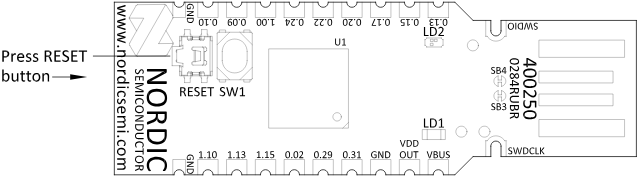
    You must put the dongle in bootloader mode first. To do so, press the RESET button and wait for the LED LD2 to pulse red.

    Best regards,
    Marte

  • I have tried that and see the LED pulse RED, but the Erase and Write functions remain greyed out, so it is not possible to program the .zip file.  I am able to program a Hex file on the Dongle (nrf802154_sniffer_nrf52840dongle.hex), but the nRF programmer (v4.7.4) doesn't like the zip file (sniffer_nrf52840dongle_nrf52840_4.1.1.zip).

  • Hi,

    You are correct. With the zip file, you must use nRF Util, like this:

    nrfutil device program --serial-number <serial-number> --firmware sniffer_nrf52840dongle_nrf52840_4.1.1.zip

    Make sure to replace <serial-number> with the dongle's serial number.

    Best regards,
    Marte

  • Thank you that worked after a couple more gotchas.

    First, I needed "nrfutil install device" to install the device feature otherwise I got the error:
    Error: nrfutil command `device` not found. See `nrfutil list` for full list of installed commands, `nrfutil search` for installable commands, and `nrfutil install` for installation of new commands.

    Second, the dongle has 2 serial numbers apparently, I'll call bootloader serial number and app serial number.  I first attempted to use the serial number that showed up in nRF Connect Desktop Programmer when I plugged the device in. That's the app s/n that doesn't work. I got error:
    Error: No devices with requested serial number(s) or trait(s) found

    After pressing the reset button, and viewing again in nRF Connect Desktop Programmer it shows the DFU bootloader s/n.  That's the one to use.

Reply
  • Thank you that worked after a couple more gotchas.

    First, I needed "nrfutil install device" to install the device feature otherwise I got the error:
    Error: nrfutil command `device` not found. See `nrfutil list` for full list of installed commands, `nrfutil search` for installable commands, and `nrfutil install` for installation of new commands.

    Second, the dongle has 2 serial numbers apparently, I'll call bootloader serial number and app serial number.  I first attempted to use the serial number that showed up in nRF Connect Desktop Programmer when I plugged the device in. That's the app s/n that doesn't work. I got error:
    Error: No devices with requested serial number(s) or trait(s) found

    After pressing the reset button, and viewing again in nRF Connect Desktop Programmer it shows the DFU bootloader s/n.  That's the one to use.

Children
No Data
Related