Can't flash PCA10040

Hi, 

I can't flash my PCA10040 dev board.

I get this when I connect with J-Link Commander:

Connecting to target via SWD
InitTarget() start
CTRL-AP indicates that the device is secured.
For debugger connection the device needs to be unsecured.
Note: Unsecuring will trigger a mass erase of the internal flash.

Executing default behavior previously saved in the registry.
Device will be unsecured now.
InitTarget() end - Took 4.11s
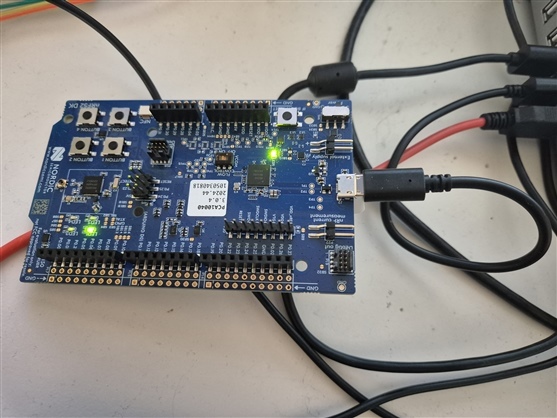
Connect failed. Resetting via Reset pin and trying again.
InitTarget() start
CTRL-AP indicates that the device is secured.
For debugger connection the device needs to be unsecured.
Note: Unsecuring will trigger a mass erase of the internal flash.

Executing default behavior previously saved in the registry.
Device will be unsecured now.
InitTarget() end - Took 4.11s

When I run nrfjprog --recover I get this:

C:\Program Files\Nordic Semiconductor\nrf-command-line-tools\bin>nrfjprog --recover
[error] [SeggerBackend] - JLinkARM.dll reported error -256 at line 736.
[error] [SeggerBackend] - JLinkARM.dll reported error -256 at line 629.
[error] [SeggerBackend] - JLinkARM.dll reported error -256 at line 3139.
[error] [SeggerBackend] - JLinkARM.dll reported error -256 at line 911.
[error] [SeggerBackend] - JLinkARM.dll reported error -256 at line 3139.
[error] [SeggerBackend] - JLinkARM.dll reported error -256 at line 3139.
[error] [SeggerBackend] - JLinkARM.dll reported error -256 at line 3139.
[error] [SeggerBackend] - JLinkARM.dll reported error -256 at line 3087.
[error] [SeggerBackend] - JLinkARM.dll reported error -256 at line 3112.
[error] [SeggerBackend] - JLinkARM.dll reported error -256 at line 3349.
[error] [SeggerBackend] - JLinkARM.dll reported error -256 at line 3160.
[error] [SeggerBackend] - JLinkARM.dll reported error -256 at line 3176.
Recovering device. This operation might take 30s.
[error] [ Worker] - Encountered error while performing post-recover cleanup. -90: Access protection is enabled, can't read device version.
[error] [ Client] - Encountered error -21: Command recover executed for 30310 milliseconds with result -21
ERROR: Recover failed. Please make sure that the correct device family is given
ERROR: and try again.
NOTE: For additional output, try running again with logging enabled (--log).
NOTE: Any generated log error messages will be displayed.

C:\Program Files\Nordic Semiconductor\nrf-command-line-tools\bin>

What might the issue be? Seems like it is locked somehow.

Parents Reply
  • Hi, 
    I tried but got this:

    C:\Program Files\Nordic Semiconductor\nrf-command-line-tools\bin>nrfutil device recover
    X Failed to recover 1050340818, Device error: Access port is still protected after Erase and Reset Error: One or more recover tasks failed:
    * 1050340818: Device error: Access port is still protected after Erase and Reset (Generic)


    C:\Program Files\Nordic Semiconductor\nrf-command-line-tools\bin>

Children
  • Could you execute "nrfutil upgrade" and then try again?

  • Herer is the output, I also executed "nrfutil self-upgrade":

    C:\Program Files\Nordic Semiconductor\nrf-command-line-tools\bin>nrfutil upgrade
    Downloading nrfutil-ble-sniffer-x86_64-pc-windows-msvc-0.19.0
    Verifying nrfutil-ble-sniffer-x86_64-pc-windows-msvc-0.19.0
    Updating nrfutil-ble-sniffer to 0.19.0
    nrfutil-completion is already the newest version (1.5.0)
    Downloading nrfutil-device-x86_64-pc-windows-msvc-2.18.2
    Verifying nrfutil-device-x86_64-pc-windows-msvc-2.18.2
    Updating nrfutil-device to 2.18.2
    [00:00:05] ###### 100% [Upgrade packages] Upgrade packages
    A new version of nrfutil is available. Please run: nrfutil self-upgrade

    C:\Program Files\Nordic Semiconductor\nrf-command-line-tools\bin>nrfutil device recover
    x Failed to recover 1050340818, Device error: Access port is still protected after Erase and Reset Error: One or more recover tasks failed:
    * 1050340818: Device error: Access port is still protected after Erase and Reset (Generic)


    C:\Program Files\Nordic Semiconductor\nrf-command-line-tools\bin>nrfutil self-upgrade
    Uninstalled nrfutil
    [00:00:03] ###### 100% [Install packages] Install packages
    C:\Program Files\Nordic Semiconductor\nrf-command-line-tools\bin>nrfutil device recover
    x Failed to recover 1050340818, Device error: Access port is still protected after Erase and Reset Error: One or more recover tasks failed:
    * 1050340818: Device error: Access port is still protected after Erase and Reset (Generic)


    C:\Program Files\Nordic Semiconductor\nrf-command-line-tools\bin>nrfutil device recover
    x Failed to recover 1050340818, Device error: Access port is still protected after Erase and Reset Error: One or more recover tasks failed:
    * 1050340818: Device error: Access port is still protected after Erase and Reset (Generic)


    C:\Program Files\Nordic Semiconductor\nrf-command-line-tools\bin>

Related