Can't flash PCA10040

Hi, 

I can't flash my PCA10040 dev board.

I get this when I connect with J-Link Commander:

Connecting to target via SWD
InitTarget() start
CTRL-AP indicates that the device is secured.
For debugger connection the device needs to be unsecured.
Note: Unsecuring will trigger a mass erase of the internal flash.

Executing default behavior previously saved in the registry.
Device will be unsecured now.
InitTarget() end - Took 4.11s
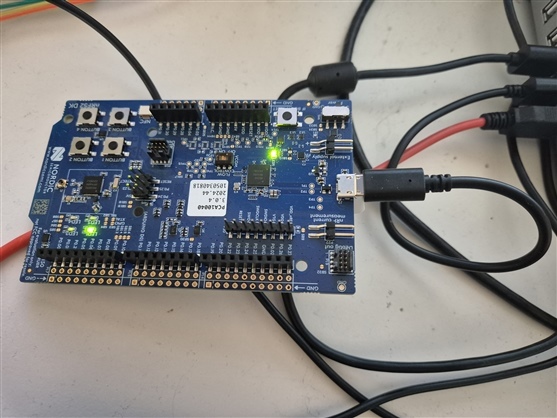
Connect failed. Resetting via Reset pin and trying again.
InitTarget() start
CTRL-AP indicates that the device is secured.
For debugger connection the device needs to be unsecured.
Note: Unsecuring will trigger a mass erase of the internal flash.

Executing default behavior previously saved in the registry.
Device will be unsecured now.
InitTarget() end - Took 4.11s

When I run nrfjprog --recover I get this:

C:\Program Files\Nordic Semiconductor\nrf-command-line-tools\bin>nrfjprog --recover
[error] [SeggerBackend] - JLinkARM.dll reported error -256 at line 736.
[error] [SeggerBackend] - JLinkARM.dll reported error -256 at line 629.
[error] [SeggerBackend] - JLinkARM.dll reported error -256 at line 3139.
[error] [SeggerBackend] - JLinkARM.dll reported error -256 at line 911.
[error] [SeggerBackend] - JLinkARM.dll reported error -256 at line 3139.
[error] [SeggerBackend] - JLinkARM.dll reported error -256 at line 3139.
[error] [SeggerBackend] - JLinkARM.dll reported error -256 at line 3139.
[error] [SeggerBackend] - JLinkARM.dll reported error -256 at line 3087.
[error] [SeggerBackend] - JLinkARM.dll reported error -256 at line 3112.
[error] [SeggerBackend] - JLinkARM.dll reported error -256 at line 3349.
[error] [SeggerBackend] - JLinkARM.dll reported error -256 at line 3160.
[error] [SeggerBackend] - JLinkARM.dll reported error -256 at line 3176.
Recovering device. This operation might take 30s.
[error] [ Worker] - Encountered error while performing post-recover cleanup. -90: Access protection is enabled, can't read device version.
[error] [ Client] - Encountered error -21: Command recover executed for 30310 milliseconds with result -21
ERROR: Recover failed. Please make sure that the correct device family is given
ERROR: and try again.
NOTE: For additional output, try running again with logging enabled (--log).
NOTE: Any generated log error messages will be displayed.

C:\Program Files\Nordic Semiconductor\nrf-command-line-tools\bin>

What might the issue be? Seems like it is locked somehow.

Parents
  • Hi, 

    nRF Command Line Tools (nrfjprog) is deprecated and replaced by nRF Util. Please install nRF Util and run "nrfutil install device" to install the device command. Then, you can execute "nrfutil device recover" to recover (unlock) the device. 

    Regards,
    Amanda H.

  • Hi, 
    I tried but got this:

    C:\Program Files\Nordic Semiconductor\nrf-command-line-tools\bin>nrfutil device recover
    X Failed to recover 1050340818, Device error: Access port is still protected after Erase and Reset Error: One or more recover tasks failed:
    * 1050340818: Device error: Access port is still protected after Erase and Reset (Generic)


    C:\Program Files\Nordic Semiconductor\nrf-command-line-tools\bin>

  • Could you execute "nrfutil upgrade" and then try again?

  • Herer is the output, I also executed "nrfutil self-upgrade":

    C:\Program Files\Nordic Semiconductor\nrf-command-line-tools\bin>nrfutil upgrade
    Downloading nrfutil-ble-sniffer-x86_64-pc-windows-msvc-0.19.0
    Verifying nrfutil-ble-sniffer-x86_64-pc-windows-msvc-0.19.0
    Updating nrfutil-ble-sniffer to 0.19.0
    nrfutil-completion is already the newest version (1.5.0)
    Downloading nrfutil-device-x86_64-pc-windows-msvc-2.18.2
    Verifying nrfutil-device-x86_64-pc-windows-msvc-2.18.2
    Updating nrfutil-device to 2.18.2
    [00:00:05] ###### 100% [Upgrade packages] Upgrade packages
    A new version of nrfutil is available. Please run: nrfutil self-upgrade

    C:\Program Files\Nordic Semiconductor\nrf-command-line-tools\bin>nrfutil device recover
    x Failed to recover 1050340818, Device error: Access port is still protected after Erase and Reset Error: One or more recover tasks failed:
    * 1050340818: Device error: Access port is still protected after Erase and Reset (Generic)


    C:\Program Files\Nordic Semiconductor\nrf-command-line-tools\bin>nrfutil self-upgrade
    Uninstalled nrfutil
    [00:00:03] ###### 100% [Install packages] Install packages
    C:\Program Files\Nordic Semiconductor\nrf-command-line-tools\bin>nrfutil device recover
    x Failed to recover 1050340818, Device error: Access port is still protected after Erase and Reset Error: One or more recover tasks failed:
    * 1050340818: Device error: Access port is still protected after Erase and Reset (Generic)


    C:\Program Files\Nordic Semiconductor\nrf-command-line-tools\bin>nrfutil device recover
    x Failed to recover 1050340818, Device error: Access port is still protected after Erase and Reset Error: One or more recover tasks failed:
    * 1050340818: Device error: Access port is still protected after Erase and Reset (Generic)


    C:\Program Files\Nordic Semiconductor\nrf-command-line-tools\bin>

Reply
  • Herer is the output, I also executed "nrfutil self-upgrade":

    C:\Program Files\Nordic Semiconductor\nrf-command-line-tools\bin>nrfutil upgrade
    Downloading nrfutil-ble-sniffer-x86_64-pc-windows-msvc-0.19.0
    Verifying nrfutil-ble-sniffer-x86_64-pc-windows-msvc-0.19.0
    Updating nrfutil-ble-sniffer to 0.19.0
    nrfutil-completion is already the newest version (1.5.0)
    Downloading nrfutil-device-x86_64-pc-windows-msvc-2.18.2
    Verifying nrfutil-device-x86_64-pc-windows-msvc-2.18.2
    Updating nrfutil-device to 2.18.2
    [00:00:05] ###### 100% [Upgrade packages] Upgrade packages
    A new version of nrfutil is available. Please run: nrfutil self-upgrade

    C:\Program Files\Nordic Semiconductor\nrf-command-line-tools\bin>nrfutil device recover
    x Failed to recover 1050340818, Device error: Access port is still protected after Erase and Reset Error: One or more recover tasks failed:
    * 1050340818: Device error: Access port is still protected after Erase and Reset (Generic)


    C:\Program Files\Nordic Semiconductor\nrf-command-line-tools\bin>nrfutil self-upgrade
    Uninstalled nrfutil
    [00:00:03] ###### 100% [Install packages] Install packages
    C:\Program Files\Nordic Semiconductor\nrf-command-line-tools\bin>nrfutil device recover
    x Failed to recover 1050340818, Device error: Access port is still protected after Erase and Reset Error: One or more recover tasks failed:
    * 1050340818: Device error: Access port is still protected after Erase and Reset (Generic)


    C:\Program Files\Nordic Semiconductor\nrf-command-line-tools\bin>nrfutil device recover
    x Failed to recover 1050340818, Device error: Access port is still protected after Erase and Reset Error: One or more recover tasks failed:
    * 1050340818: Device error: Access port is still protected after Erase and Reset (Generic)


    C:\Program Files\Nordic Semiconductor\nrf-command-line-tools\bin>

Children
No Data
Related