Using a Power Profiler Kit II with nrf Connect for Desktop v5.3.1 and there in App Power Profiler v4.3.1, OS: Ubuntu Linux

We obtained a Power Profiler Kit II.

I updated  nrf Connect to latest version, then installed App power profiler.

The following state is reached:

When i launch the App Programmer v4.7.4, I see the Power Profiler Kit II as selectable device.

When I launch App Power Profiler v4.3.1, there is no listed device in menu "Select device" which is analogue to programmer's menu, where it is listed.

So basically the device is "fully there" in the system, but App Power Profiler v4.3.1 does not list it.

Asking AI, the following suggestion was made: Search the  App Power Profiler v4.3.1's install path for a firmware with name like pca63100_ppk2*.hex

I found pca63100_ppk2_1.2.4_db16a94.hex. Telling the AI, the AI suggested: use programmer to flash that firmware to listed PPK2.

As I cannot backup the PPK2's firmware (read-protection), i was VERY reluctant to do so, because applying the wrong firmware surely will brick the device.

So, I want to inquire here, at nordic forum, whether AI's suggestion is a good tip or a bad AI recommendation.

Also, I'd like to know in the latter case, what I need to do to get PPK2 listed in App Power Profiler v4.3.1 and any refined instructions/test steps are also welcome.

Be aware, that I also started nrfConnect (with no observable device-detection-change in any way) as:

~/Downloads/nrfconnect361x8664.AppImage --no-sandbox

Thank you and best regards,

Richard H.

Parents
  • I flashed the device, it is still visible from programmer and still missing in App Power Profiler v4.3.1. Also unplugged the PPK2, replugged, started App Power Profiler v4.3.1 before plugging and after plugging PPK2. No success.

  • Hi,

    It is safe to program the device with the hex file you used.

    I am unable to reproduce the issue on my end. If I open the PPK2 in Programmer first, it goes into bootloader mode and shows as "Open DFU Bootloader" instead of PPK2, but power cycling the device returns it to PPK2.
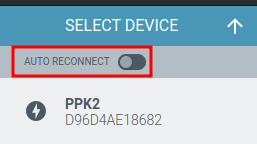
    Do you have the PPK open in the Programmer app or another app? Make sure "auto reconnect" is not enabled.

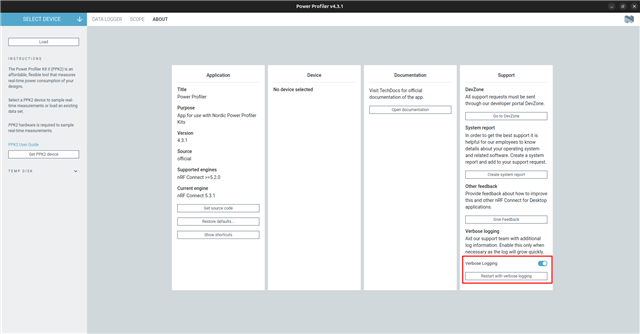
    Can you collect verbose logs? Make sure the PPK2 is connected to the computer and turnet on, then go to the "about" tab in the Power Profiler and enable verbose logging. After enabling it, select "restart with verbose logging".

    Once it has restarted, click on "open log file" at the bottom, or find the log in ~/.config/nrfconnect/pc-nrfconnect-ppk/logs. Please upload the log using Insert > Image/video/file, or copy the contents into Insert > Code.

    Best regards,
    Marte

Reply
  • Hi,

    It is safe to program the device with the hex file you used.

    I am unable to reproduce the issue on my end. If I open the PPK2 in Programmer first, it goes into bootloader mode and shows as "Open DFU Bootloader" instead of PPK2, but power cycling the device returns it to PPK2.
    Do you have the PPK open in the Programmer app or another app? Make sure "auto reconnect" is not enabled.

    Can you collect verbose logs? Make sure the PPK2 is connected to the computer and turnet on, then go to the "about" tab in the Power Profiler and enable verbose logging. After enabling it, select "restart with verbose logging".

    Once it has restarted, click on "open log file" at the bottom, or find the log in ~/.config/nrfconnect/pc-nrfconnect-ppk/logs. Please upload the log using Insert > Image/video/file, or copy the contents into Insert > Code.

    Best regards,
    Marte

Children
No Data
Related