Using a Power Profiler Kit II with nrf Connect for Desktop v5.3.1 and there in App Power Profiler v4.3.1, OS: Ubuntu Linux

We obtained a Power Profiler Kit II.

I updated  nrf Connect to latest version, then installed App power profiler.

The following state is reached:

When i launch the App Programmer v4.7.4, I see the Power Profiler Kit II as selectable device.

When I launch App Power Profiler v4.3.1, there is no listed device in menu "Select device" which is analogue to programmer's menu, where it is listed.

So basically the device is "fully there" in the system, but App Power Profiler v4.3.1 does not list it.

Asking AI, the following suggestion was made: Search the  App Power Profiler v4.3.1's install path for a firmware with name like pca63100_ppk2*.hex

I found pca63100_ppk2_1.2.4_db16a94.hex. Telling the AI, the AI suggested: use programmer to flash that firmware to listed PPK2.

As I cannot backup the PPK2's firmware (read-protection), i was VERY reluctant to do so, because applying the wrong firmware surely will brick the device.

So, I want to inquire here, at nordic forum, whether AI's suggestion is a good tip or a bad AI recommendation.

Also, I'd like to know in the latter case, what I need to do to get PPK2 listed in App Power Profiler v4.3.1 and any refined instructions/test steps are also welcome.

Be aware, that I also started nrfConnect (with no observable device-detection-change in any way) as:

~/Downloads/nrfconnect361x8664.AppImage --no-sandbox

Thank you and best regards,

Richard H.

Parents
  • I flashed the device, it is still visible from programmer and still missing in App Power Profiler v4.3.1. Also unplugged the PPK2, replugged, started App Power Profiler v4.3.1 before plugging and after plugging PPK2. No success.

  • Hi,

    It is safe to program the device with the hex file you used.

    I am unable to reproduce the issue on my end. If I open the PPK2 in Programmer first, it goes into bootloader mode and shows as "Open DFU Bootloader" instead of PPK2, but power cycling the device returns it to PPK2.
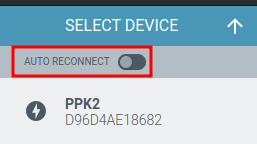
    Do you have the PPK open in the Programmer app or another app? Make sure "auto reconnect" is not enabled.

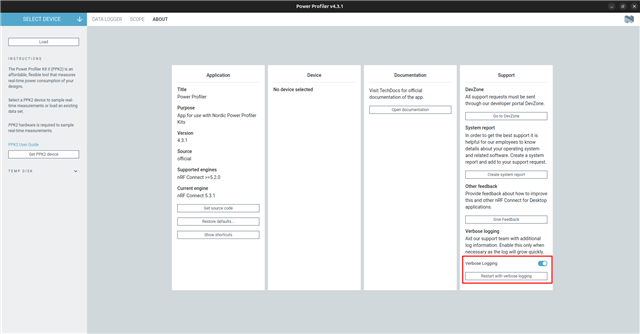
    Can you collect verbose logs? Make sure the PPK2 is connected to the computer and turnet on, then go to the "about" tab in the Power Profiler and enable verbose logging. After enabling it, select "restart with verbose logging".

    Once it has restarted, click on "open log file" at the bottom, or find the log in ~/.config/nrfconnect/pc-nrfconnect-ppk/logs. Please upload the log using Insert > Image/video/file, or copy the contents into Insert > Code.

    Best regards,
    Marte

  • Hi Marte,

    Thank you for taking care. Did as suggested:

    2026-05-21T07:58:14.092Z INFO Initialising the bundled nrfutil device
    2026-05-21T07:58:14.106Z DEBUG Application data folder: /home/richard/.config/nrfconnect/pc-nrfconnect-ppk
    2026-05-21T07:58:14.182Z DEBUG App pc-nrfconnect-ppk v4.3.1 (official)
    2026-05-21T07:58:14.182Z DEBUG App path: /home/richard/.nrfconnect-apps/node_modules/pc-nrfconnect-ppk
    2026-05-21T07:58:14.182Z DEBUG nRFConnect 5.3.1, required by the app is (>=5.2.0)
    2026-05-21T07:58:14.183Z DEBUG nRFConnect path: /tmp/.mount_nrfconhd8xnB/resources/app.asar
    2026-05-21T07:58:14.183Z DEBUG HomeDir: /home/richard
    2026-05-21T07:58:14.183Z DEBUG TmpDir: /tmp

  • Hi,

    Is this the log with verbose logging enabled? You should see some logs of it looking for devices, like this:

    2026-05-21T21:04:45.878Z INFO Initialising the bundled nrfutil device
    2026-05-21T21:04:45.895Z DEBUG Application data folder: /home/mamy/.config/nrfconnect/pc-nrfconnect-ppk
    2026-05-21T21:04:45.939Z DEBUG App pc-nrfconnect-ppk v4.3.1 (official)
    2026-05-21T21:04:45.939Z DEBUG App path: /home/mamy/.nrfconnect-apps/node_modules/pc-nrfconnect-ppk
    2026-05-21T21:04:45.939Z DEBUG nRFConnect 5.3.1, required by the app is (>=5.2.0)
    2026-05-21T21:04:45.939Z DEBUG nRFConnect path: /tmp/.mount_nrfconlibvf5/resources/app.asar
    2026-05-21T21:04:45.940Z DEBUG HomeDir: /home/mamy
    2026-05-21T21:04:45.940Z DEBUG TmpDir: /tmp
    2026-05-21T21:04:46.098Z INFO Using the bundled core version for nrfutil device: 8.0.0
    2026-05-21T21:04:46.100Z INFO [PID:2766419] nrfutil-device (version = 2.10.2, platform = x86_64-unknown-linux-gnu, classification = nrf-external) invoked with list --traits nordicUsb,nordicDfu,serialPorts,jlink --hotplug --json --log-output=stdout --log-level trace 
    2026-05-21T21:04:46.100Z DEBUG [PID:2766419] cargo = false, force_libnrfdl_lookup = false, force_nrfutil_libdir = false
    2026-05-21T21:04:46.101Z DEBUG [PID:2766419] Creating the nrfdl context via nrfdl_create_context_with_config: Plugin location is assumed to be /home/mamy/.config/nrfconnect/nrfutil-sandboxes/8.0.0/device/2.10.2/lib/nrfutil-device
    2026-05-21T21:04:46.101Z DEBUG [PID:2766419] Loading plugins from directory /home/mamy/.config/nrfconnect/nrfutil-sandboxes/8.0.0/device/2.10.2/lib/nrfutil-device
    2026-05-21T21:04:46.101Z INFO [PID:2766419] Starting parent process watchdog, current parent process ID: 2766420
    2026-05-21T21:04:46.119Z INFO [PID:2766419] [ProbeLib] [2026-05-21 21:04:46.119264Z] Opened J-Link DLL at /opt/SEGGER/JLink/libjlinkarm.so with version 9.24a
    2026-05-21T21:04:46.119Z DEBUG [PID:2766419] Plugin BOARDCONTROLLER does not support `get_version_list`
    2026-05-21T21:04:46.120Z DEBUG [PID:2766419] Plugin sdfu does not support `get_version_list`
    2026-05-21T21:04:46.120Z DEBUG [PID:2766419] Plugin mcuBoot does not support `get_version_list`
    2026-05-21T21:04:46.120Z DEBUG [PID:2766419] enumerate_devices
    2026-05-21T21:04:46.120Z DEBUG [PID:2766419] Probing device "/sys/bus/usb/devices/2-4.4"
    2026-05-21T21:04:46.120Z DEBUG [PID:2766419] Probing device "/sys/bus/usb/devices/3-8"
    2026-05-21T21:04:46.120Z DEBUG [PID:2766419] Probing device "/sys/bus/usb/devices/3-2.4.3.4"
    2026-05-21T21:04:46.121Z DEBUG [PID:2766419] Probing device "/sys/bus/usb/devices/3-2.4.1.5"
    2026-05-21T21:04:46.121Z DEBUG [PID:2766419] Probing device "/sys/bus/usb/devices/3-2"
    2026-05-21T21:04:46.122Z DEBUG [PID:2766419] Probing device "/sys/bus/usb/devices/2-4.4.2"
    2026-05-21T21:04:46.122Z DEBUG [PID:2766419] Probing device "/sys/bus/usb/devices/3-2.4.5"
    2026-05-21T21:04:46.123Z DEBUG [PID:2766419] Probing device "/sys/bus/usb/devices/2-4"
    2026-05-21T21:04:46.123Z DEBUG [PID:2766419] Probing device "/sys/bus/usb/devices/3-2.4.3"
    2026-05-21T21:04:46.123Z DEBUG [PID:2766419] Probing device "/sys/bus/usb/devices/3-10"
    2026-05-21T21:04:46.124Z DEBUG [PID:2766419] Probing device "/sys/bus/usb/devices/3-2.4.1"
    2026-05-21T21:04:46.124Z DEBUG [PID:2766419] Probing device "/sys/bus/usb/devices/3-3"
    2026-05-21T21:04:46.125Z DEBUG [PID:2766419] Probing device "/sys/bus/usb/devices/2-4.4.3"
    2026-05-21T21:04:46.125Z DEBUG [PID:2766419] Probing device "/sys/bus/usb/devices/2-4.4.1"
    2026-05-21T21:04:46.126Z DEBUG [PID:2766419] Probing device "/sys/bus/usb/devices/3-2.4"
    2026-05-21T21:04:46.126Z DEBUG [PID:2766419] [Linux] Linux serialport enumerate.

    Can you check which version of nrfutil and nrfutil device you have installed? You can check with nrfutil --version and nrfutil device --version. The latest versions are nrfutil 8.2.0 and nrfutil-device 2.18.2.

    Also, make sure you have J-Link and nrf-udev installed. The latter required to access Nordic USB devices with correct permissions. You can download JLink (v9.24a) from here: SEGGER J-Link, and for nrf-udev you can download the latest DEB file from https://github.com/NordicSemiconductor/nrf-udev and install it with the following command:

    sudo dpkg -i nrf-udev_1.0.1-all.deb

    Best regards,
    Marte

Reply
  • Hi,

    Is this the log with verbose logging enabled? You should see some logs of it looking for devices, like this:

    2026-05-21T21:04:45.878Z INFO Initialising the bundled nrfutil device
    2026-05-21T21:04:45.895Z DEBUG Application data folder: /home/mamy/.config/nrfconnect/pc-nrfconnect-ppk
    2026-05-21T21:04:45.939Z DEBUG App pc-nrfconnect-ppk v4.3.1 (official)
    2026-05-21T21:04:45.939Z DEBUG App path: /home/mamy/.nrfconnect-apps/node_modules/pc-nrfconnect-ppk
    2026-05-21T21:04:45.939Z DEBUG nRFConnect 5.3.1, required by the app is (>=5.2.0)
    2026-05-21T21:04:45.939Z DEBUG nRFConnect path: /tmp/.mount_nrfconlibvf5/resources/app.asar
    2026-05-21T21:04:45.940Z DEBUG HomeDir: /home/mamy
    2026-05-21T21:04:45.940Z DEBUG TmpDir: /tmp
    2026-05-21T21:04:46.098Z INFO Using the bundled core version for nrfutil device: 8.0.0
    2026-05-21T21:04:46.100Z INFO [PID:2766419] nrfutil-device (version = 2.10.2, platform = x86_64-unknown-linux-gnu, classification = nrf-external) invoked with list --traits nordicUsb,nordicDfu,serialPorts,jlink --hotplug --json --log-output=stdout --log-level trace 
    2026-05-21T21:04:46.100Z DEBUG [PID:2766419] cargo = false, force_libnrfdl_lookup = false, force_nrfutil_libdir = false
    2026-05-21T21:04:46.101Z DEBUG [PID:2766419] Creating the nrfdl context via nrfdl_create_context_with_config: Plugin location is assumed to be /home/mamy/.config/nrfconnect/nrfutil-sandboxes/8.0.0/device/2.10.2/lib/nrfutil-device
    2026-05-21T21:04:46.101Z DEBUG [PID:2766419] Loading plugins from directory /home/mamy/.config/nrfconnect/nrfutil-sandboxes/8.0.0/device/2.10.2/lib/nrfutil-device
    2026-05-21T21:04:46.101Z INFO [PID:2766419] Starting parent process watchdog, current parent process ID: 2766420
    2026-05-21T21:04:46.119Z INFO [PID:2766419] [ProbeLib] [2026-05-21 21:04:46.119264Z] Opened J-Link DLL at /opt/SEGGER/JLink/libjlinkarm.so with version 9.24a
    2026-05-21T21:04:46.119Z DEBUG [PID:2766419] Plugin BOARDCONTROLLER does not support `get_version_list`
    2026-05-21T21:04:46.120Z DEBUG [PID:2766419] Plugin sdfu does not support `get_version_list`
    2026-05-21T21:04:46.120Z DEBUG [PID:2766419] Plugin mcuBoot does not support `get_version_list`
    2026-05-21T21:04:46.120Z DEBUG [PID:2766419] enumerate_devices
    2026-05-21T21:04:46.120Z DEBUG [PID:2766419] Probing device "/sys/bus/usb/devices/2-4.4"
    2026-05-21T21:04:46.120Z DEBUG [PID:2766419] Probing device "/sys/bus/usb/devices/3-8"
    2026-05-21T21:04:46.120Z DEBUG [PID:2766419] Probing device "/sys/bus/usb/devices/3-2.4.3.4"
    2026-05-21T21:04:46.121Z DEBUG [PID:2766419] Probing device "/sys/bus/usb/devices/3-2.4.1.5"
    2026-05-21T21:04:46.121Z DEBUG [PID:2766419] Probing device "/sys/bus/usb/devices/3-2"
    2026-05-21T21:04:46.122Z DEBUG [PID:2766419] Probing device "/sys/bus/usb/devices/2-4.4.2"
    2026-05-21T21:04:46.122Z DEBUG [PID:2766419] Probing device "/sys/bus/usb/devices/3-2.4.5"
    2026-05-21T21:04:46.123Z DEBUG [PID:2766419] Probing device "/sys/bus/usb/devices/2-4"
    2026-05-21T21:04:46.123Z DEBUG [PID:2766419] Probing device "/sys/bus/usb/devices/3-2.4.3"
    2026-05-21T21:04:46.123Z DEBUG [PID:2766419] Probing device "/sys/bus/usb/devices/3-10"
    2026-05-21T21:04:46.124Z DEBUG [PID:2766419] Probing device "/sys/bus/usb/devices/3-2.4.1"
    2026-05-21T21:04:46.124Z DEBUG [PID:2766419] Probing device "/sys/bus/usb/devices/3-3"
    2026-05-21T21:04:46.125Z DEBUG [PID:2766419] Probing device "/sys/bus/usb/devices/2-4.4.3"
    2026-05-21T21:04:46.125Z DEBUG [PID:2766419] Probing device "/sys/bus/usb/devices/2-4.4.1"
    2026-05-21T21:04:46.126Z DEBUG [PID:2766419] Probing device "/sys/bus/usb/devices/3-2.4"
    2026-05-21T21:04:46.126Z DEBUG [PID:2766419] [Linux] Linux serialport enumerate.

    Can you check which version of nrfutil and nrfutil device you have installed? You can check with nrfutil --version and nrfutil device --version. The latest versions are nrfutil 8.2.0 and nrfutil-device 2.18.2.

    Also, make sure you have J-Link and nrf-udev installed. The latter required to access Nordic USB devices with correct permissions. You can download JLink (v9.24a) from here: SEGGER J-Link, and for nrf-udev you can download the latest DEB file from https://github.com/NordicSemiconductor/nrf-udev and install it with the following command:

    sudo dpkg -i nrf-udev_1.0.1-all.deb

    Best regards,
    Marte

Children
No Data
Related