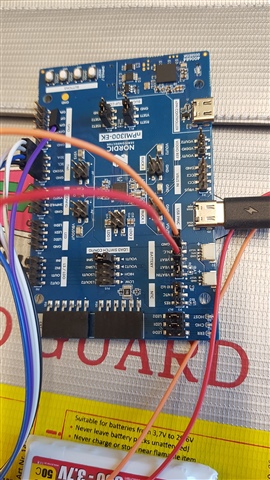
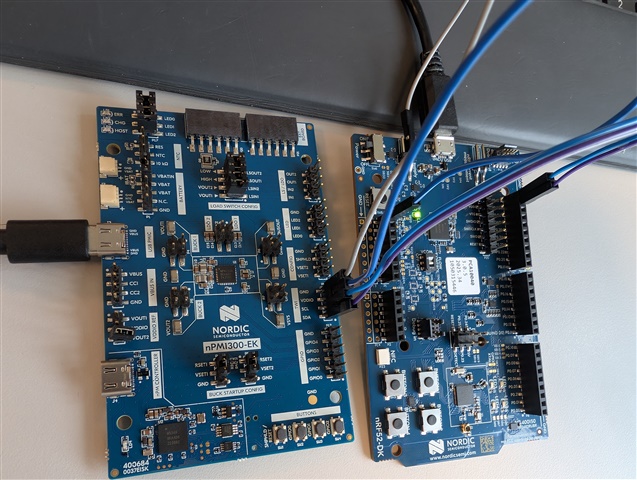
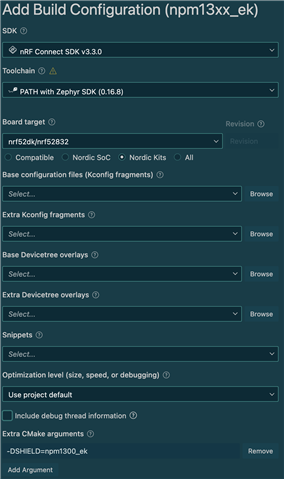
no device npm1300_ek (one button sample) with nRF52 DK on I2C Bus

I try to get the one button sample to work. There were several details missing to be able to compile and run this sample, which was very frustrating. After editing/updating the

prj.conf: CONFIG_I2C=y

CMakeLists.txt: set(SHIELD npm1300_ek)

nrf52dk_nrf52832.overlay:

 #include <zephyr/dt-bindings/pinctrl/nrf-pinctrl.h>

 &i2c1 {
 status = "okay";
 pinctrl-0 = <&i2c1_default>;
 pinctrl-1 = <&i2c1_sleep>;
 pinctrl-names = "default", "sleep";
 clock-frequency = <I2C_BITRATE_STANDARD>; 
 //clock-frequency = <10000>;
 };
 
 &i2c1_default {
 group1 {
 psels = <NRF_PSEL(TWIM_SDA, 0, 26)>,
 <NRF_PSEL(TWIM_SCL, 0, 27)>;
 bias-pull-up;
 };
};

&i2c1_sleep {
 group1 {
 psels = <NRF_PSEL(TWIM_SDA, 0, 26)>,
 <NRF_PSEL(TWIM_SCL, 0, 27)>;
 low-power-enable;
 };
};

My zephyr.dts i2c1 snippet:

/* node '/soc/i2c@40004000' defined in zephyr/dts/arm/nordic/nrf52832.dtsi:172 */
		i2c1: i2c@40004000 {
			#address-cells = < 0x1 >;      /* in zephyr/dts/arm/nordic/nrf52832.dtsi:181 */
			#size-cells = < 0x0 >;         /* in zephyr/dts/arm/nordic/nrf52832.dtsi:182 */
			reg = < 0x40004000 0x1000 >;   /* in zephyr/dts/arm/nordic/nrf52832.dtsi:183 */
			interrupts = < 0x4 0x1 >;      /* in zephyr/dts/arm/nordic/nrf52832.dtsi:184 */
			easydma-maxcnt-bits = < 0x8 >; /* in zephyr/dts/arm/nordic/nrf52832.dtsi:185 */
			zephyr,pm-device-runtime-auto; /* in zephyr/dts/arm/nordic/nrf52832.dtsi:187 */
			compatible = "nordic,nrf-twi"; /* in zephyr/boards/nordic/nrf52dk/nrf52dk_nrf52832.dts:188 */
			status = "okay";               /* in ../../../../mnt/df01dc22-f3bf-40d5-9858-752a58c9832d/devprojects/nordicsemi/npm13xx_one_button/build/npm13xx_one_button/zephyr/boards/nrf52dk_nrf52832.overlay:9 */
			pinctrl-0 = < &i2c1_default >; /* in ../../../../mnt/df01dc22-f3bf-40d5-9858-752a58c9832d/devprojects/nordicsemi/npm13xx_one_button/build/npm13xx_one_button/zephyr/boards/nrf52dk_nrf52832.overlay:10 */
			pinctrl-1 = < &i2c1_sleep >;   /* in ../../../../mnt/df01dc22-f3bf-40d5-9858-752a58c9832d/devprojects/nordicsemi/npm13xx_one_button/build/npm13xx_one_button/zephyr/boards/nrf52dk_nrf52832.overlay:11 */
			pinctrl-names = "default",
			                "sleep";       /* in ../../../../mnt/df01dc22-f3bf-40d5-9858-752a58c9832d/devprojects/nordicsemi/npm13xx_one_button/build/npm13xx_one_button/zephyr/boards/nrf52dk_nrf52832.overlay:12 */
			clock-frequency = < 0x186a0 >; /* in ../../../../mnt/df01dc22-f3bf-40d5-9858-752a58c9832d/devprojects/nordicsemi/npm13xx_one_button/build/npm13xx_one_button/zephyr/boards/nrf52dk_nrf52832.overlay:13 */
		};

with claudes assistance/support i got it to compile and run. But an i2c scan i2c0 shows no device at all.

What minimal required steps/configuration have to setup to get I2C enabled and detect devices on the bus should be?

Trying with the nrf-connect (Ubuntu) Linux-Desktop app (2x USB -C, 1x LiPo Battery) i get NPM detected, the LiPo Battery to and can change parameters for ex. the LED's live, so the BOARD is working.

Any support/hint/help is appreciated.

Parents
  • Hi,


    You should not need to alter anything when compiling the example:

    https://docs.nordicsemi.com/bundle/ncs-3.3.0/page/nrf/samples/pmic/native/npm13xx_one_button/README.html


    Please note that the "npm1300_ek" shield uses i2c0 on the nrf52dk, and not i2c1.

    Same goes for the zephyr sample:

    https://docs.nordicsemi.com/bundle/ncs-3.3.0/page/zephyr/samples/shields/npm13xx_ek/index.html#npm13xx_ek

    Here you need to set the shield parameter (as you do in CMakeLists.txt):

    https://docs.nordicsemi.com/bundle/ncs-3.3.0/page/zephyr/samples/shields/npm13xx_ek/index.html#building_and_running


    Kind regards,

    Håkon

  • Hi,

    editing an example was my fault. But Using I2c0 is no difference. Tried with the original sample npm1300.overlay.

    I additonally enabled the shell in the prj.conf:

    CONFIG_PRINTK=y
    CONFIG_LOG_CMDS=y
    CONFIG_I2C_LOG_LEVEL_DBG=y
    CONFIG_SHELL=y
    CONFIG_LOG=y
    CONFIG_UART_CONSOLE=y
    CONFIG_EARLY_CONSOLE=y
    CONFIG_I2C_SHELL=y

    The result of >device list< is:

    uart:~$ device list
    devices:
    - clock@40000000 (READY)
      DT node labels: clock
    - gpio@50000000 (READY)
      DT node labels: gpio0
    - uart@40002000 (READY)
      DT node labels: uart0 arduino_serial
    - i2c@40003000 (READY)
      DT node labels: i2c0 arduino_i2c
    - pwm@4001c000 (READY)
      DT node labels: pwm0
    - pmic@6b (DISABLED)
      DT node labels: npm1300_ek_pmic
    - gpio-controller (DISABLED)
      DT node labels: npm1300_ek_gpio
    - regulators (READY)
      DT node labels: npm1300_ek_regulators
    - LDO2 (DISABLED)
      DT node labels: npm1300_ek_ldo2
    - LDO1 (DISABLED)
      DT node labels: npm1300_ek_ldo1
    - BUCK2 (DISABLED)
      DT node labels: npm1300_ek_buck2
    - BUCK1 (DISABLED)
      DT node labels: npm1300_ek_buck1
    - leds (READY)
    - leds (DISABLED)
      DT node labels: npm1300_ek_leds
    - pwmleds (READY)
    - temp@4000c000 (READY)
      DT node labels: temp
    - charger (DISABLED)
      DT node labels: npm1300_ek_charger

    So pmic@6b is disabled despite in the npm1300.overlay:

    &npm1300_ek_pmic {
    host-int-gpios = <&gpio0 22 0>;
    pmic-int-pin = <3>;
    };
    What am i missing?
  • On P18 is no jumper. See my jumper configuration picture attached.

  • HI, what about the SHIELD detect pins on the nRF52 DK using the I/O expander for boards that follow arduino standard, see from the nRF52 DK userguide v3.x.x?

    "The I/O expander releases these GPIOs for general use when the nRF52 DK is used together with boards
    that follow the Arduino standard. The I/O expander can be permanently enabled by shorting solder bridge
    SB18, or permanently disabled by cutting the shorting track on SB19. You must also short SB18 when
    cutting SB19 for full compatibility with the Arduino standard.
    The I/O expander can be temporarily enabled by connecting SHIELD DETECT to ground."

  • HI, i tried some LOG_DBG and some LED switching....with worked partially but is confusing too.

    static const struct device *leds_npm = NPM13XX_DEVICE(leds);
    
    int main(void)
    {
    
    	k_sleep(K_MSEC(100));
    	LOG_DBG("=====Boot complete=====");
    
    	int err = i2c_is_ready_dt(&i2c_spec);
    
    	k_sleep(K_MSEC(1000));	
    	
    	printk("====One Button===\n");
    	//printk("PMIC Init Status: %d\n", device_init(pmic->state));
    	LOG_DBG("I2C bus state: %d", err);
    	LOG_DBG("I2C0 state: %p", (void*)i2c->state);
    	LOG_DBG("LEDs name: %s\n", leds_npm->name);
    	k_sleep(K_MSEC(100));
    	LOG_DBG("LEDs ready: %d\n", device_is_ready(leds));
    	k_sleep(K_MSEC(100));
    	LOG_DBG("PMIC name: %s", (pmic->name));	
    	LOG_DBG("PMIC state: %p", (void*)pmic->state);
    	//LOG_DBG("PMIC config: %s", pmic->ops);
    	LOG_DBG("Charger name: %s", (charger->name));	
    
    	/*
    	if (!device_is_ready(leds)) {
    		printk("Error: led device is not ready\n");
    		//return 0;		
    	}
    
    	if (!configure_events()) {
    		printk("Error: could not configure events\n");
    		//return 0;
    	}*/
    
    	while (1) {
    		led_on(leds_npm, 2U);
    		k_msleep(flash_time_ms);
    		led_off(leds_npm, 2U);
    		k_msleep(flash_time_ms);
    	}
    }

    The amber LED is blinking, removing SDA/SDC or Jumper on P17 results in no blinking.

    Adding another LED1 by:

    -adapt npm1300.overlay with: >nordic,led1-mode="host";<

    pristine rebuild DOESN'T work, against expectation. Why?

    The LED is "not ready", but switching in a while loop, so the I2C signal from nRF52 DK is obviously working. Confusing.

  • Hi,


    Here is the .hex that I used for testing:

    8400.zephyr.hex 

    And here is a picture of my setup:

    It is similar to yours, and I also tried setting up similar to your setup (P15 header), and still did not see any issues.


    Could you try my .hex file and see if this behaves similar?


    Kind regards,

    Håkon

  • HI, thanks for the file, but how do i flash the hexfile onto my nRF52 DK in VS Code?

Reply Children
  • You can use nrfutil from cmd line:

    nrfutil device program --firmware zephyr.hex


    Or you can use the nRF connect for desktop -> "Programmer" application if you want a graphical interface.


    Kind regards,

    Håkon

  • *** Booting nRF Connect SDK v3.3.0-ba167d9f3db4 ***
    *** Using Zephyr OS v4.3.99-fd9204a02d52 ***
    Set up button at gpio@50000000 pin 13
    V: 4.165 I: 0.0001 T: 24.79
    Charger Status: 5, Error: 0, VBUS: connected
    V: 4.165 I: 0.0003 T: 24.79
    Charger Status: 5, Error: 0, VBUS: connected
    V: 4.165 I: 0.0001 T: 24.79
    Charger Status: 5, Error: 0, VBUS: connected
    V: 4.165 I: 0.0001 T: 24.79

  • After connecting a BAttery the charger status changed:

    Charger Status: 5, Error: 0, VBUS: connected
    V: 4.165 I: 0.0001 T: 24.79
    Charger Status: 5, Error: 0, VBUS: connected
    V: 4.165 I: 0.0001 T: 24.79
    Charger Status: 5, Error: 0, VBUS: connected
    V: 4.145 I: 0.1590 T: 24.79
    Charger Status: 9, Error: 0, VBUS: connected
    V: 4.145 I: 0.1590 T: 24.79
    Charger Status: 9, Error: 0, VBUS: connected
    V: 4.145 I: 0.1590 T: 24.79
    Charger Status: 9, Error: 0, VBUS: connected

  • Hi,


    Good, this means that the setup is working with the precompiled .hex that I shared.

    Then I suspect the issue is how your firmware is setup, ie. built.


    Try to delete your build folder, do not add any specific overlays or .conf files; and only set the SHIELD parameter, similar to this:


    Since we cannot overload the west cmd switch here, we just set the EK directly in CMakeLists.txt:

    # Copyright (c) 2023 Nordic Semiconductor ASA
    # SPDX-License-Identifier: Apache-2.0
    
    cmake_minimum_required(VERSION 3.20.0)
    
    set(EXTRA_DTC_OVERLAY_FILE npm1300.overlay)
    
    find_package(Zephyr REQUIRED HINTS $ENV{ZEPHYR_BASE})
    
    project(npm13xx_ek)
    target_sources(app PRIVATE src/main.c)


    Kind regards,

    Håkon

  • Hi, build/compiling works with that setup. Situation stays, only the LED2 (amber) is blinking. despite turning on all 3 LEDs.

    "led_off(leds, 2U);"

    works. disabling it makes the LED2 light up constantly. Strange.

    #include <dt-bindings/regulator/npm13xx.h>
    
    &npm1300_ek_ldo1 {
    	regulator-initial-mode = <NPM13XX_LDSW_MODE_LDSW>;
    };
    
    &npm1300_ek_pmic {
    	host-int-gpios = <&gpio0 4 0>;
    	pmic-int-pin = <3>;
    
    	/*
    	npm1300_ek_leds: leds {
    		compatible = "nordic,npm1300-led";
    		status="okay";
    		//nordic,led0-mode = "error";
    		//nordic,led1-mode = "charging";
    		nordic,led0-mode = "host";
    		nordic,led1-mode = "host";
    		nordic,led2-mode = "host";
    	};*/
    };
    
    &npm1300_ek_leds {
    		compatible = "nordic,npm1300-led";
    		status="okay";
    		//nordic,led0-mode = "error";
    		//nordic,led1-mode = "charging";
    		nordic,led0-mode = "host";
    		nordic,led1-mode = "host";
    		nordic,led2-mode = "host";
    	};

    See the C-code and my npm1300.overlay attached.

    Additional, with USB-C in USB PMIC and without Battery the LED1 "CHG" is constantly on. Adding a battery, led1 turns off.

Related