

Hi,
I am facing an issue with the latest nrfcloud-utils provisioning flow when using a custom nRF91-based board connected through a generic FT232R USB-to-TTL adapter.
Background
With older versions of device_credentials_installer.py, I was able to provision custom boards successfully by adding my FTDI adapter serial numbers to the usb_patterns table inside the script.
Example modification:
usb_patterns = [
    (r'THINGY91', 'Thingy:91', False),
    (r'PCA20035', 'Thingy:91', False),
    (r'0010550', 'Thingy:91 X', False),
    (r'0010551', 'Thingy:91 X', False),
    (r'0010513', 'Thingy:91 X', False),
    (r'0009600', 'nRF9160-DK', False),
    (r'0010509', 'nRF9161-DK', False),
    (r'0010512', 'nRF9151-DK', False),
    (r'0009601', 'nRF5340-DK', False),
    (r'A10JO7ZD','FT232R USB UART',False),
    (r'B003FBGC','FT232R USB UART',False),
    (r'A10PQF68','FT232R USB UART',False),
    (r'A10PQF67','FT232R USB UART',False),
    (r'B003FKTS','FT232R USB UART',False),
    (r'NRFBLEGW', 'nRF Cloud Gateway', True)
]
This allowed provisioning over standard FTDI UART adapters without any issues.
Current issue
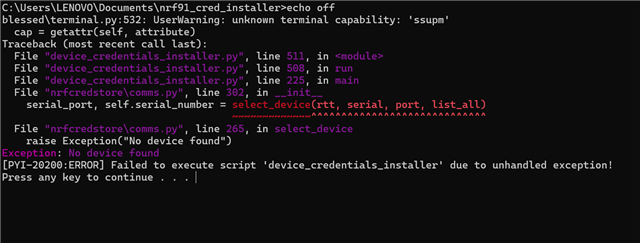
In the latest nrfcloud-utils, this logic appears to have changed and I can no longer provision custom boards using FTDI adapters.
This is the error i'm seeing:
The same firmware works correctly on:
- nRF9151-DK
- Thingy:91 X
The modem is fully accessible over UART through the FTDI adapter:
- AT commands work correctly from a serial terminal
%CMNGcommands work manually- UART communication is stable
However, the provisioning utility fails to detect or use the FTDI interface.
Concern
It seems the newer tooling may now be tightly coupled to Nordic DK / SEGGER-based USB interfaces.
For custom boards, this is problematic because:
- production hardware typically uses generic USB-UART bridges
- many custom designs do not include SEGGER hardware
- provisioning over standard serial interfaces should still be supported
If a user explicitly provides:
--port
or--serial-number
the tool should ideally bypass Nordic-specific USB filtering and simply communicate over the selected serial port.
Questions
- Is provisioning custom boards over generic UART adapters still officially supported in the latest
nrfcloud-utils? - Has the device detection mechanism changed intentionally?
- Is there a recommended way to bypass Nordic-specific device filtering for custom hardware?
- Would it be possible to add an option to skip USB device validation entirely when a COM port is explicitly provided?
Thanks.


