Clarification on migrating from Partition Manager to Devicetree

Hi,

I have a couple of questions on migrating from Partition Manager to Devicetree since a particular example was not provided.  Following the procedure in the SDK v3.3.0 release notes, an nrf52840dongle_nrf52840.overlay was created by pm_to_dts.py as shown here:
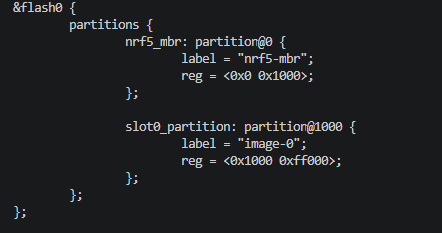
It is considerably different from the ..\v3.3.0\zephyr\boards\nordic\nrf52840dongle\nrf52840dongle_nrf52840.dts shown here:
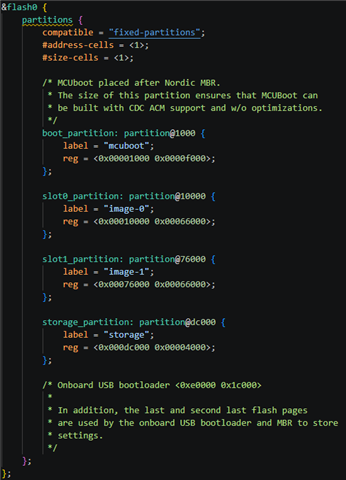
Questions:

What would you recommend I do for the migration?

Will the default nrf52840dongle_nrf52840.dts in future versions of the SDK be modified for this partitioning?

How and where should I set CONFIG_PARTITION_MANAGER_ENABLED=n ?  I thought .config.sysbuild is generated by the SDK and should not be directly modified.

Thank you,

Ken

Parents
  • Hi Kenneth

    If your project is running on the nRF52840 Dongle, I'd recommend you use the default board/.dts file from the SDK version you're using after a merge. The python script doesn't seem to have made separate partitions for the MBR, Bootloader, and slot partitions.

    The built in USB bootloader is indeed not part of MCUBoot, please see the Dongle documentation for more information on that.

    We will also be getting back to you on the questions Maria is looking into.

    For your last question, there are no planse to change the Dongle DTS files further AFAIK. Do you see any reason they should be changed?

    Best regards,

    Simon

  • Hi Simonr,

    Thanks for getting back to me.  It's summer and many people are on holiday.  The remaining questions I have regarding the default nrf52840dongle_nrf52840.dts:

    1. Why not list the partitions used for the MBR, USB bootloader, and last and second to last flash pages like the other partitions listed rather than only making this visible in the comments?  I think they can be specified as read only if needed.
    2. There are 2 pages of flash not accounted for in that file, specifically bytes at address 0x000FC000 through 0x000FDFFF.  Should this be corrected in the file?

    Also, I have not been able to build my application successfully with the Partition Manager disabled within nRF Connect for VS Code.  So, taking the Nordic blinky example, which still uses the Partition Manager in V3.3.0, how would I disable it and successfully build?

    Thank you,

    Ken

  • Hi again Ken

    1. I don't have a good answer with reasoning for you here, as this is a design choice on our end.

    2. These page addresses are beyond the 1024 kB of data, so I don't think they are missing. 

    In addition to following the migration guide, you also need to manually update the flash_layout.h as well. Please refer to this commit: https://github.com/nrfconnect/sdk-zephyr/commit/e542188ce9c07e89d5d47791ea92a539eb38ab40#diff-a8ef76e5ec93e0a45b8e73ab1aa110c47567fec2bc51166ffb5fb4426e94f7a2R13 

    Best regards,

    Simon

Reply Children
  • Hi SImonr,

    On your point 2. above: 1MB of flash = 1024kB which is actually 1048576 bytes of flash ranging from address 0x00000000 to 0x000FFFFF.  Therefore, I think there are two flash pages missing from the partitioning and comments in the nrf52840dongle_nrf52840.dts file.

    0x00000 0x00FFF MBR
    0x01000 0x0FFFF BOOT
    0x10000 0x75FFF SLOT 0
    0x76000 0xDBFFF SLOT 1
    0xDC000 0xDFFFF STORAGE
    0xE0000 0xFBFFF USB BOOTLOADER
    0xFC000 0xFCFFF ?
    0xFD000 0xFDFFF ?
    0xFE000 0xFEFFF SECOND TO LAST PAGE
    0xFF000 0xFFFFF LAST PAGE

    One of your customers might be in need of those 8k bytes of flash. Slight smile  Maybe those pages are actually in use by the USB boot loader.  It is possible I'm missing something or my math is wrong.  Perhaps another engineer can check us on this?

    I will try to see if I can get blinky to build without the partition manager and let you know what happens.

    Thank you,

    Ken

Related