Lis2mdl dont launch a trigger when i program with a threshold

Hello everyone,

I have tried several different approaches to solve this issue, but I have not been successful so far.

My goal is to generate an interrupt when the LIS2MDL magnetic field measurements (X, Y, and Z) go below a defined threshold. I created a small test application (shown below) to verify the interrupt functionality.

I have experimented with many different threshold values, including very low and very high settings, but the interrupt is never triggered.

Has anyone successfully used the LIS2MDL threshold interrupt feature with Zephyr or the nRF5340? Am I missing a required configuration step, such as interrupt routing, GPIO configuration, or sensor initialization?

Alsi "I'm having an doubt verifying if a trigger was successfully programmed on the sensor. When I configure it like this:

The function always returns success (ret == 0), even when I set a trigger type that the sensor theoretically doesn't support. I have no way to verify if the trigger was actually applied or just silently ignored by the driver."

 my code :: 
````

truct sensor_trigger trig = {
        .type = SENSOR_TRIG_THRESHOLD,  
        .chan = SENSOR_CHAN_MAGN_XYZ,
    };
    ret = sensor_trigger_set(sensor, &trig, trigger_handler);
    if (ret != 0) {
        LOG_ERR("Failed to set trigger: %d\n", ret);
        return ret;
    }
    LOG_INF("trigger set successfull\n");
    return 0;````

Driver code :: 

/* link external trigger to event data ready */
int lis2mdl_trigger_set(const struct device *dev,
              const struct sensor_trigger *trig,
              sensor_trigger_handler_t handler)
{
    const struct lis2mdl_config *cfg = dev->config;
    stmdev_ctx_t *ctx = (stmdev_ctx_t *)&cfg->ctx;
    struct lis2mdl_data *lis2mdl = dev->data;
    int16_t raw[3];

    if (!cfg->trig_enabled) {
        LOG_ERR("trigger_set op not supported");
        return -ENOTSUP;
    }

    if (trig->chan == SENSOR_CHAN_MAGN_XYZ) {
        lis2mdl->handler_drdy = handler;
        lis2mdl->trig_drdy = trig;
        if (handler) {
            /* fetch raw data sample: re-trigger lost interrupt */
            LOG_ERR("trigger_set supported");
            lis2mdl_magnetic_raw_get(ctx, raw);

            //return lis2mdl_enable_int(dev, 1);
            return 0;
        } else {
            return lis2mdl_enable_int(dev, 0);
        }
    }

    return -ENOTSUP;
}````

Any suggestions would be greatly appreciated.

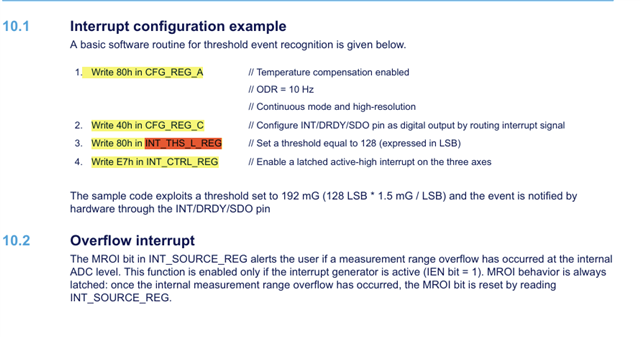
To configure a trigger mode i applied this configuration as say in the datasheet but no respone :: 
`````

Thank you.

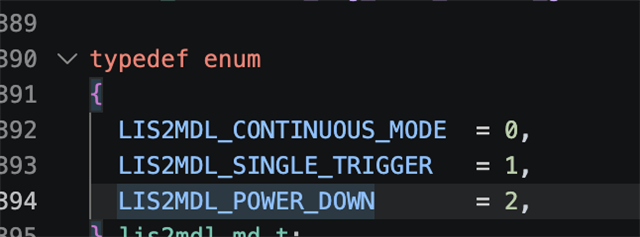
  • Why do you have this set to 0x82, 0x02 in that number means POWER_DOWN

    The only place that is written to that sensor is in lis2mdl_pm_action


    Seems like CONFIG_PM_DEVICE in your prj.conf is making this sensor go to low power mode by default. Try disabling CONFIG_PM_DEVICE andCONFIG_PM_DEVICE_RUNTIME just to test and see.

  • Also  INT_CTRL is the threshold-interrupt control register, it is not used for data-ready at all. Data-ready is routed only by the DRDY-on-pin bit in CFG_REG_C, which you already have set. So for the DRDY test you can ignore INT_CTRL.

  • So , when i did as you said , when there will be a New data(xyz)  , the interruptions pin drdy  triggered ......

    As well as ; i dont understand why when i configure the reg_A to take 0x80 , it takes and the value of reg_A displays 0x80 but when they finish the initialisation (lis2mdl_init)  it takes the default value 0x82 

  • Arebhi said:
    it takes and the value of reg_A displays 0x80 but when they finish the initialisation (lis2mdl_init)  it takes the default value 0x82 

    Good, so now you have a working system. As I mentioned in earlier reply, the CONFIG_PM is making the sensor go to sleep immediately, that is because the driver of that sensor have implemented the powre management and you have enabled that power management in your prj.conf. As to why the driver decides to do that is the question you need to ask in Zephyr forums and/or that sensor manufacturer. You can easily override it (like you just did) if you need. You can also enable those configs and change the behavior of the pm_action calls as your application requires. 

Related