Struggling to isolate custom nRF52840 board from DK on-board debugger

Hi,

I am developing a custom PCB based on the nRF52840 and am currently trying to flash/debug it using an nRF52840-DK (PCA10056) as an external debugger. 

connected devices like this without the custom board: 

So how do I connect the custom board when I have made testpads for vdd, gnd, swdio, swdclk. No testpad for nReset and no way to get to it anymore.

im seeing in the pca10056 3.0.3 p20 where are connections to 

pin 1: VDD_nRF

pin 2: VDD_nRF

pin 3: SWD SEL

pin 4: SWD IO

pin 5: SWD CLK

pin 6: SWO

pin 7: RESET

pin 8: empty

pin 9: VIN 3-5V

pin 10: VDD nRF_HV

pin 11: VDD nRF_HV

pin 12: VIO REF

pin 13: empty

And which way the all switches needs to be?

Parents
  • Hi,

    I cannot see the picture you attached, can you please attach it again?

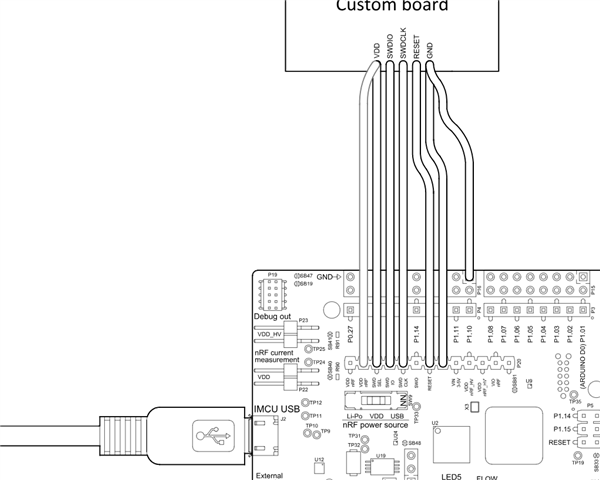
    Please see the image below on how to connect your custom board to the DK:

    Please note that SWD_SEL must be connected to nRF_VDD. See more info on this page. If all the connections are correct, the debugger should recognize your board.

    While it is possible to flash the chip without connecting reset, it is recommended to have a reset line available, especially in the development phase. (It is needed for recovery, for example.)

Reply
  • Hi,

    I cannot see the picture you attached, can you please attach it again?

    Please see the image below on how to connect your custom board to the DK:

    Please note that SWD_SEL must be connected to nRF_VDD. See more info on this page. If all the connections are correct, the debugger should recognize your board.

    While it is possible to flash the chip without connecting reset, it is recommended to have a reset line available, especially in the development phase. (It is needed for recovery, for example.)

Children
  • What I observe in J-Link Commander:

    SWDReadDP 0 returns 0x2BA01477 consistently every time, so the DP level is clearly working. However all AP level reads return zeros or garbage:

    SWDReadAP 0x00 = 0x00000000
    SWDReadAP 0x08 = 0x00000000
    CTRL-AP registers = 0x00000000

    connect result always:

    CTRL-AP indicates that the device is secured.
    Found SW-DP with ID 0x2BA01477
    AP[0]: JTAG-AP (IDR: 0x23000000)
    AP[1]: JTAG-AP (IDR: 0x02880000)
    Could not find core in Coresight setup
    Cannot connect to target.

    nrfjprog --recover --family nrf52 result:

    Recovering device. This operation might take 30s.
    error -21: Command recover executed for 3124 milliseconds
    error -90: Access protection is enabled, can't read device version.
    ERROR: Recover failed.

    I have tried both PCA10056 and PCA10040 as debugger with identical results. The schematic has been verified — VDD, all decoupling capacitors, 32MHz and 32.768kHz crystals are all correct.

    Is the missing nRESET the root cause of the recovery failure? And is there any way to recover the device without a nRESET connection?

Related