ncs-zigbee: Custom Board

Hello,

I have downloaded the newest Zigbee R23 SDK (v1.3.0).

When I use the feature inside VS Code: "nRF Connect" -> "Create a new board" to create my custom board, it creates the "boards" folder and the files:

boards\test_vendor\test_board\
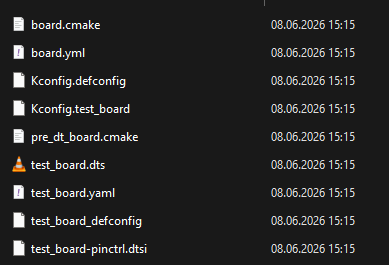
However when I try to create a new build configuration I don't see my board in the board target list (I mad sure to check the "All" button):

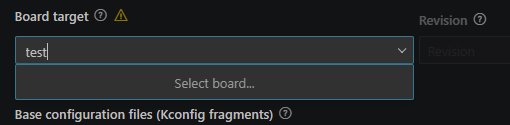
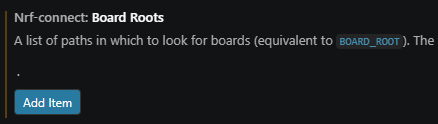
When I go to Preferences → Settings and search for nRF Connect Board Roots

And then add a new item with just a dot "." I can see my board:
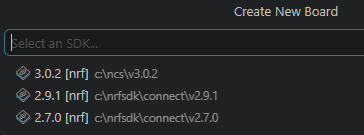
I am also unable to select the v1.3.0 SDK when I create the custom board.

I'm assuming these are bugs.

I went to the repo located here:

https://github.com/nrfconnect/ncs-zigbee

But there are currently no way to create issues (at least for me when I visit the site).

That's why I'm reporting the issue here.

Could also be a problem with the extension itself, but I don't know.

Parents
  • Hello,

    Unfortunately, the "create new board" experience is not quite polished. Please see this DevAcademy Lesson:

    https://academy.nordicsemi.com/courses/nrf-connect-sdk-intermediate/lessons/lesson-3-adding-custom-board-support/?version=v2.9.0-v2.7.0 

    Perhaps it works with a board based on nRF52840, but I am not sure. In fact. This "Create board" functionality comes from Zephyr, and it is not something that we created, and hence it is not made to work out of the box with the Zigbee addons. I can tell you that the zigbee addon is based on NCS c2.9.2, which is why I sent you the v2.9.0 version of the devacademy course as well.

    You already figured out that you needed to add the folder containing the "boards" folder to your BOARD_ROOT using preferences -> Settings -> nRF Connect Board Roots. That is good.

    I am also unable to select the v1.3.0 SDK when I create the custom board.

    For that, you need to use v2.9.2 for now.

    I will take your feedback back to the VS Code team. Thank you for reporting!

    Best regards,

    Edvin

Reply
  • Hello,

    Unfortunately, the "create new board" experience is not quite polished. Please see this DevAcademy Lesson:

    https://academy.nordicsemi.com/courses/nrf-connect-sdk-intermediate/lessons/lesson-3-adding-custom-board-support/?version=v2.9.0-v2.7.0 

    Perhaps it works with a board based on nRF52840, but I am not sure. In fact. This "Create board" functionality comes from Zephyr, and it is not something that we created, and hence it is not made to work out of the box with the Zigbee addons. I can tell you that the zigbee addon is based on NCS c2.9.2, which is why I sent you the v2.9.0 version of the devacademy course as well.

    You already figured out that you needed to add the folder containing the "boards" folder to your BOARD_ROOT using preferences -> Settings -> nRF Connect Board Roots. That is good.

    I am also unable to select the v1.3.0 SDK when I create the custom board.

    For that, you need to use v2.9.2 for now.

    I will take your feedback back to the VS Code team. Thank you for reporting!

    Best regards,

    Edvin

Children
Related