Unexplained current spikes during sleep

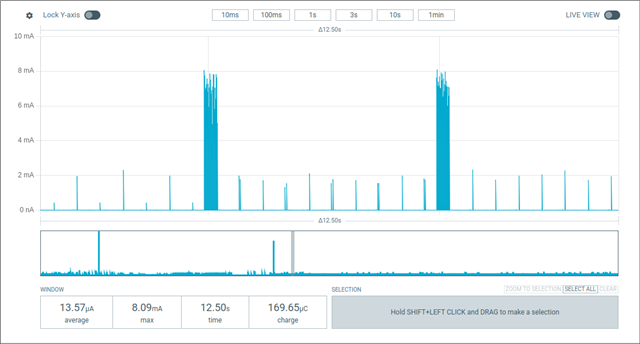
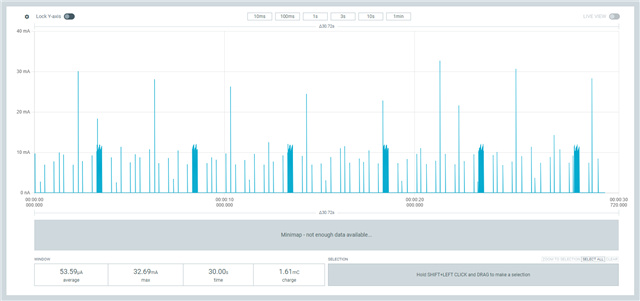
I am trying to track down the source of unexplained current spikes visible on the Power Profiler Kit 2 when the nRF52832 should be in sleep mode.

I have stripped the project down to as bare bones as possible (see below) and tried every possible solution from Google's AI (most of which were hallucinations...) to no avail.

 #include <zephyr/kernel.h>

int main(void) {
	for(unsigned int i = 0; i < 2000; i++) {
		k_msleep(1);
	}
	for(;;) {
		const unsigned int width = 250;
		k_msleep(5 * 1000 - width);
		for(unsigned int i = 0; i < width; i++) {
			k_msleep(1);
		}
	}
}

# prj.conf
CONFIG_BOOTLOADER_MCUBOOT=y
CONFIG_BT=n
CONFIG_CLOCK_CONTROL=y
CONFIG_LOG=n
CONFIG_MCUMGR=n
CONFIG_PM_DEVICE=y
CONFIG_SERIAL=n
CONFIG_TICKLESS_KERNEL=y
CONFIG_TIMESLICING=n
CONFIG_UART_CONSOLE=n
CONFIG_WATCHDOG=n
CONFIG_SHELL=n

I am building using v3.2.3 of the SDK using the nRF Connect extension in VS Code

I'm using a custom board that does _NOT_ exhibit these spikes when using code built using v2.5.x of the SDK (not a hardware problem!!!)

The board uses an external crystal for the 32.768 kHz
PPK2 capture

Things I've already tried:

  • PPK2 is in "source" mode, no other connections to the board (including completely disconnecting the JTAG cable)
  • power cycling the board after programming and before capturing the plot of current
  • disabling all 20 PPI channels at the start of main (no effect on most, one actually causes the k_sleep to never wake up...)
  • stopping all 3 timers at the start of main
  • removing all mentions of peripherals (I2C, SPI, PWM, etc.) from the C code, prj.conf, and board files
  • switching from the DC/DC regulator to the LDO (again, same hardware does not show the problem with older SDKs!)
  • using the debugger to look for unexpected threads or IRQs
  • adding special code to main() to differentiate between legitimate wake behavior (and code resets) and the unexpected wakeups - the legit ones are the "fat" ones.
  • Hi,

    I was able to reproduce your isse on a nRF52DK. It seems like this behaviour only appears from NCS v3.2.0 onward.

    I also have the spikes but mine are significantly smaller, and every 500ms exactly. Are you also seeing this frequency ?

    And from what I can see, the difference between having the spikes and not having them is around 0.2uA. So not much.

    And these spikes are already very likely exagerated by the PPK2 as it has to change measurement range and tries its best to output a value. But during the change the PPK2 is known to be very inaccurate and outputs much higher values than they really are.

    Even though, I'll try to see if I can find anything more on it, and I'll also ask internally if someone knows something about it.

    I'll keep you updated.

    Best regards,

    Simon

  • Thanks Simon. Unfortunately my spikes are significantly larger, many in the tens of milliamps range so they are not something we can ignore (this is a VERY power sensitive battery project so every wasted joule adds up quickly).

    If I change the main loop code to just sleep for a really long time, then the spikes go back to being periodic at almost exactly 500ms (give or take a few milliseconds). Every once in a while there are two spikes within a millisecond of each other. I notice this phenomenon in the scree capture you posted as well.

    The amplitude I see is still in the milliamp to tens of milliamps range though, so not sure why yours are so much smaller than mine.

  • Potentially two separate issues here:

    1: When the nRF52 goes into the lowest power mode then the regulator goes into refresh mode. This means it has close to 0 power consumption all the time but when the voltage drops too low it will recharge the external capacitor. This is seen as a very short, high spike in the power consumption. This is normal and not an issue. This spike is in the single digit mAs normally.

    2: When the PPK2 sees very low power consumption it automatically changes it measurement range downwards, this is done by changing the measurement resistor. When you then get the real current spike, this resistor will be changed to accommodate a higher current. This may in some cases make a larger spike than actual show up in the plot, this is an artificial artifact caused by the measurement circuit. It does not impact the average current as it evens out over time, the PPK2 will still be within spec with this.

    If you want to make sure the spike is real and not the artifact then the solution is to use an oscilloscope to check the real height/width of the current spike, remember to use your own shunt resistor for this.

    You can also enable a low pass filter in the PC fronted to remove these spikes, they are in the advanced menu of the Power Profiler app. Note that this is just changing the display and not the data measured and averaged.

  • I do not believe this is the case because the exact same board/hardware, using an older SDK build of the code does NOT exhibit these spikes. So the culprit must lie in the software/firmware/configuration difference between the two, not in a hardware issue.

    I previously tried switching from the DC/DC to the LDO per one of the AI suggestions and saw no change, which also suggests that the spikes are not caused by the capacitor refresh.

    I can rule out a PPK2 ranging issue since that would appear in both the old and new builds of the software on the same board.

    Trying another AI suggestion, I also made sure that the 32kHz source was set to an external crystal _AND_ that the recalibration period was increased from 4 to 64, but the periodicity/amplitude of the pikes was unchanged.

    Per Simon's post above, it seems to be something introduced in the NCS 3.2.0 that did not exist in prior versions.

  • Hi,

    Will_20241202 said:
    I can rule out a PPK2 ranging issue since that would appear in both the old and new builds of the software on the same board.

    The root problem is indeed not a PPK2 ranging issue. I was able to find the commit that introduce the issue (link) using "git bisect" on the SDK. I've reported it internally, I'll get back to you when I have more information about it.

    But PaKa is also right in the sense that you shouldn't trust the number that are displayed on the spikes. The fact that you are seeing much higher spikes than me is probably cause by the PPK2 ranging behavior, and the real peak current is likely much lower.

    If you want to check the actual peak current of the spike, then as Paka said previously, you need an shunt resistor and a oscilloscope. The PPK2 is not the right tool for that.

    Best regards,

    Simon

Related