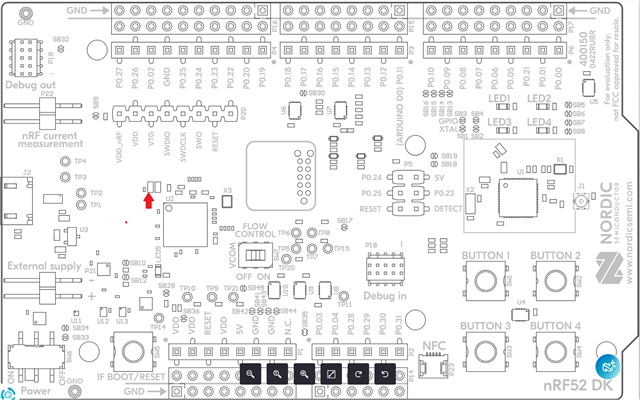
nRF52-DK Non-responsive

I have been using a NRF52-DK board to develop a BTle solution for the past week.
Today, midway through a debug session, the board vanished from my BT interfaces.

It also no longer shows up on USB when plugged in, neither directly or when attempting to put into DFU mode (holding the reset button down and powering on over USB).

Is there something in software I can do, or is this a hardware fault somewhere?

LED5 is not on.

Nothign is seen on USB.

Parents
  • Old DK hardware with the ST debug MCU chip? Hold reset when powering up, put interface MCU firmware on the drive that appears. You need to do this every time you held reset down when powering up, its quite annoying.

    The newer HW revision with the NRF5340 debug MCU has a different upgrade procedure IIRC.

  • This is the new DK. It can be flashed with a J-link to the pins under the label, but I don't have a J-link handy.

  • Hello Emlyn,
    Thank you for the picture of the kit. It's not a common issue, but with the number of kits we do have in the market, sometimes things do go wrong. Unfortunately it can come down to board switches set incorrectly (hence the picture request), often it is related to USB port and cable along with non-windows environment. Some then try to peel of the sticker and re-program the On Board Debugger. As indicated by Paal below here as well.
    • Did you try to reprogram the ODB on the kit through the JTAG header under the sticker?
    • The behaviour you're describing does indicate that the FW on the nRF5340 ODB has been changed and this isn't something we have a clear path understand on how it could be. What sort of OS environment are you working with? What versions of Segger SW and tools are you using?
    Best regards
    Asbjørn
  • Hello Asbjørn,

    No, I did not try to reprogram the ODB. I don't have a J-Link other than this broken board.
    My questions down this path were whether it could be recovered this way though another J-link, but that seems not to be the case.

    I was running a BTle app on the application processor, using softdevice 132. 
    RTT viewer 9.62
    nRF Connect Desktop 5.3.2, programmer 4.8.0
    Windows 11, 64 bit

  • Hi Emlyn, 

    I should have asked you in a previous reply, but what are you measuring on the VBUS input to the ODB nRF5340? 

    See the red arrow for the location of the R9, C35 and C36 cap on the VBUS input. When the cable and everything is plugged in, what voltage are you measuring there on these three components?

    Best regards

    Asbjørn

  • 5.18V on the bottom pads of the two left most components (R/C) and 0V on the bottom of the right component of the three (the other cap).

    Resistor is measuring 2ohms, 
    Top pads of the two caps measure zero 

    So:

    5.18     0       0
       |        |        |

    5.18   5.18    0

    A full schematic would be helpful to diagnose.
    The P1 VDDs have 3v reading

  • That LED5 has me curious...

    So I know you said no switches have moved but seemed as though it failed suddenly and unconventionally. That in mind, I 'll post these things to try if you want and others have found them useful.


    Since the interface MCU (OBD) is unresponsive, the only ways to access or recover the board are:

    1. Bypass the On-Board Debugger via External J-Link (Target Direct SWD):

      • If the main nRF52 target application chip is fine, bypass the dead nRF5340 debugger completely.

      • Connect an external standalone J-Link programmer (or another working nRF52/53 DK operating as a debug probe via Debug Out) directly to the SWD header pins (SWDIO, SWDCLK, GND, VTG) routed to the target chip on the DK.

      • From there, issue a standard recover command targeting the external probe:

    ok

    nrfjprog --recover -f nrf52

    2. Isolate Hardware / Power Faults on the DK:

    • Power Supply Mode: Ensure the power source switch (SW10) is set strictly to VDD or USB depending on which port is plugged in.

    • Cut Straps & Switches: Double-check that no trace cut-straps (like nRF_POWER or SWD) were modified or bridging adjacent traces.

    • USB Controller Reset: Disconnect all power, hold down the RESET button, and plug in the USB cable. If the board was stuck in a degraded power state, this can occasionally force the nRF5340 OBD back into a valid boot state.

    3.... RMA / Replacement: If the nRF5340 interface MCU suffered an ESD strike or flash corruption on its USB stack (hence brief flash of LED5 before shutting off), Nordic support typically treats the kit as damaged hardware requiring an RMA replacement.

    GL :-) PJ :v:

Reply
  • That LED5 has me curious...

    So I know you said no switches have moved but seemed as though it failed suddenly and unconventionally. That in mind, I 'll post these things to try if you want and others have found them useful.


    Since the interface MCU (OBD) is unresponsive, the only ways to access or recover the board are:

    1. Bypass the On-Board Debugger via External J-Link (Target Direct SWD):

      • If the main nRF52 target application chip is fine, bypass the dead nRF5340 debugger completely.

      • Connect an external standalone J-Link programmer (or another working nRF52/53 DK operating as a debug probe via Debug Out) directly to the SWD header pins (SWDIO, SWDCLK, GND, VTG) routed to the target chip on the DK.

      • From there, issue a standard recover command targeting the external probe:

    ok

    nrfjprog --recover -f nrf52

    2. Isolate Hardware / Power Faults on the DK:

    • Power Supply Mode: Ensure the power source switch (SW10) is set strictly to VDD or USB depending on which port is plugged in.

    • Cut Straps & Switches: Double-check that no trace cut-straps (like nRF_POWER or SWD) were modified or bridging adjacent traces.

    • USB Controller Reset: Disconnect all power, hold down the RESET button, and plug in the USB cable. If the board was stuck in a degraded power state, this can occasionally force the nRF5340 OBD back into a valid boot state.

    3.... RMA / Replacement: If the nRF5340 interface MCU suffered an ESD strike or flash corruption on its USB stack (hence brief flash of LED5 before shutting off), Nordic support typically treats the kit as damaged hardware requiring an RMA replacement.

    GL :-) PJ :v:

Children
No Data
Related