nRF52840 reset during image_copy in nrf_bootloader_fw_activation.c

Hi,

I'm working on a project with the nRF52840 using nRF5 SDK v15.3.0 and have been working on enabling dual-bank DFU in the bootloader. During this process I made several captures of the MCU's reset behavior when installing DFU packages (either with only application images or both bootloader and SoftDevice images) transferred over BLE. My understanding of the installation process is as follows:

  • Application image only:
    • To start the download the MCU resets and the bootloader enters DFU mod
    • After the download is complete the MCU resets and the bootloader starts activating the image in the DFU package
    • After the new image has been copied from bank 1 to bank 0 the MCU resets into the bootloader and boots the new application image
  • Bootloader + SoftDevice:
    • To start the download the MCU resets and the bootloader enters DFU mode
    • After the download is complete the MCU resets and the bootloader starts activating the images in the DFU package
      • The new SoftDevice is copied and overwrites the old one
      • The SD_MBR_COMMAND_COPY_BL command is submitted, the MCU resets and the MBR copies the new bootloader and overwrites the old one
      • The MCU boots into the new bootloader and the activation continues
    • After the activation is finished the MCU resets into the bootloader and boots the application image

In the described scenarios there's going to be 3 and 4 resets respectively for the installation to complete. However, from my testing I'm consistently seeing 1 additional reset in both scenarios. The additional reset happens during the image_copy function in nrf_bootloader_fw_activation.c (which is called when copying the new application image and when copying the new SoftDevice image). The additional reset happens consistently, and in the same place. The image_copy function is called with arguments that at most allows it to copy 8*4KiB=32KiB at a time, and it's during the 4th of these copies (the 4th iteration of the while-loop in the function) that the reset happens. In both cases the MCU reset an additional time and continues the copying and finishes the whole installation process.

Below are some Saleae captures I hope help illustrate what I'm seeing. The signal POWER_ON indicates MCU resets, with it going low meaning the MCU reset and it going high meaning the bootloader has started running. I've then added additional toggling of the same signal to indicate loops in image_copy.

  • Base capture without additional toggling of POWER_ON

  • Capture with additional toggling of POWER_ON
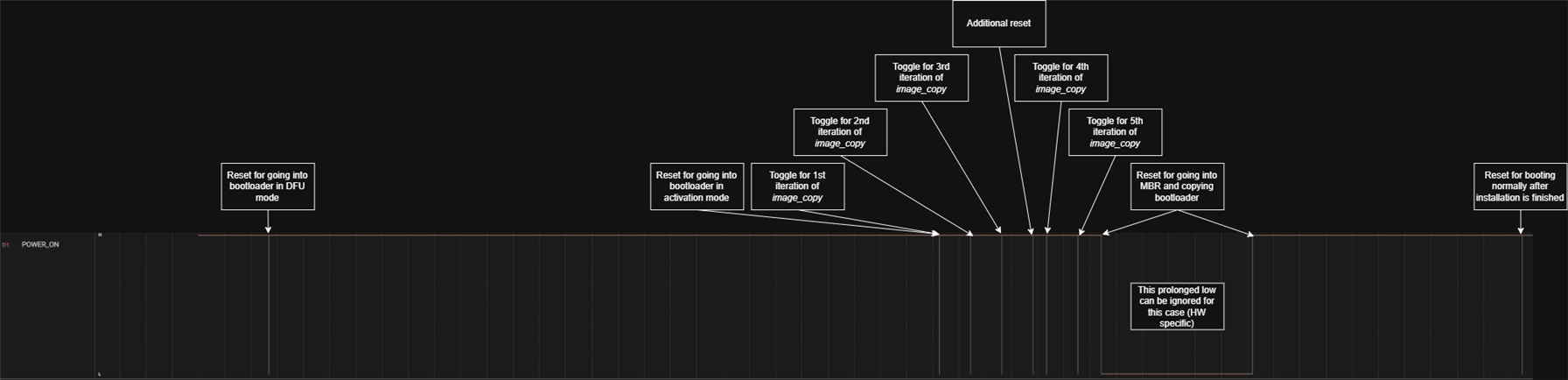
It's not visible in the captures, but I can tell the difference between my toggles and MCU resets by how long POWER_ON stays low (my toggles holds POWER_ON low for 300ns while MCU resets holds it low for 700us).

I've tried moving the extra toggling of POWER_ON to after the other function calls in image_copy (nrf_dfu_flash_erase, nrf_dfu_flash_store and nrf_dfu_settings_write_and_backup), but I see the same number of toggles and the behavior is still present. To me this means it's not one of the functions failing. In image_copy there's this line:

//Firmware copying is time consuming operation thus watchdog handling is started
nrf_bootloader_wdt_init();

Could there be an issue wrt. the watchdog that's "fixed" when a reset happens and the MCU continues with the same process/code? The above captures are from updating the bootloader+SoftDevice, so the amount of copying isn't that large, but when updating the application there's substantially more data being copied after the additional reset than before, so I don't think it's simply the amount of time spent copying that's potentially resulting in the watchdog timing out.

Unfortunately I don't have logs from the bootloader as building with logs exceeds the amount of flash the bootloader can occupy.

As a whole the update process works, so I'm mostly interested to understand why the additional reset is there.

Thanks,
Daniel

Parents
  • Indeed, what we are seeing is a watchdog reset, so your original suspicion was correct 

    Can you try this for me:

    in nrf_bootloader_fw_activation.c, try adding a wdt_feed() directly before it erases all the pages inside the image_copy() function:

    static uint32_t image_copy(uint32_t dst_addr,
                               uint32_t src_addr,
                               uint32_t size,
                               uint32_t progress_update_step)
    {
        if (src_addr == dst_addr)
        {
            NRF_LOG_DEBUG("No copy needed");
            return NRF_SUCCESS;
        }
    
        ASSERT(src_addr >= dst_addr);
        ASSERT(progress_update_step > 0);
        ASSERT((dst_addr % CODE_PAGE_SIZE) == 0);
    
        uint32_t max_safe_progress_upd_step = (src_addr - dst_addr)/CODE_PAGE_SIZE;
        ASSERT(max_safe_progress_upd_step > 0);
    
        uint32_t ret_val = NRF_SUCCESS;
        uint32_t pages_left = CEIL_DIV(size, CODE_PAGE_SIZE);
    
        //Firmware copying is time consuming operation thus watchdog handling is started
        nrf_bootloader_wdt_init();
    
        progress_update_step = MIN(progress_update_step, max_safe_progress_upd_step);
    
        while (size > 0)
        {
            uint32_t pages;
            uint32_t bytes;
            if (pages_left <= progress_update_step)
            {
                pages = pages_left;
                bytes = size;
            }
            else
            {
                pages = progress_update_step;
                bytes = progress_update_step * CODE_PAGE_SIZE;
            }
            // Feed the watchdog
            nrf_bootloader_wdt_feed();
            NRF_LOG_INFO("Watchdog fed");
            // Erase the target pages
            ret_val = nrf_dfu_flash_erase(dst_addr, pages, NULL);
            if (ret_val != NRF_SUCCESS)
            {
                return ret_val;
            }
            ...

    Does that change the reset behavior?

    Best regards,

    Edvin

  • Yes, then the additional reset is gone.

    A colleague also found this post, maybe it's related: devzone.nordicsemi.com/.../181328

  • Yes, it looks related. 

    The issue is that the page erase that happens in image_copy() is a blocking function for the entire time it takes to erase the pages that is going to be used for the new image. I guess the reason it is not seen by all is that:

    1: It depends on the watchdog interval

    2: It may not be noticed in most cases when a reset occurs. The DFU will still succeed.

    But I would say it is a simple workaround. The issue is not that the erasing of the pages takes longer than your watchdog timeout, but it is started at just the right time before the watchdog times out. The timer is set to feed the watchdog before the watchdog itself times out, but erasing the pages takes longer than this period, so the timer callback that is supposed to feed the watchdog never reaches the CPU before the reset occurs. 

    The workaround is pretty simple. Just feed the watchdog directly one time before:

            // Erase the target pages
            ret_val = nrf_dfu_flash_erase(dst_addr, pages, NULL);

    inside image_copy(). This gives plenty of time to complete this action, and the timer that is responsible to feed the watchdog will time out when it was set up to do, and this will start the next timer, so no need to worry about it. It will just result in an additional watchdog feed during the DFU.

    Best regards,

    Edvin

  • Hmm...I'm a bit confused. In the last log I shared I see the following

    # This is the boot after the download has finished and activation is about to start
    <info> app: booting up. Reset reason: 00000004
    ...
    <info> nrf_bootloader_wdt: WDT enabled CRV:134348 ticks
    <info> nrf_bootloader_wdt: Starting a timer (131148 ticks) for feeding watchdog.
    ...
    # This is the additional WDT reset
    <info> app: booting up. Reset reason: 00000002
    ...
    <info> nrf_bootloader_wdt: WDT is not enabled

    The way I understand this is that the first time image_copy is called the watchdog running, so the timer is started. But for some reason the timer doesn't feed the watchdog in time (does nrf_dfu_flash_erase disable interrupts?). After the additional reset there's no active watchdog, so naturally the system also can't be reset due to it timing out.

    I guess my main question is why the timer isn't able to feed the watchdog and keep the system running?

  • The timer is runnning, and the interrupt triggers, but since the CPU is busy with the erase page operation, the interrupt is not able to reach the CPU, and the watchdog (which is a hardware peripheral) resets the device before the CPU is able to handle the timer interrupt. So the interrupt is not disabled, but it is running a task with higher priority.

    The reason the watchdog is disabled after the watchdog reset is that the watchdog is not disabled in a soft reset, but it is disabled after a watchdog reset. You can enable it again in the bootloader, but it is not done automatically. 

    So the watchdog is never started by the bootloader, but it is started from the application, before the soft resets.

    BR,

    Edvin

Reply
  • The timer is runnning, and the interrupt triggers, but since the CPU is busy with the erase page operation, the interrupt is not able to reach the CPU, and the watchdog (which is a hardware peripheral) resets the device before the CPU is able to handle the timer interrupt. So the interrupt is not disabled, but it is running a task with higher priority.

    The reason the watchdog is disabled after the watchdog reset is that the watchdog is not disabled in a soft reset, but it is disabled after a watchdog reset. You can enable it again in the bootloader, but it is not done automatically. 

    So the watchdog is never started by the bootloader, but it is started from the application, before the soft resets.

    BR,

    Edvin

Children
No Data
Related