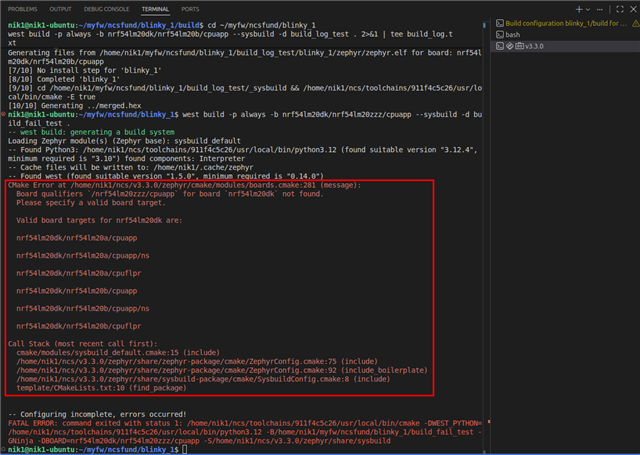
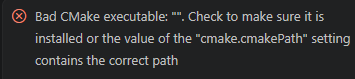
Have tried several times to install the SDK into VS code without success. This is one of the errors I am getting:
Hi David,
I noticed that the SDK and toolchain are installed on different drives. The SDK appears to be on d:\ drive, and the toolchain on C:\ drive. Could you confirm whether you have a d:\ drive at all? Could you reinstall both the SDK and toolchain under the same root directory to see whether that resolves the issue?
Regards,
Nissanth Karunanithy
Please advise next steps.
Hi David,
Could you send me the full log leading up to the crash, everything before the error message "Unable to build: SDK not found. Ensure that a valid SDK is used for the build configuration."? The log may show which path is being used, which would help me debug the problem.
Thanks,
Nissanth Karunanithy
The only message I have is the one saying: "Unable to build: SDK not found. Ensure that a valid SDK is used for the build configuration." I do not see any other logs. Please advise.
I found an issue with the build conf. Fixed it, but still getting this error:
C:/ncs/v3.3.0/zephyr/share/sysbuild-package/cmake/SysbuildConfig.cmake:8 (include)
template/CMakeLists.txt:10 (find_package)
-- Configuring incomplete, errors occurred!
FATAL ERROR: command exited with status 1: 'C:\ncs\toolchains\936afb6332\opt\bin\cmake.EXE' -DWEST_PYTHON=C:/ncs/toolchains/936afb6332/opt/bin/python.exe '-Bd:\Active\firealarm\firealarm\build_1' -GNinja -DBOARD=nrf54lm20dk/nrf54lm20b/cpuapp -DCONFIG_DEBUG_THREAD_INFO=y '-SC:\ncs\v3.3.0\zephyr\share\sysbuild'
I found an issue with the build conf. Fixed it, but still getting this error:
C:/ncs/v3.3.0/zephyr/share/sysbuild-package/cmake/SysbuildConfig.cmake:8 (include)
template/CMakeLists.txt:10 (find_package)
-- Configuring incomplete, errors occurred!
FATAL ERROR: command exited with status 1: 'C:\ncs\toolchains\936afb6332\opt\bin\cmake.EXE' -DWEST_PYTHON=C:/ncs/toolchains/936afb6332/opt/bin/python.exe '-Bd:\Active\firealarm\firealarm\build_1' -GNinja -DBOARD=nrf54lm20dk/nrf54lm20b/cpuapp -DCONFIG_DEBUG_THREAD_INFO=y '-SC:\ncs\v3.3.0\zephyr\share\sysbuild'
Hi David,
I have noticed that you have been using two different toolchains. If you are building with nRF Connect SDK v3.3.0, the toolchain with the hash 936afb6332 is the correct one. The one you used earlier (dcbdc366a1) belongs to v3.4.0.
I am currently trying to reproduce the error on my end. In the meantime, could you check the build output in the nRF Connect terminal? Specifically, I would like to know whether you see a line beginning with "CMake Error at" and a "Call Stack (most recent call first):" block above the two lines you sent me. The image below shows what this looks like on my setup.

Regards,
Nissanth Karunanithy