VS Code SDK install failure

Have tried several times to install the SDK into VS code without success. This is one of the errors I am getting:

Failed to register SDK installation: west failed with code -4058 (cmd 'west zephyr-export) (cwd 'd:\ncs\v3.3.0'):
The SDK will not be detected by VSCode before the CMake Package Registry is corrected for the Zephyr package: d:\ncs\v3.3.0
[11:17:50] Unable to find the toolchain at path:  C:/ncs/toolchains/dcbdc366a1/opt/zephyr-sdk/gnu/arm-zephyr-eabi/bin/arm-zephyr-eabi-gcc.exe
[11:17:50] Unable to find the toolchain at path:  C:/ncs/toolchains/dcbdc366a1/opt/zephyr-sdk/gnu/arm-zephyr-eabi/bin/arm-zephyr-eabi-gcc.exe
I also tried reinstalling without success. Do I need to stall more than "nRF Connect for VS Code Extension Pack  v2025.4.4" before installing the SDK? 
  • Hi again, 

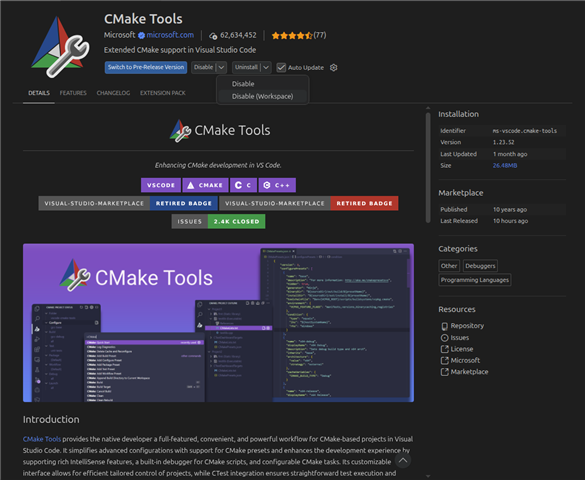
    Do you have "CMake tools" from microsoft enabled as extension? If you do, can you try to disable it? Click on disable (workspace) as shown in the screenshot below. Close and reopen VScode, then remove all build folders under "d:\Active\firealarm\firealarm\". Then create the build configuration and build again. 

    Regards,

    Nissanth Karunanithy

  • Did  everything to the point of adding a new build config. Here is the error:

    [west]: FATAL ERROR: failed manifest import in sdk-edge-ai> (external/edge-ai>):
    [west]:   Failed importing "west.yml" from revision "">github.com/.../sdk-edge-ai>"
    [west]:   Hint: sdk-edge-ai> must be cloned, owned by the user and its manifest-rev ref must point to a commit with the import data
    [west]:   To fix, run "west update. If it still fails, try "west -vv ..."

    [west]: exited with code 1.
Related