nRF93M1 DK: PPP shell

Hello,

we are trying the nRF93M1 DK hw rev. 0.4.0

As suggested, we wanted to build the following sample: https://nrfconnectdocs.nordicsemi.com/ncs/latest/nrf/samples/nrf93m1dk/ppp_shell/README.html#nrf93m1dk-ppp-shell

However, it is not clear with which SDK we shall build the sample (it seems not included in 3.4.0)

So we tried to build with the development branch (main/development branch) but, as a result, we got a non-responsive board (no serial console).

Before diving into debuggind the example itself, can you please suggest a full build procedure?

Thanks

Marco

Parents
  • Just to add some further info: even building 

    nrf/samples/nrf93m1dk/modem_bypass

    does not result in a working serial interface. But the serial interface was working when I first tested the board (there was some builtin firmware but it was not including ppp).

    so I guess there is something not updated in the project?

    thanks,
    Marco
  • Hi Marco,

    I'm also quite new to the nRF93M1 DK, and I was able to get the same issue.

    I'll look deeper into it, and I'll get back to you when I have as soon as I have a better answer.

    Best regards,

    Simon

  • Hi Marco,

    It looks like it is fixed now. Please try to pull the latest commits on the "main" NCS branch and run it again. (Don't forget to run "west update" after pulling the latest version to correctly update the SDK.)

    It seems an intermediate version of Zephyr was causing some trouble.

    And if you really want the blue LED to be ON, it looks like they forgot to configure the LED before using it. You can just modify the sample like this:

    int main(void)
    {
    	/* LED4 blue */
    	gpio_pin_configure_dt(&led_blue, GPIO_OUTPUT_ACTIVE);
    	gpio_pin_set_dt(&led_blue, 1);	return 0;
    }

    Please tell me if it works for you too now.

    Best regards,

    Simon

  • the ppp_shell builds, but never connects to the network
    the modem_bypass builds, but I get nothing on the serial

    which toolchain are you using to build? do you get the modem_bypass to work?

  • Hi Marco,

    ing-barbiz said:
    the ppp_shell builds, but never connects to the network

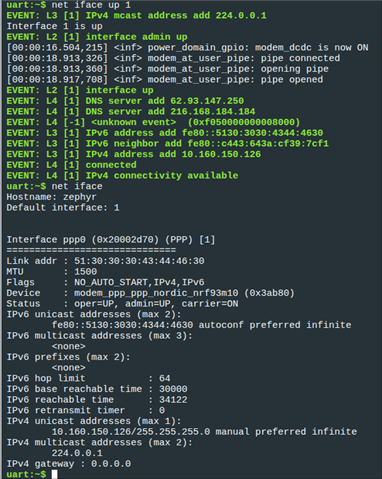
    That's strange, I was able to make it work on the very latest commit:

    Do you see any active LEDs on the DK? Are you able to see the shell interface? And if you are, can you please show me some logs?

    ing-barbiz said:
    the modem_bypass builds, but I get nothing on the serial

    For some reason, it seems like Zephyr doesn't get the "app.overlay" automatically in this version. Can you try to build the app with the following command:

    west build -b [email protected]/nrf54l15/cpuapp -p always -- -DEXTRA_DTC_OVERLAY_FILE=app.overlay

    Also, the Serial port where startup logs are is not the one where you can send the AT commands, please try both serial port.

    ing-barbiz said:
    which toolchain are you using to build? do you get the modem_bypass to work?

    I'm using the toolchain for NCS V3.4.0.

    If you are still experiencing issues, can you maybe send me the exact commit that you are on, and also your hex file so that I can try your build on my board.

    Also, here are the both hex files that I just built if you want to try them too:

    - modem bypass: 7382.zephyr.hex

    - ppp shell: 7382.zephyr.hex

    Best regards,

    Simon

  • Hello,

    I thnk the .hex files refer to the same build.

    However, I tested your shell build and I get the same behavior (no connection).

    I have tried the onomndo sim included in the package (not sure if I have to activate it) and an activated sim from 1NCE and one from T-Mobile.

    My log stops here:

    uart:~$ > net iface up 1
    net iface up 1
    EVENT: L3 [1] IPv4 mcast address add 224.0.0.1
    Interface 1 is up
    EVENT: L2 [1] interface admin up
    [00:00:47.386,893] <inf> power_domain_gpio: modem_dcdc is now ON

    Marco

  • Hello,

    ing-barbiz said:
    I thnk the .hex files refer to the same build.

    Oops, you are correct, It looks like I uploaded the ppp shell sample twice. Here is the correct Modem Bypass hex file : modem_bypass.hex

    ing-barbiz said:

    However, I tested your shell build and I get the same behavior (no connection).

    I have tried the onomndo sim included in the package (not sure if I have to activate it) and an activated sim from 1NCE and one from T-Mobile.

    Can you maybe try to check if you are able to connect to the network with the Modem Bypass sample using the AT commands directly? (The AT interface is not on the same COM port as the startup message)

    And also, how is the "NET" LED on the DK behaving? Is it doing long pulses, short pulses, or even something else?

    Best regards,

    Simon 

Reply
  • Hello,

    ing-barbiz said:
    I thnk the .hex files refer to the same build.

    Oops, you are correct, It looks like I uploaded the ppp shell sample twice. Here is the correct Modem Bypass hex file : modem_bypass.hex

    ing-barbiz said:

    However, I tested your shell build and I get the same behavior (no connection).

    I have tried the onomndo sim included in the package (not sure if I have to activate it) and an activated sim from 1NCE and one from T-Mobile.

    Can you maybe try to check if you are able to connect to the network with the Modem Bypass sample using the AT commands directly? (The AT interface is not on the same COM port as the startup message)

    And also, how is the "NET" LED on the DK behaving? Is it doing long pulses, short pulses, or even something else?

    Best regards,

    Simon 

Children
Related