SoftDevice Controller: Scanner window gets truncated/cancelled during concurrent Advertiser activity on nRF54LM20 (NCS v3.3.1)

Subject:
SoftDevice Controller: Scanner window gets truncated/cancelled during concurrent Advertiser activity on nRF54LM20 (NCS v3.3.1)

Description:

Environment:

  • Board: nRF54LM20 DK

  • SDK: nRF Connect SDK v3.3.1

  • Stack: SoftDevice Controller (default)

  • Role: Concurrent Advertiser (Connectable) + Scanner (No connection)

Configuration:

  • CONFIG_BT_PERIPHERAL=y

  • CONFIG_BT_OBSERVER=y

  • CONFIG_BT_CENTRAL=y (Required for bt_scan library compilation)

  • Advertising: BT_LE_ADV_CONN_FAST_1, interval 30–60 ms (randomized)

  • Scanning: Passive scan via Nordic bt_scan API, using default parameters: scan interval = 60 ms, scan window = 30 ms. A non-existent MAC address is used as a filter so it never matches/connects.

  • Connection interval: When a central device connects to us (we are the Peripheral), we request a connection interval of 60 ms via bt_conn_le_param_update(). Therefore, once connected, connection events occur every 60 ms and can also preempt the Scanner's RX window.

Problem Description:
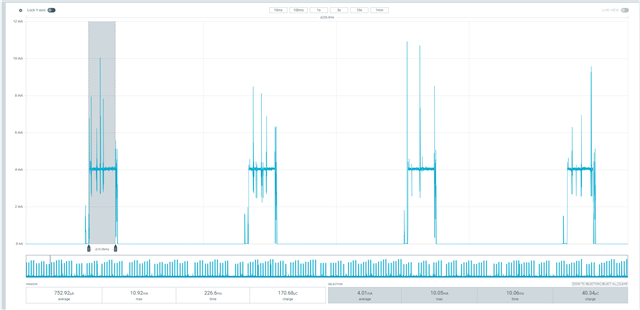
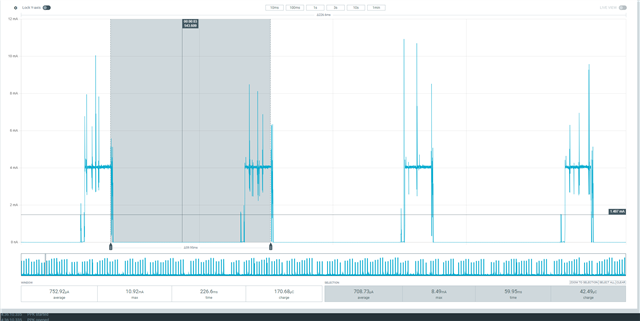
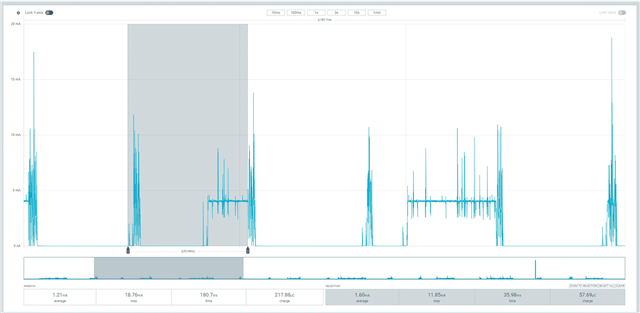
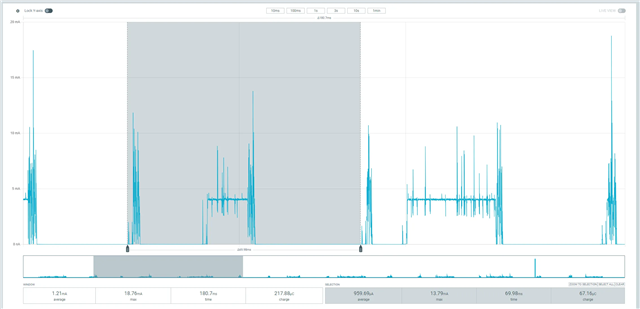
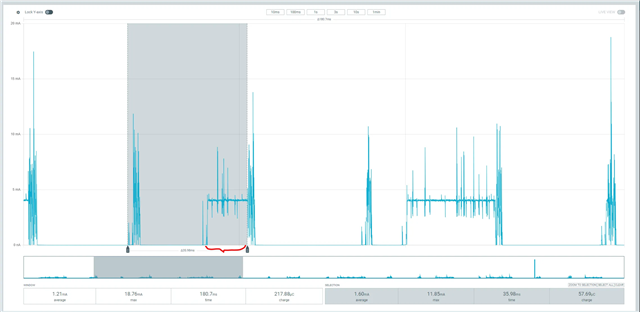
I am running a dual-role application (Advertiser + Scanner). When monitoring power consumption, I observe that the Scanner RX window (approx. 4-5mA) starts, but gets abruptly truncated by TX spikes (approx. 15mA) around the 15ms mark. The scanner window does not resume after the TX spike; instead, it waits for the next scan interval. The interruption appears to be caused by the Advertiser's TX activity, which may be either an advertising event or a connection event (if a central device has connected to us, with a 60 ms connection interval).

[Please see the attached power profiler waveform showing the interruption]

Questions:

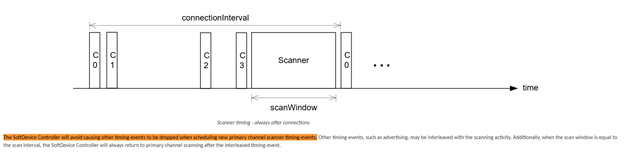
  1. The documentation states: "The timing-activities run to completion and cannot be preempted by other timing-activities, even if the timing-activity trying to preempt has a higher priority." However, my power profiler waveform shows that the Scanner RX window (approx. 4-5mA) has already been running for ~15ms when it gets abruptly truncated by the Advertiser TX spikes (approx. 15mA). How does the SoftDevice Controller define "already started"? Is it at the moment the radio starts receiving, or at the moment the scheduler officially locks the radio resource? Why does an event that appears to have already started still get truncated?

  2. The documentation states: "Activity B will be blocked and its timing-event will be rescheduled for a later time." However, in my observation, the Scanner window is not "blocked and rescheduled" — it is directly terminated, and the remaining 15ms is discarded. The scanner does not resume after the TX spike; it waits for the next scan interval. Does "rescheduled for a later time" mean the next scan interval (i.e., the entire window is discarded), or does it mean the remaining window time should be resumed?

    CONFIG_BT=y
    CONFIG_BT_PERIPHERAL=y
    CONFIG_BT_OBSERVER=y
    CONFIG_BT_DEVICE_NAME="DualRole"
    
    CONFIG_BT_SCAN=y
    CONFIG_BT_SCAN_FILTER_ENABLE=y
    CONFIG_BT_SCAN_UUID_CNT=1
    CONFIG_BT_CENTRAL=y
    
    CONFIG_SERIAL=n
    CONFIG_UART_CONSOLE=n
    CONFIG_PRINTK=n
    #include <zephyr/kernel.h>
    #include <zephyr/bluetooth/bluetooth.h>
    #include <zephyr/bluetooth/conn.h>
    #include <zephyr/bluetooth/gap.h>
    #include <bluetooth/scan.h>
    
    /* ========== Advertising data ========== */
    static const struct bt_data ad[] = {
        BT_DATA_BYTES(BT_DATA_FLAGS, (BT_LE_AD_GENERAL | BT_LE_AD_NO_BREDR)),
        BT_DATA(BT_DATA_NAME_COMPLETE, CONFIG_BT_DEVICE_NAME,
                sizeof(CONFIG_BT_DEVICE_NAME) - 1),
    };
    
    /* ========== Connection callbacks ========== */
    
    static void connected(struct bt_conn *conn, uint8_t err)
    {
        if (err) {
            return;
        }
        /* Connection established. No action needed here. */
    }
    
    static void disconnected(struct bt_conn *conn, uint8_t reason)
    {
        struct bt_conn_info info;
    
        bt_conn_get_info(conn, &info);
    
        /* Restart connectable advertising when the peripheral role disconnects */
        if (info.role == BT_CONN_ROLE_PERIPHERAL) {
            bt_le_adv_start(BT_LE_ADV_CONN_FAST_1,
                            ad, ARRAY_SIZE(ad), NULL, 0);
        }
    }
    
    BT_CONN_CB_DEFINE(conn_callbacks) = {
        .connected = connected,
        .disconnected = disconnected,
    };
    
    /* ========== Advertising start ========== */
    
    static void adv_start(void)
    {
        bt_le_adv_start(BT_LE_ADV_CONN_FAST_1,
                        ad, ARRAY_SIZE(ad), NULL, 0);
    }
    
    /* ========== Scan callbacks (empty, placeholders only) ========== */
    
    static void scan_filter_match(struct bt_scan_device_info *device_info,
                                  struct bt_scan_filter_match *filter_match,
                                  bool connectable)
    {
        (void)device_info;
        (void)filter_match;
        (void)connectable;
    }
    
    static void scan_connecting_error(struct bt_scan_device_info *device_info)
    {
        (void)device_info;
    }
    
    static void scan_connecting(struct bt_scan_device_info *device_info,
                                struct bt_conn *conn)
    {
        (void)device_info;
        (void)conn;
    }
    
    BT_SCAN_CB_INIT(scan_cb, scan_filter_match, NULL,
                    scan_connecting_error, scan_connecting);
    
    /* ========== Scan initialization ========== */
    
    static void scan_init(void)
    {
        /* Non-existent MAC address, so the filter never matches */
        static const bt_addr_le_t target_addr = {
            .type = BT_ADDR_LE_PUBLIC,
            .a = { { 0xDE, 0xAD, 0xBE, 0xEF, 0x00, 0x01 } },
        };
    
        struct bt_scan_init_param param = {
            .scan_param       = NULL,          /* Use default scan parameters */
            .conn_param       = BT_LE_CONN_PARAM_DEFAULT,
            .connect_if_match = 1,             /* Auto-connect enabled, but filter never matches */
        };
    
        bt_scan_init(&param);
        bt_scan_cb_register(&scan_cb);
    
        /* Add address filter (never matches) */
        bt_scan_filter_add(BT_SCAN_FILTER_TYPE_ADDR, (void *)&target_addr);
        bt_scan_filter_enable(BT_SCAN_ADDR_FILTER, false);
    }
    
    /* ========== Main ========== */
    
    int main(void)
    {
        int err;
    
        err = bt_enable(NULL);
        if (err) {
            return 0;
        }
    
        /* Start connectable advertising (Peripheral role) */
        adv_start();
    
        /* Initialize scan module and start continuous scanning */
        scan_init();
    
        err = bt_scan_start(BT_SCAN_TYPE_SCAN_PASSIVE);
        if (err) {
            return 0;
        }
    
        while (1) {
            k_sleep(K_FOREVER);
        }
    
        return 0;
    }
Parents
  • Hello,

    I am not really sure what I am looking at here. 

    Please be aware that you are mixing different types of documentation and software. All the screenshots mentioning S140 is for the Softdevice S140 from the nRF5 SDK. This is not what you have running on your nRF54LM20A. This is your first and third screenshots. Your second screenshot, however, seems to be from the nRF Connect SDK (NCS) where the Softdevice Controller is being documented. 

    However, after checking, the behavior is more or less the same. It says that the SoftDevice Controller from NCS also shouldn't stop already started events. This part is documented here:
    https://nrfconnectdocs.nordicsemi.com/ncs/latest/nrfxlib/softdevice_controller/doc/scheduling.html#scheduling

    Although, I am not sure exactly what I am looking at here. I asssume that throughout all this, you are using a scan interval of 60ms, and a scan window of 10ms. Also, it looks like you are using an advertising interval of 30ms. 

    What I can't tell is e.g. from your 6th screenshot, what the length of the scan window is:

    To me it looks like roughly 10ms. 

    However, from the changelog (present from v2.7.0) found in NCS v3.3.1\nrfxlib\softdevice_controller\CHANGELOG.rst, it says:

    * The |controller| will now schedule all scanner primary channel timing-events cooperatively even when the sum of the scan windows is less than the scan interval.
      If the |controller| is unable to schedule a full scan window for a long time, the scheduling priority will be raised to ensure a full window is scheduled.
    
      Generally, this change will result in either increased scanning time, or similar scanning time to before.
      In cases where there are many conflicting activities within the scan window, this change may result in reduced scanning time. (DRGN-19050)

    (Note that I was looking in the changelog from v3.4.0, but this has been present since v2.7.0).

    I would say that this explains what you are seeing. However, it does not explain that you are seeing constant 10ms scan windows in your first plot, but I am not sure you were using the same scan parameters there?

    I agree that the changelog makes the behavior different from the documentation, and perhaps the documentation should be updated. However, the change itself means that you will get more scan time than you would otherwise. Without that change, all the scan windows that would collide would be dropped completely. Now at least parts of it will be scheduled. Ideally, if you know that you will be advertising and scanning at the same time, you should try to set the scanning and advertising parameters so that they don't continuously overlap. 

    You would think that setting both intervals to e.g. 60 and a scan window of 30 would be the best, but remember that a random delay of 0-10ms is added between each advertising interval, so the advertisements will drift. Hence, play around with the numbers until you find something that works for you.

    Best regards,

    Edvin

Reply
  • Hello,

    I am not really sure what I am looking at here. 

    Please be aware that you are mixing different types of documentation and software. All the screenshots mentioning S140 is for the Softdevice S140 from the nRF5 SDK. This is not what you have running on your nRF54LM20A. This is your first and third screenshots. Your second screenshot, however, seems to be from the nRF Connect SDK (NCS) where the Softdevice Controller is being documented. 

    However, after checking, the behavior is more or less the same. It says that the SoftDevice Controller from NCS also shouldn't stop already started events. This part is documented here:
    https://nrfconnectdocs.nordicsemi.com/ncs/latest/nrfxlib/softdevice_controller/doc/scheduling.html#scheduling

    Although, I am not sure exactly what I am looking at here. I asssume that throughout all this, you are using a scan interval of 60ms, and a scan window of 10ms. Also, it looks like you are using an advertising interval of 30ms. 

    What I can't tell is e.g. from your 6th screenshot, what the length of the scan window is:

    To me it looks like roughly 10ms. 

    However, from the changelog (present from v2.7.0) found in NCS v3.3.1\nrfxlib\softdevice_controller\CHANGELOG.rst, it says:

    * The |controller| will now schedule all scanner primary channel timing-events cooperatively even when the sum of the scan windows is less than the scan interval.
      If the |controller| is unable to schedule a full scan window for a long time, the scheduling priority will be raised to ensure a full window is scheduled.
    
      Generally, this change will result in either increased scanning time, or similar scanning time to before.
      In cases where there are many conflicting activities within the scan window, this change may result in reduced scanning time. (DRGN-19050)

    (Note that I was looking in the changelog from v3.4.0, but this has been present since v2.7.0).

    I would say that this explains what you are seeing. However, it does not explain that you are seeing constant 10ms scan windows in your first plot, but I am not sure you were using the same scan parameters there?

    I agree that the changelog makes the behavior different from the documentation, and perhaps the documentation should be updated. However, the change itself means that you will get more scan time than you would otherwise. Without that change, all the scan windows that would collide would be dropped completely. Now at least parts of it will be scheduled. Ideally, if you know that you will be advertising and scanning at the same time, you should try to set the scanning and advertising parameters so that they don't continuously overlap. 

    You would think that setting both intervals to e.g. 60 and a scan window of 30 would be the best, but remember that a random delay of 0-10ms is added between each advertising interval, so the advertisements will drift. Hence, play around with the numbers until you find something that works for you.

    Best regards,

    Edvin

Children
No Data
Related