nRF Academy Intermediate Course - Lesson 1 Exercise 1: Issue with Debugging

Hello,

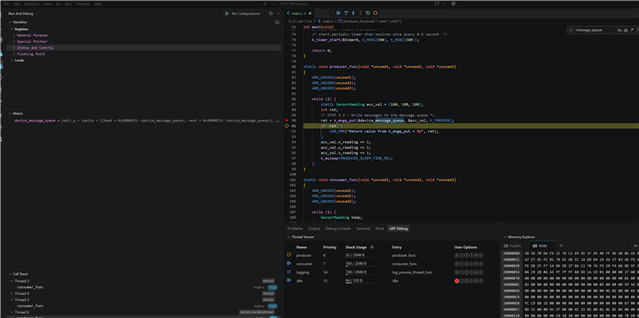
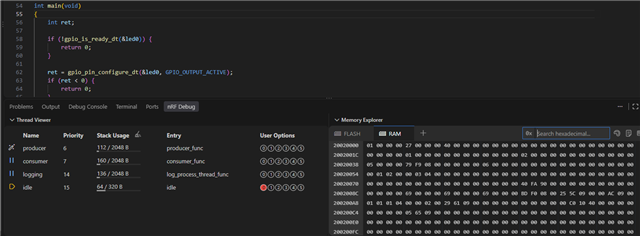
I tried following the exercise until the part where you start a debugging session. I looked at the thread viewer and the result was different than what was on the exercise. The picture below shows that the running thread is the idle thread instead of the main thread. Execution is supposed to break by default at main(). I tried manually putting a breakpoint in the main function but it didn't work either.
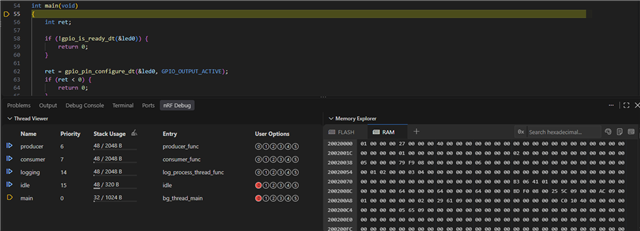
After that I tried changing the build configuration and unchecked "Include debug thread information". Somehow this fixed the problem. The result I'm getting in the thread viewer matches what's on the exercise. I can still see the thread names and stack usage even with the "Include debug thread information" unchecked.
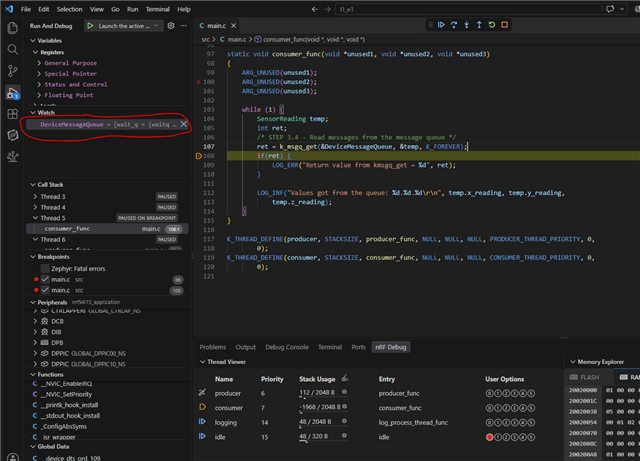
Edit: I continued the exercise and am unable to see the details of the message queue in the watch list like in the exercise. Could this be because I unchecked "Include debug thread information"?
Parents
  • Hello,

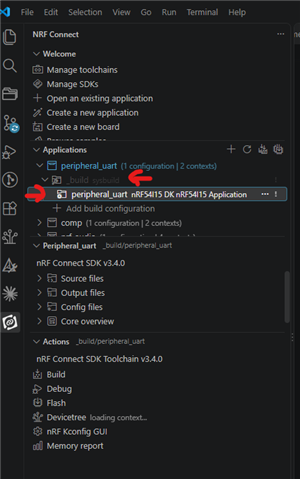
    I suspect that the behavior you are seeing is based on what you selected when you clicked "start debug session". Can you plaese let me know, right before you click "Debug", Did you use the build folder, or the application name below that?

    Which one of the red arrows was selected?

    And after you changed your build configuration, was the application built again? And was it flashed again?

    Best regards,

    Edvin

  • Hello Edvin,

    I used the application name below the build folder (bottom red arrow) when I started the debugging session and I also do the same for flashing. Is there a difference between using one vs the other? 

    I right click the build folder, remove the build configuration and make another one. Sometimes if I just edit the build configuration it will keep telling me to do a pristine build even after doing a pristine build already. I don't know what's causing this so I just remove the build config and make a new one if I want to make changes.

    For this exercise, I usually just press debug without flashing after making changes. Although at some point I did try flashing first before using the debugger but I didn't notice any difference.

    Thank you

Reply
  • Hello Edvin,

    I used the application name below the build folder (bottom red arrow) when I started the debugging session and I also do the same for flashing. Is there a difference between using one vs the other? 

    I right click the build folder, remove the build configuration and make another one. Sometimes if I just edit the build configuration it will keep telling me to do a pristine build even after doing a pristine build already. I don't know what's causing this so I just remove the build config and make a new one if I want to make changes.

    For this exercise, I usually just press debug without flashing after making changes. Although at some point I did try flashing first before using the debugger but I didn't notice any difference.

    Thank you

Children
  • Ok. Is it possible to zip and upload the application you are testing with, so that I can try to reproduce what you are seeing? And what NCS version are you using?

    Best regards,

    Edvin

  • I was able to get the threads to run correctly with "Include debug thread information" checked. VS Code gave me a prompt to update the Segger J-Link debug probe and it might have solved the issue. 

    I'm still unable to see what's inside the message queue when I add it to the watch list.

    I'm actually using the l1_e1_sol for this one which I took from https://github.com/NordicDeveloperAcademy/ncs-inter 

    I made no changes to it and just build, erase and flash, and then run the debugger but I still can't see inside the message queue from the watch list. Here is the build configuration I used.

    I'm using NCS version 3.4.1 although I had the same problem with version 3.4.0. The board I'm using is an nRF54L15 DK.

    Edit: I tried using an nRF52840 DK and still have the same exact problem.

  • Hello,

    Sorry for the late reply. I have been out of office for a period of time.

    This is not the same that I see:

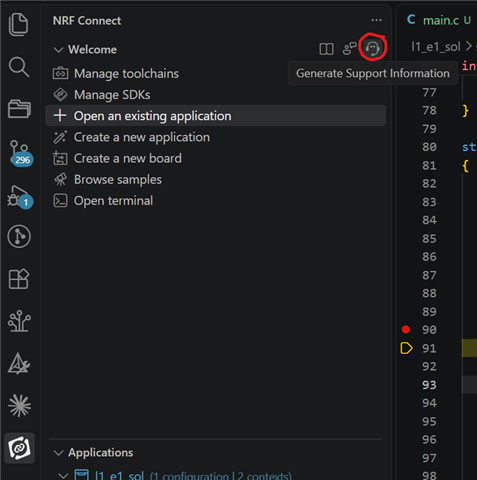
    Can you please reproduce this one more time, and directly after you do, exit the debug mode, and click "Generate Support Information:


    And paste me what it outputs.

    Best regards,

    Edvin

  • Hello Edvin,

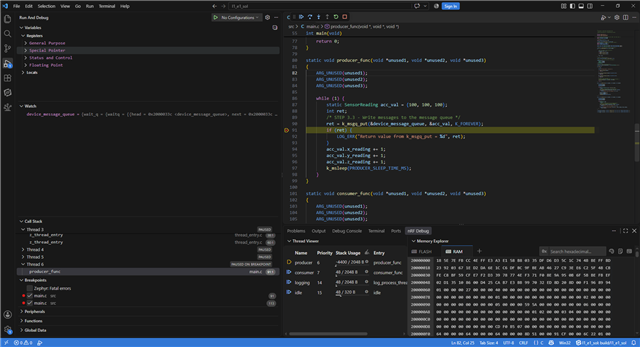
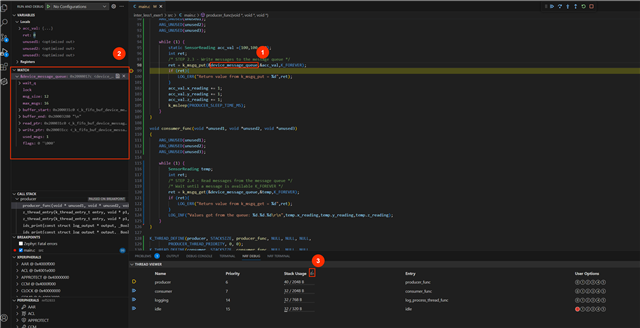
    The watch list looks the same as what you have. In the previous post, I put both device_message_queue and &device_message_queue just to see if it made a difference. I want the watch list to look like the picture below from the nRF Intermediate course. 

    Here is the output from generating support information.

    {
      "platform": {
        "os": "win32",
        "osVersion": "Windows 10 Pro",
        "osKernel": "10.0.19045",
        "vscode": "1.143.0",
        "electron": "43.7.7",
        "node": "v24.21.0",
        "appName": "Visual Studio Code",
        "appHost": "desktop"
      },
      "system": {
        "date": "2026-10-28T22:48:08.499Z",
        "vscodeRoot": "c:\\Users\\Brian\\AppData\\Local\\Programs\\Microsoft VS Code\\2d0b7506a3\\resources\\app",
        "nrfConnectForDesktopInstalled": true,
        "vscodeUptime": "00:26:16",
        "osUptime": "1004:30:49",
        "cpu": "AMD Ryzen 5 PRO 4650U with Radeon Graphics"
      },
      "workspace": {
        "name": "l1_e1_sol",
        "workspaceFile": null,
        "folders": [
          "c:\\nordicfw\\ncsinter\\l1_e1_sol"
        ]
      },
      "sdks": [
        {
          "version": "v3.4.1",
          "path": "c:\\ncs\\v3.4.1",
          "active": true
        }
      ],
      "activeBuild": "/nordicfw/ncsinter/l1_e1_sol/build/l1_e1_sol",
      "apps": [
        {
          "workspace": "c:\\nordicfw\\ncsinter\\l1_e1_sol",
          "uri": "c:\\nordicfw\\ncsinter\\l1_e1_sol",
          "buildConfigurations": [
            {
              "id": "/nordicfw/ncsinter/l1_e1_sol/build",
              "name": "build",
              "boardId": "nrf54l15dk/nrf54l15/cpuapp",
              "type": "Sysbuild",
              "isChild": false,
              "isStale": false,
              "taskBindings": {
                "build": [],
                "pristineBuild": [],
                "flash": [],
                "eraseAndFlash": []
              },
              "sdk": "c:\\ncs\\v3.4.1",
              "toolchain": "nRF Connect SDK Toolchain v3.4.1"
            },
            {
              "id": "/nordicfw/ncsinter/l1_e1_sol/build/l1_e1_sol",
              "name": "build/l1_e1_sol",
              "boardId": "nrf54l15dk/nrf54l15/cpuapp",
              "type": "Zephyr",
              "isChild": true,
              "isStale": false,
              "taskBindings": {
                "build": [],
                "pristineBuild": [],
                "flash": [],
                "eraseAndFlash": []
              },
              "sdk": "c:\\ncs\\v3.4.1",
              "toolchain": "nRF Connect SDK Toolchain v3.4.1"
            }
          ]
        }
      ],
      "toolchains": [
        {
          "version": "v3.4.1",
          "path": "c:\\ncs\\toolchains\\4f5b6ad6dd",
          "displayName": "nRF Connect SDK Toolchain v3.4.1",
          "compilerTools": [
            "Zephyr SDK (arm) 1.0.1",
            "Zephyr SDK (riscv) 1.0.1"
          ],
          "active": true
        }
      ],
      "connectedDevices": [
        {
          "serialNumber": "001057749757",
          "boardVersion": "PCA10156",
          "deviceFamily": "NRF54L_FAMILY",
          "deviceName": "nRF54L15",
          "deviceVersion": "NRF54L15_xxAA_REV2",
          "jlinkDeviceNames": {
            "NRFDL_DEVICE_CORE_APPLICATION": "nRF54L15_M33",
            "NRFDL_DEVICE_CORE_FLPR": "nRF54L15_RV32"
          },
          "jlinkObFirmwareVersion": "J-Link OB-nRF5340-NordicSemi compiled Jun 11 2026 13:12:28",
          "protectionStatus": "NRFDL_PROTECTION_STATUS_NONE",
          "protectionStatusCore": "NRFDL_DEVICE_CORE_APPLICATION"
        }
      ],
      "tools": {
        "_": "Toolchain: nRF Connect SDK Toolchain v3.4.1",
        "C:\\ncs\\toolchains\\4f5b6ad6dd\\opt\\zephyr-sdk\\gnu\\arm-zephyr-eabi\\bin\\arm-zephyr-eabi-gcc.exe": "1.0.1",
        "C:\\Program Files\\SEGGER\\JLink_V982\\JLink.exe": "9.82",
        "nrfjprog": "not needed",
        "C:\\ncs\\toolchains\\4f5b6ad6dd\\nrfutil": "8.1.1",
        "C:\\ncs\\toolchains\\4f5b6ad6dd\\nrfutil\\home\\bin\\nrfutil-device.exe": "2.20.0",
        "C:\\ncs\\toolchains\\4f5b6ad6dd\\cmake": "4.2.1",
        "C:\\ncs\\toolchains\\4f5b6ad6dd\\opt\\bin\\Scripts\\west.exe": "1.5.0",
        "C:\\ncs\\toolchains\\4f5b6ad6dd\\opt\\bin\\python.exe": "3.12.4",
        "C:\\ncs\\toolchains\\4f5b6ad6dd\\opt\\bin\\ninja.exe": "1.13.2",
        "C:\\ncs\\toolchains\\4f5b6ad6dd\\opt\\bin\\gperf.exe": "3.1",
        "C:\\ncs\\toolchains\\4f5b6ad6dd\\opt\\bin\\dtc.exe": "1.4.7",
        "C:\\ncs\\toolchains\\4f5b6ad6dd\\opt\\bin\\gn.exe": "2223",
        "C:\\ncs\\toolchains\\4f5b6ad6dd\\mingw64\\bin\\git.exe": "git version 2.52.0.",
        "debugger (arm)": "c:\\ncs\\toolchains\\4f5b6ad6dd\\opt\\zephyr-sdk\\gnu\\arm-zephyr-eabi\\bin\\arm-zephyr-eabi-gdb.exe",
        "debugger (riscv)": "c:\\ncs\\toolchains\\4f5b6ad6dd\\opt\\zephyr-sdk\\gnu\\riscv64-zephyr-elf\\bin\\riscv64-zephyr-elf-gdb.exe"
      },
      "nrfutil": {
        "nrfutil-device": {
          "version": "2.20.1",
          "binPath": "c:\\Users\\Brian\\.vscode\\extensions\\nordic-semiconductor.nrf-connect-2026.9.2823-win32-x64\\platform\\nrfutil\\bin\\nrfutil-device",
          "jlinkInfo": {
            "description": "This version of SEGGER J-Link is different from the J-Link version that was used to test nrfutil device commands",
            "expectedVersion": {
              "version": "JLink_V9.24a",
              "versionFormat": "string"
            },
            "name": "JlinkARM",
            "version": "JLink_V9.82",
            "versionFormat": "string"
          }
        },
        "nrfutil-sdk-manager": {
          "version": "1.16.1",
          "binPath": "c:\\Users\\Brian\\.vscode\\extensions\\nordic-semiconductor.nrf-connect-2026.9.2823-win32-x64\\platform\\nrfutil\\bin\\nrfutil-sdk-manager"
        }
      },
      "environment": {
        "_": "SDK: c:\\ncs\\v3.4.1, Toolchain: nRF Connect SDK Toolchain v3.4.1",
        "westEnv": {
          "HOME": "C:\\Users\\Brian",
          "HOMEDRIVE": "C:",
          "HOMEPATH": "\\Users\\Brian",
          "PATH": "C:\\ncs\\toolchains\\4f5b6ad6dd;C:\\ncs\\toolchains\\4f5b6ad6dd\\mingw64\\bin;C:\\ncs\\toolchains\\4f5b6ad6dd\\bin;C:\\ncs\\toolchains\\4f5b6ad6dd\\opt\\bin;C:\\ncs\\toolchains\\4f5b6ad6dd\\opt\\bin\\Scripts;C:\\ncs\\toolchains\\4f5b6ad6dd\\opt\\nanopb\\generator-bin;C:\\ncs\\toolchains\\4f5b6ad6dd\\nrfutil\\bin;C:\\ncs\\toolchains\\4f5b6ad6dd\\opt\\zephyr-sdk\\gnu\\arm-zephyr-eabi\\bin;C:\\ncs\\toolchains\\4f5b6ad6dd\\opt\\zephyr-sdk\\gnu\\riscv64-zephyr-elf\\bin;c:\\Users\\Brian\\.vscode\\extensions\\nordic-semiconductor.nrf-connect-2026.9.2823-win32-x64\\platform\\nrfutil\\lib\\nrfutil-sdk-manager;C:\\Windows\\system32;C:\\Windows;C:\\Windows\\System32\\Wbem;C:\\Windows\\System32\\WindowsPowerShell\\v1.0\\;C:\\Windows\\System32\\OpenSSH\\;C:\\Program Files\\MATLAB\\R2018a\\bin;C:\\Program Files\\dotnet\\;C:\\Program Files\\Git\\cmd;C:\\Users\\Brian\\AppData\\Local\\Microsoft\\WindowsApps;C:\\Users\\Brian\\.nrfutil;C:\\Users\\Brian\\AppData\\Local\\Programs\\Microsoft VS Code\\bin;C:\\Users\\Brian\\AppData\\Local\\Programs\\Microsoft VS Code\\bin\\copilot-shim",
          "ZEPHYR_BASE": "c:\\ncs\\v3.4.1\\zephyr",
          "ZEPHYR_TOOLCHAIN_VARIANT": "zephyr",
          "ZEPHYR_SDK_INSTALL_DIR": "c:\\ncs\\toolchains\\4f5b6ad6dd\\opt\\zephyr-sdk",
          "PYTHONPATH": "C:\\ncs\\toolchains\\4f5b6ad6dd\\opt\\bin;C:\\ncs\\toolchains\\4f5b6ad6dd\\opt\\bin\\Lib;C:\\ncs\\toolchains\\4f5b6ad6dd\\opt\\bin\\Lib\\site-packages"
        },
        "inherited": {
          "HOME": "C:\\Users\\Brian",
          "HOMEDRIVE": "C:",
          "HOMEPATH": "\\Users\\Brian",
          "Path": "C:\\Windows\\system32;C:\\Windows;C:\\Windows\\System32\\Wbem;C:\\Windows\\System32\\WindowsPowerShell\\v1.0\\;C:\\Windows\\System32\\OpenSSH\\;C:\\Program Files\\MATLAB\\R2018a\\bin;C:\\Program Files\\dotnet\\;C:\\Program Files\\Git\\cmd;C:\\Users\\Brian\\AppData\\Local\\Microsoft\\WindowsApps;C:\\Users\\Brian\\.nrfutil;C:\\Users\\Brian\\AppData\\Local\\Programs\\Microsoft VS Code\\bin;C:\\Users\\Brian\\AppData\\Local\\Programs\\Microsoft VS Code\\bin\\copilot-shim",
          "PATH": "C:\\Windows\\system32;C:\\Windows;C:\\Windows\\System32\\Wbem;C:\\Windows\\System32\\WindowsPowerShell\\v1.0\\;C:\\Windows\\System32\\OpenSSH\\;C:\\Program Files\\MATLAB\\R2018a\\bin;C:\\Program Files\\dotnet\\;C:\\Program Files\\Git\\cmd;C:\\Users\\Brian\\AppData\\Local\\Microsoft\\WindowsApps;C:\\Users\\Brian\\.nrfutil;C:\\Users\\Brian\\AppData\\Local\\Programs\\Microsoft VS Code\\bin;C:\\Users\\Brian\\AppData\\Local\\Programs\\Microsoft VS Code\\bin\\copilot-shim"
        }
      },
      "terminal": {
        "defaultProfile": null
      },
      "config": {
        "nordic-semiconductor.nrf-connect": {
          "ozonePath": "",
          "applications": [],
          "applicationOptions": {},
          "west": {
            "env": {
              "$base": "terminal"
            },
            "verbose": ""
          },
          "boardRoots": [],
          "taskBindings": {},
          "buildTerminal": {
            "condensedProgress": true
          },
          "debugging": {
            "flash": true,
            "bindings": {},
            "justMyCode": false,
            "focusOnNrfDebug": true,
            "logging": "default"
          },
          "activeAppFollowActiveEditor": true,
          "flash": {
            "softreset": false,
            "erase": false,
            "recover": false
          },
          "enableTelemetry": false,
          "thirdpartyIntegration": {},
          "toolchainManager": {
            "indexURL": null,
            "installDirectory": null
          },
          "sdkManager": {
            "region": "default"
          },
          "defaultOpenAction": "ask",
          "terminalProfile": {
            "shell": {}
          },
          "remoteDevices": [],
          "buildLogs": {
            "numberOfLogs": 1,
            "timestamped": true
          },
          "mcp": {
            "local": {
              "enabled": true
            }
          },
          "topdir": "${nrf-connect.sdk:2.8.0}"
        },
        "nordic-semiconductor.nrf-terminal": {
          "terminalMode": "character",
          "localEcho": false
        }
      },
      "extensions": {
        "internal": {
          "nordic-semiconductor.nrf-connect": {
            "version": "2026.9.2823",
            "path": "c:\\Users\\Brian\\.vscode\\extensions\\nordic-semiconductor.nrf-connect-2026.9.2823-win32-x64",
            "isActive": true
          },
          "nordic-semiconductor.nrf-terminal": {
            "version": "2026.9.409",
            "path": "c:\\Users\\Brian\\.vscode\\extensions\\nordic-semiconductor.nrf-terminal-2026.9.409",
            "isActive": true
          },
          "nordic-semiconductor.nrf-devicetree": {
            "version": "2026.9.977",
            "path": "c:\\Users\\Brian\\.vscode\\extensions\\nordic-semiconductor.nrf-devicetree-2026.9.977",
            "isActive": true
          },
          "nordic-semiconductor.nrf-kconfig": {
            "version": "2026.9.358",
            "path": "c:\\Users\\Brian\\.vscode\\extensions\\nordic-semiconductor.nrf-kconfig-2026.9.358",
            "isActive": true
          }
        },
        "external": {
          "marus25.cortex-debug": null,
          "ms-vscode.cpptools": "1.34.4",
          "TypeScriptTeam.jsts-chat-features": "0.0.4",
          "ms-vscode.js-debug": "1.140.0",
          "ms-vscode.js-debug-companion": "1.1.3",
          "ms-vscode.vscode-js-profile-table": "1.0.11",
          "KyleMicallefBonnici.dts-lsp": "0.14.2",
          "trond-snekvik.gnu-mapfiles": "1.1.0"
        }
      }
    }
  • This tree structure is not possible to achieve right now. You have to downgrade to a version older than 2026.9.2797 as that replaced Microsoft MIEngine with a new debug adapter, and we do not have full feature parity yet. We will put this in the backlog so a future release may add tree views for watches.

Related