nRF5340 Audio DK Unicast Server – PACS/ASCS Not Discovered or Connected by Pixel 8/8a

Hello Nordic Support Team,

I am using the nRF5340 Audio DK with the nRF Audio application provided with the nRF SDK, configured as a Unicast Server.

The board advertises correctly, and when I check it using the nRF Connect app, I can see the expected LE Audio-related services/profiles.

However, when I connect the nRF5340 Audio DK to a **Pixel 8 or Pixel 8a running Android 17, the connection is successful, but I don't see any LE Audio-related options or on/off settings on the phone side.

Could you please confirm if any additional configuration is required on the nRF side or Android side to enable and establish the LE Audio connection?

Thank you.

Parents
  • Hello,

    Can you try, for debugging purposes, to add this to your prj.conf:

    CONFIG_BT_AUDIO_PRESENTATION_DELAY_US=40000

    And also, make sure that there is no old bonding information on the device. Try erasing it completely (nrfutil device erase) and re-program it. Also make sure that there is no bonding information on the phone side by opening the bluetooth settings, and check that it doesn't list this device under "known devices" or something similar to that. 

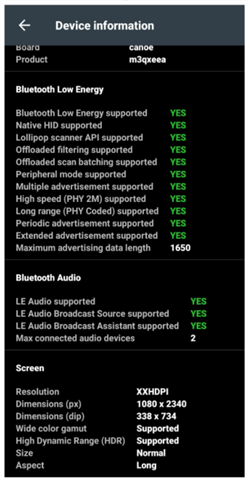
    Finally, can you please try to open nRF Connect for Android. There should be somewhere in that app where you can see the supported BLE features. 

    I don't have an Android phone at hand, but you should be able to find something like this:

    Please check that LE Audio supported reads "yes".

    Best regards,

    Edvin

  • Hello,

    I tried the suggested steps. I added CONFIG_BT_AUDIO_PRESENTATION_DELAY_US=40000 to prj.conf, erased the nRF5340 Audio DK, re-flashed the application, and checked the phone for old bonding information.

    I also checked the BLE features in nRF Connect for Android, and LE Audio supported is reported as Yes.

    However, the issue remains the same. The Pixel 8/8a pairs and connects to the nRF5340 Audio DK, but no LE Audio-related options or settings are available on the phone.

    On the nRF side, the connection and pairing complete successfully, and MCS discovery also finishes successfully. Here are the relevant logs:

    <inf> bt_mgmt: Connected: 42:DA:4F:DE:64:38 (random)
    <inf> main: Connection event. Num connections: 1
    <inf> bt_mgmt: Security changed: level 2
    <inf> main: Security changed
    <inf> bt_mgmt: Pairing complete. Bonded: 1
    <inf> bt_content_ctrl_media: Discovery of MCS finished

    Since LE Audio is reported as supported by the phone and MCS discovery completes successfully on nRF side , could you please advise what I should check next to determine why the Pixel does not recognize the board as an LE Audio device?

    Thank you for your support.

  • Hello,

    Just to be clear, the Unicast server sample acts as a Bluetooth LE Audio headset. 

    I am not sure exactly how this works on a Pixel 8, but you should look for the DK inside the phones Bluetooth settings, and see if there is an option to toggle LE Audio there. Do you see that?

    Best regards,

    Edvin

  • Hello Edvin,

    I checked the Bluetooth settings on my Pixel 8/8a after connecting it to the nRF5340 Audio DK. However, I can only see the Disconnect and Forget options. There is no option to enable or disable LE Audio or any other audio-related setting for the device.

    The phone connects and pairs with the DK successfully, but I still cannot see any LE Audio options.

    Could you please advise if any additional configuration is required on the nRF side? If you don't have a  Pixel 8 available for testing, could you please assign this issue to someone who has access to one so they can verify the behavior?

    Thank you for your support.

    Best regards,

  • Hello, 

    Edvin is currently out of office, so I will support you in the mean time. 

    I was able to discuss this shortly with some colleagues today, and one of them let me know that they are also having issues with Pixel 8 and a cis headset/unicast server. However, this was from a previous trial and we do not have a Pixel 8 available for testing this currently. I will try to get a hold of one, but note that this may take some time. 

    Yash48 said:
    Could you please advise if any additional configuration is required on the nRF side? If you don't have a  Pixel 8 available for testing, could you please assign this issue to someone who has access to one so they can verify the behavior?

    We have to investigate this some more to be able to give you any feedback. While I don't have a Pixel 8 easily available, I could make a trial on a Pixel 7 pro, at least to get some data with a Pixel phone. This is not a guarantee, but if it works it should be quicker than trying to get a hold of a Pixel 8. 

    Thank you for your patience so far. I'll update you on my status tomorrow, though I can't promise any results yet. 

    Best regards,

    Maria

Reply
  • Hello, 

    Edvin is currently out of office, so I will support you in the mean time. 

    I was able to discuss this shortly with some colleagues today, and one of them let me know that they are also having issues with Pixel 8 and a cis headset/unicast server. However, this was from a previous trial and we do not have a Pixel 8 available for testing this currently. I will try to get a hold of one, but note that this may take some time. 

    Yash48 said:
    Could you please advise if any additional configuration is required on the nRF side? If you don't have a  Pixel 8 available for testing, could you please assign this issue to someone who has access to one so they can verify the behavior?

    We have to investigate this some more to be able to give you any feedback. While I don't have a Pixel 8 easily available, I could make a trial on a Pixel 7 pro, at least to get some data with a Pixel phone. This is not a guarantee, but if it works it should be quicker than trying to get a hold of a Pixel 8. 

    Thank you for your patience so far. I'll update you on my status tomorrow, though I can't promise any results yet. 

    Best regards,

    Maria

Children
  • Hi again,

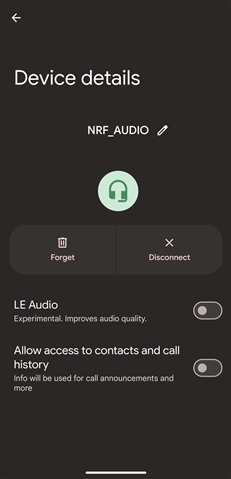
    As promised, here is the current update with the Pixel 7 Pro. I was not able to reproduce the issue with Android 16 running on the phone. Here is a screenshot of the Bluetooth settings I am seeing currently: 

    As you can see I have the option of enabling LE Audio for the NRF_AUDIO device running the default Unicast Server configuration of the nRF Audio application v3.4.0. 

    I am currently updating the OS to Android 17 to see if there is a change in behaviour. 

    Which nRF Connect SDK version are you working with? 

    Best regards,

    Maria

  • Hello Maria,

    Thank you for checking this.

    I also tested with a Pixel 10, and I was not able to reproduce the same issue. I am using nRF Audio application v3.4.0 with SDK version 3.4.0.

    Please let me know if you need any additional logs or information from my side.

    Best regards,
    Yash

  • Hi Yash, 

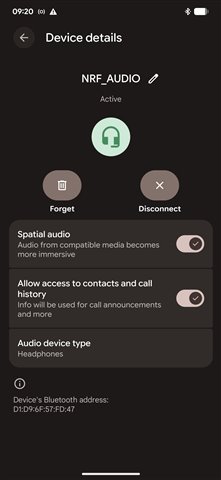
    I was able to get LE Audio working with the Pixel 7 Pro and Android 17 by enabling the "Bypass Bluetooth LE Audio allowlist" setting in the developer settings on the phone. My settings screen looks like the below screenshot now, and the headset is chosen as the audio output on the phone. 

    Could you give it a try to enable developer options and bypassing the allowlist? 

    Best regards,

    Maria

Related