Beware that this post is related to an SDK in maintenance mode
More Info: Consider nRF Connect SDK for new designs
This post is older than 2 years and might not be relevant anymore
More Info: Consider searching for newer posts

Package for BLE Secure DFU bootloader step by step guide for S132 PCA10040

Hi There,

I was trying to understand the step to create a test app for dfu bootloader update via BLE for PCA10040. Below is the documentation I read.

http://infocenter.nordicsemi.com/index.jsp?topic=%2Fcom.nordic.infocenter.sdk5.v14.2.0%2Fble_sdk_app_dfu_bootloader.html

I'm interested to further explore the Testing part by create my own firmware package for testing, and I not sure which example I could use for putting public key and generate the programming zip package.

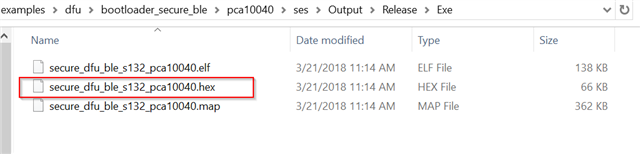
Can I use the below package?

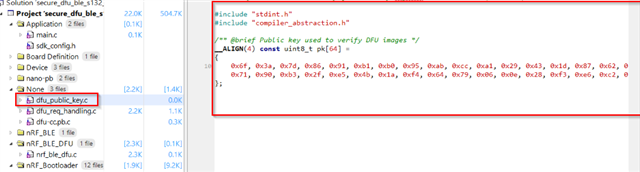
By the way, I tested flashing the dfu bootloader firmware which i have my public key place before generate the hex file.

Guide: https://infocenter.nordicsemi.com/index.jsp?topic=%2Fcom.nordic.infocenter.sdk52.v0.9.2%2Fbledfu_example_running.html

Example: 

I received flashing error as below.
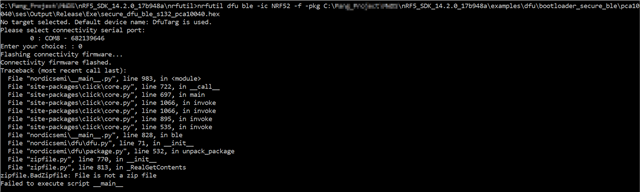
Mind to share similar document as the following link for S132 PCA10040? It would be much appreciated.

devzone.nordicsemi.com/.../getting-started-with-nordics-secure-dfu-bootloader

Parents
  • I would suggest following the secure dfu blog post that you posted at the bottom. It works for your PCA10040 board. An easy way to get started is just by updating the application on the nrf52 PCA10040 DK. The application you could update could be the Blinky example located at: nRF5_SDK_14.2.0_17b948a\examples\peripheral\blinky\pca10040\s132\ses\

    Just follow the blog post & finish steps A to D. At the end, you should notice that the LEDs on your board start blinking one after the other in a loop. Then, you know that the DFU has been successful. 

  • Hi 

    I test the step and program the softdevices using the following command.

    nrfjprog --program C:\nRF5_SDK_14.2.0_17b948a\components\softdevice\s132\hex\s132_nrf52_5.0.0_softdevice.hex --verify --chiperase -f NRF52
    nrfjprog --program C:\nRF5_SDK_14.2.0_17b948a\examples\dfu\bootloader_secure_ble\pca10040\ses\Output\Release\Exe\secure_dfu_ble_s132_pca10040.hex --verify -f NRF52

    I notice the DfuTarg won't appear if I use nrfjprog to program the bootloader, while the dfutarg works for segger build and run option.

Reply
  • Hi 

    I test the step and program the softdevices using the following command.

    nrfjprog --program C:\nRF5_SDK_14.2.0_17b948a\components\softdevice\s132\hex\s132_nrf52_5.0.0_softdevice.hex --verify --chiperase -f NRF52
    nrfjprog --program C:\nRF5_SDK_14.2.0_17b948a\examples\dfu\bootloader_secure_ble\pca10040\ses\Output\Release\Exe\secure_dfu_ble_s132_pca10040.hex --verify -f NRF52

    I notice the DfuTarg won't appear if I use nrfjprog to program the bootloader, while the dfutarg works for segger build and run option.

Children
Related