

Hi everyone. I'm starting from scratch and using as reference the example/ble_peripheral/ble_app_template.
I'm using Embedded Studio 3.50 + Jlink V6.32 / The chip is nRF52832-QFAA / The SDK15.0.0 + S132 SoftDevice v6.0.0
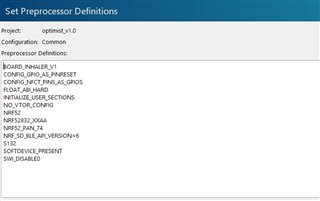
I designed a custom board, I defined the new board, as you can see in the PREPROCESSOR DEFINITIONS. (I used the example definition as reference)
I quite new using softdevice.
When I tried to start the timer, it couldn't.
Then I found a lot of threads in the forum explaining that you must request the low-frequency clock ( if you don't use the soft-device).
But I'm using the softdevice, and It seems that is not requesting the LFCLK.
Then I found this post https://devzone.nordicsemi.com/f/nordic-q-a/31982/can-t-make-app_timer-work I added the lines and now the timer is working.
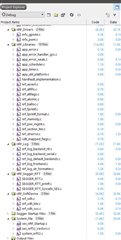
But I'm a little concerned because of the softdevice is not requesting LFCK automatically, and maybe I missed to set something in the sdk_config.h or maybe I'm not compiling a library/driver etc.
I read the documentation and I can't find a list of dependencies or required libraries/drivers to compile with.
Here are how I'm creating the timer and the handlers
//-------------------------------------------------------------------------------------------------------------------------------TIMERS
//-----------------------------------------------------------------------------------------------------------------------HANDDLERS
static void blink_timeout_handler(void * p_context)
{
  BLINK_STATE=!BLINK_STATE;
  if (BLINK_STATE)
  {
  NRF_LOG_INFO("Blink handler");
  NRF_LOG_FLUSH();
  }
}

//-----------------------------------------------------------------------------------------------------------------------TIMER INIT
/**@brief Function for the Timer initialization.
 *
 * @details Initializes the timer module. This creates and starts application timers.
 */
static void timers_init(void)
{
    NRF_CLOCK->TASKS_LFCLKSTART = 1;
    while (NRF_CLOCK->EVENTS_LFCLKSTARTED == 0);


    // Initialize timer module.
    ret_code_t err_code = app_timer_init();
    APP_ERROR_CHECK(err_code);
    if (err_code == NRF_SUCCESS)
      {
      NRF_LOG_INFO("Timer Init");
      NRF_LOG_FLUSH();
      }
    // Create timers.

    /* YOUR_JOB: Create any timers to be used by the application.
                 Below is an example of how to create a timer.
                 For every new timer needed, increase the value of the macro APP_TIMER_MAX_TIMERS by
                 one.
       ret_code_t err_code;
       err_code = app_timer_create(&m_app_timer_id, APP_TIMER_MODE_REPEATED, timer_timeout_handler);
       APP_ERROR_CHECK(err_code); */
    //----Blink timer

      err_code = app_timer_create(&blink_timer, APP_TIMER_MODE_REPEATED, blink_timeout_handler);
      APP_ERROR_CHECK(err_code);

      if (err_code == NRF_SUCCESS)
      {
      NRF_LOG_INFO("Timer create");
      NRF_LOG_FLUSH();
      }
}
the main entry
void main(void) {

//-----------------------------------------------Initialize device.


      log_init();
      timers_init();

      INHALER_led_RGB_init(PIN_LED_R, PIN_LED_G, PIN_LED_B);
      gpio_init();

      NRF_LOG_INFO("Device Initialized");
      NRF_LOG_FLUSH();
      if (app_timer_start(blink_timer,BLINK_tick,NULL) == NRF_SUCCESS)
      {
      NRF_LOG_INFO("Timer Init");
      NRF_LOG_FLUSH();
      }

//-----------------------------------------------Enter Main loop.

  for (;;)
          {
          CHARGING_UPDATE();
          LED_UPDATE();
          }
}
the Preprocessor definitions,
all the files compiled
and the sdk_config file.
Thanks for your help!!!

