Beware that this post is related to an SDK in maintenance mode
More Info: Consider nRF Connect SDK for new designs
This post is older than 2 years and might not be relevant anymore
More Info: Consider searching for newer posts

Bootloader on custom board using uart

Hi,

We have developed a customized board for use in a gateway. We would like to have a working bootloader on that board but it looks like it is almost impossible to make things work.

We are using nRF5 SDK version 15.0.0. I have tested the secure_dfu_test_images for nrf52840 on a PCA10056 board and they do not work as expected, so perhaps I was foolish to think that it would make any difference adapting the secure uart example for our board.

I have tested the uart example on both boards and they work perfectly so there is nothing wrong with the hardware (at least the uart is working properly). I have tried various baudrates since one support case suggested a baudrate of 9600 instead of the 115200 which is default in the bootloader example. I have also read most of the other support cases concerning the dfu and I have not found anything that could explain the problems that I see. I have also altered the python code to make the default baudrate 9600 but I cannot understand how to create a new version of nrfutil. However I assume that using the -b 9600 argument makes those changes unnecessary. 

When trying to upload a new application to the board I get the following response:

pc_ble_driver_py.exceptions.NordicSemiException: No ping response after opening COM port

I have nrfutil version 3.5.1 (some support cases suggests exactly version 3.0.0 while others say >= 3.0.0).

Now I am out of ideas to try and fix this. Any ideas and/or suggestions?

If it does not work with nrfutil, how am I going to write a similar software to use inside the gateway? Is there a detailed specification for the protocol used by the bootloader/nrfutil? In that case where? (Yes, I know - RTFM, but the documentation is really fragmentet in certain parts and it is far from easy to know where to look).

Best regards

Anders

Parents
  • Hi Anders.

    When you say you have tested the secure_dfu_test_images for nRF52840, could you be a bit more specific? Which files have you flashed to your board? Did you follow any of the DFU bootloader examples and if you did, which example?

    You also say you tested the uart example, which UART example? The one found in examples\dfu\secure_dfu_test_images\uart, or in examples\ble_peripheral\ble_app_uart?

    Any more information would be much helpful, so I can try to recreate what you're doing.

    - Andreas

  • Hi Andreas,

    I used the files under ..\examples\dfu\secure_dfu_test_images\uart\nrf52840 and I am using nrfutil.exe version 3.5.1 (which I found on my computer because downloading and the master branch using pip install nrfutil produces som very strange failures probably due to python version mismatch) and nrfjprog.

    I am using several batch files containing the following content

    nrfjprog --eraseall

    nrfjprog --reset --program bootloader_secure_uart_debug_without_bonds_mbr.hex --family NRF52 --sectoranduicrerase

    nrfjprog --reset --program mbr.hex --family NRF52 --sectoranduicrerase

    nrfjprog --reset --program softdevice_s140.hex --family NRF52 --sectoranduicrerase

    nrfutil dfu serial -pkg blinky_mbr.zip -p COM3 -b 115200 -fc 0

    Using the instructions found on http://infocenter.nordicsemi.com/index.jsp?topic=%2Fcom.nordic.infocenter.sdk5.v15.0.0%2Fsdk_app_serial_dfu_bootloader.html&cp=4_0_0_4_3_4
    w
    hich by the way is difficult to follow since the instructions are intended for other uses. Which of the points needs to be done in order to test the bootloader? 1? 2? 3? 4? 5? 6? 7? 8? 9? 10?

    The uart has been tested with ..\examples\peripheral\uart\pca10056\blank\ses both using the original board (PCA10056) and with my custom board, and it works every time.

    We are using an FTDI cable to connect the devices to the PC and we are not using flow control since it is not available on our custom board, so only GND, RX and TX are used.

    I have tried debugging the bootloader while trying to download the application and it appears that the ping is received in the bootloader and it is replying as expected. Altering the copmmand line to add "-fc 0" did actually do someting for the result from nrfutil. It then became:

    pc_ble_driver_py.exceptions.NordicSemiException: Extended Error 0x07: The array of supported SoftDevices for the update does not contain the FWID of the current SoftDevice.

    Which may be a good thing since it no longer complains about no response from ping. I have not yet been able to make a package that does not contain an "--sd-req". This is strange because neither the bootloader nor the application depends on having a softdevice (why is it even included in the "secure_dfu_test_images"?). How can I create that zip file without having to tell nrfutil the version of the soft device when I do not want any soft device?

    If I get this bootloader up and running, which I firmly believes that I already have,  there is still a problem on how to create a similar functionality (working that is) like that of nrfutil to be able to download new software over the uart using C-code in a gateway. For that I would like to have som specifications on the protocol...

    Addition:

    Just noted one thing in ReadMe.md "**Note**: The Thread stack doesn't use a SoftDevice but --sd-req option is required for compatibility reasons. You can provide any value for the option as it is ignored during DFU.". Am I to understand that I can put any value in "--sd-req" like for instance 0x00, but then why does nrfutil complain about SoftDevice?

    BTW is there a way to get soft device versions like you get when you use s_dfu_settings.app_version? All I see is the s_dfu_settings.sd_size which may or may not be enough information...

    Best regards

    Anders

  • Hi again.

    The batch files you try to flash now does not require a SoftDevice.

    Could you try to run this batch script and perform a DFU?

    nrfjprog --eraseall
    nrfjprog --reset --program examples\dfu\secure_dfu_test_images\uart\nrf52840\bootloader_secure_uart_debug_without_bonds_mbr.hex --chiperase
    nrfjprog --reset --program examples\dfu\secure_dfu_test_images\uart\nrf52840\mbr.hex
    nrfutil dfu serial -pkg examples\dfu\secure_dfu_test_images\uart\nrf52840\blinky_mbr.zip -p COM3 -b 115200 -fc 0

    Run it from the nRF5_SDK_15.0.0_a53641a folder. I got the following output, and the LEDs start blinking.

    nrfutil dfu serial -pkg examples\dfu\secure_dfu_test_images\uart\nrf52840\blinky_mbr.zip -p COM3 -b 115200 -fc 0
      [####################################]  100%
    Device programmed.

    I agree that the steps in the example are a bit difficult to follow, as you say they are combination of DIY and use the examples provided.

    Before, when you tried to do a DFU, did you generate a DFU packet yourself, or did you use the blinky_mbr.zip packet found in examples\dfu\secure_dfu_test_images\uart\nrf52840\ ? Since the error you have now suggests that the SoftDevice firmware id (FWID) of the packet you tried to do a DFU with is wrong compared to the FWID already on the chip.

    If you are creating either your own bootloader or application when you are trying to do the DFU you should note that you need a private key, and you also have to configure whether or not to use flow-control or different baudrates in the sdk_config.h file.

    - Andreas

  • Hi,

    If I run it from where I have the nrfutil.exe it gives the following response:

    C:\Users\anderslundqvist\Documents\Projekt\IoT card\PC NrfUtil>nrfutil dfu serial -pkg blinky_mbr.zip -p COM3 -b 115200 -fc 0
    [------------------------------------] 0%
    Traceback (most recent call last):
    File "nordicsemi\__main__.py", line 987, in <module>
    File "site-packages\click\core.py", line 722, in __call__
    File "site-packages\click\core.py", line 697, in main
    File "site-packages\click\core.py", line 1066, in invoke
    File "site-packages\click\core.py", line 1066, in invoke
    File "site-packages\click\core.py", line 895, in invoke
    File "site-packages\click\core.py", line 535, in invoke
    File "nordicsemi\__main__.py", line 745, in serial
    File "nordicsemi\__main__.py", line 680, in do_serial
    File "nordicsemi\dfu\dfu.py", line 129, in dfu_send_images
    File "nordicsemi\dfu\dfu.py", line 90, in _dfu_send_image
    File "nordicsemi\dfu\dfu_transport_serial.py", line 211, in open
    pc_ble_driver_py.exceptions.NordicSemiException: No ping response after opening COM port
    Failed to execute script __main__

    If I run it from the position you suggest, I get the following response:

    C:\Users\anderslundqvist\Documents\SEGGER Embedded Studio Projects\nRF5_SDK>nrfutil dfu serial -pkg examples\dfu\secure_dfu_test_images\uart\nrf52840\blinky_mbr.zip -p COM3 -b 115200 -fc 0
    [------------------------------------] 0%
    Traceback (most recent call last):
    File "C:\Users\anderslundqvist\AppData\Local\Programs\Python\Python37\Scripts\nrfutil-script.py", line 11, in <module>
    load_entry_point('nrfutil==3.5.1', 'console_scripts', 'nrfutil')()
    File "c:\users\anderslundqvist\appdata\local\programs\python\python37\lib\site-packages\click\core.py", line 722, in __call__
    return self.main(*args, **kwargs)
    File "c:\users\anderslundqvist\appdata\local\programs\python\python37\lib\site-packages\click\core.py", line 697, in main
    rv = self.invoke(ctx)
    File "c:\users\anderslundqvist\appdata\local\programs\python\python37\lib\site-packages\click\core.py", line 1066, in invoke
    return _process_result(sub_ctx.command.invoke(sub_ctx))
    File "c:\users\anderslundqvist\appdata\local\programs\python\python37\lib\site-packages\click\core.py", line 1066, in invoke
    return _process_result(sub_ctx.command.invoke(sub_ctx))
    File "c:\users\anderslundqvist\appdata\local\programs\python\python37\lib\site-packages\click\core.py", line 895, in invoke
    return ctx.invoke(self.callback, **ctx.params)
    File "c:\users\anderslundqvist\appdata\local\programs\python\python37\lib\site-packages\click\core.py", line 535, in invoke
    return callback(*args, **kwargs)
    File "c:\users\anderslundqvist\appdata\local\programs\python\python37\lib\site-packages\nordicsemi\__main__.py", line 745, in serial
    do_serial(package, port, connect_delay, flow_control, packet_receipt_notification, baud_rate, True)
    File "c:\users\anderslundqvist\appdata\local\programs\python\python37\lib\site-packages\nordicsemi\__main__.py", line 680, in do_serial
    dfu.dfu_send_images()
    File "c:\users\anderslundqvist\appdata\local\programs\python\python37\lib\site-packages\nordicsemi\dfu\dfu.py", line 129, in dfu_send_images
    self._dfu_send_image(self.manifest.application)
    File "c:\users\anderslundqvist\appdata\local\programs\python\python37\lib\site-packages\nordicsemi\dfu\dfu.py", line 90, in _dfu_send_image
    self.dfu_transport.open()
    File "c:\users\anderslundqvist\appdata\local\programs\python\python37\lib\site-packages\nordicsemi\dfu\dfu_transport_serial.py", line 211, in open
    raise NordicSemiException("No ping response after opening COM port")
    pc_ble_driver_py.exceptions.NordicSemiException: No ping response after opening COM port

    When working with the PCA10056 I have not created any DFU package at all. It is strange that my PCA10056 does not work with this. My PCA10056 has a n MCU marked QIAAAA which means that it is som sort of preseries sample. Could this be the reason that it doesn't work?

    The Software device error message stems from my attempt in using my tweaked bootloader to accept my DFU package (or whatever you call it).

    I have created a private key - the example I used as a template, did not compile otherwise. That same key is also used to create the zip file.

    In fact this bootloader is overly complicated and since we will program the device from the gateway, it is not necessary to have a secure bootloader. However, your bootloader example that does not have elevated security also requires a private key (and public c-file key). In out case the security will reside in the programming the gateway. However, I see no solution that simplifies this process and all recommendations that I have seen is not to create anything from scratch - i.e. use the examples and do not mess with the SDK... Am I right or have I misunderstood your intentions?

    Addition:

    In case you are wondering why the ticket concerns two separate but very much connected issues, it is because last ticket I created took more than two months before anyone bothered to answer it. So I am thankful for your swift response. In retrospective, I should perhaps have created two different tickets...

    Best regards

    Anders

Reply
  • Hi,

    If I run it from where I have the nrfutil.exe it gives the following response:

    C:\Users\anderslundqvist\Documents\Projekt\IoT card\PC NrfUtil>nrfutil dfu serial -pkg blinky_mbr.zip -p COM3 -b 115200 -fc 0
    [------------------------------------] 0%
    Traceback (most recent call last):
    File "nordicsemi\__main__.py", line 987, in <module>
    File "site-packages\click\core.py", line 722, in __call__
    File "site-packages\click\core.py", line 697, in main
    File "site-packages\click\core.py", line 1066, in invoke
    File "site-packages\click\core.py", line 1066, in invoke
    File "site-packages\click\core.py", line 895, in invoke
    File "site-packages\click\core.py", line 535, in invoke
    File "nordicsemi\__main__.py", line 745, in serial
    File "nordicsemi\__main__.py", line 680, in do_serial
    File "nordicsemi\dfu\dfu.py", line 129, in dfu_send_images
    File "nordicsemi\dfu\dfu.py", line 90, in _dfu_send_image
    File "nordicsemi\dfu\dfu_transport_serial.py", line 211, in open
    pc_ble_driver_py.exceptions.NordicSemiException: No ping response after opening COM port
    Failed to execute script __main__

    If I run it from the position you suggest, I get the following response:

    C:\Users\anderslundqvist\Documents\SEGGER Embedded Studio Projects\nRF5_SDK>nrfutil dfu serial -pkg examples\dfu\secure_dfu_test_images\uart\nrf52840\blinky_mbr.zip -p COM3 -b 115200 -fc 0
    [------------------------------------] 0%
    Traceback (most recent call last):
    File "C:\Users\anderslundqvist\AppData\Local\Programs\Python\Python37\Scripts\nrfutil-script.py", line 11, in <module>
    load_entry_point('nrfutil==3.5.1', 'console_scripts', 'nrfutil')()
    File "c:\users\anderslundqvist\appdata\local\programs\python\python37\lib\site-packages\click\core.py", line 722, in __call__
    return self.main(*args, **kwargs)
    File "c:\users\anderslundqvist\appdata\local\programs\python\python37\lib\site-packages\click\core.py", line 697, in main
    rv = self.invoke(ctx)
    File "c:\users\anderslundqvist\appdata\local\programs\python\python37\lib\site-packages\click\core.py", line 1066, in invoke
    return _process_result(sub_ctx.command.invoke(sub_ctx))
    File "c:\users\anderslundqvist\appdata\local\programs\python\python37\lib\site-packages\click\core.py", line 1066, in invoke
    return _process_result(sub_ctx.command.invoke(sub_ctx))
    File "c:\users\anderslundqvist\appdata\local\programs\python\python37\lib\site-packages\click\core.py", line 895, in invoke
    return ctx.invoke(self.callback, **ctx.params)
    File "c:\users\anderslundqvist\appdata\local\programs\python\python37\lib\site-packages\click\core.py", line 535, in invoke
    return callback(*args, **kwargs)
    File "c:\users\anderslundqvist\appdata\local\programs\python\python37\lib\site-packages\nordicsemi\__main__.py", line 745, in serial
    do_serial(package, port, connect_delay, flow_control, packet_receipt_notification, baud_rate, True)
    File "c:\users\anderslundqvist\appdata\local\programs\python\python37\lib\site-packages\nordicsemi\__main__.py", line 680, in do_serial
    dfu.dfu_send_images()
    File "c:\users\anderslundqvist\appdata\local\programs\python\python37\lib\site-packages\nordicsemi\dfu\dfu.py", line 129, in dfu_send_images
    self._dfu_send_image(self.manifest.application)
    File "c:\users\anderslundqvist\appdata\local\programs\python\python37\lib\site-packages\nordicsemi\dfu\dfu.py", line 90, in _dfu_send_image
    self.dfu_transport.open()
    File "c:\users\anderslundqvist\appdata\local\programs\python\python37\lib\site-packages\nordicsemi\dfu\dfu_transport_serial.py", line 211, in open
    raise NordicSemiException("No ping response after opening COM port")
    pc_ble_driver_py.exceptions.NordicSemiException: No ping response after opening COM port

    When working with the PCA10056 I have not created any DFU package at all. It is strange that my PCA10056 does not work with this. My PCA10056 has a n MCU marked QIAAAA which means that it is som sort of preseries sample. Could this be the reason that it doesn't work?

    The Software device error message stems from my attempt in using my tweaked bootloader to accept my DFU package (or whatever you call it).

    I have created a private key - the example I used as a template, did not compile otherwise. That same key is also used to create the zip file.

    In fact this bootloader is overly complicated and since we will program the device from the gateway, it is not necessary to have a secure bootloader. However, your bootloader example that does not have elevated security also requires a private key (and public c-file key). In out case the security will reside in the programming the gateway. However, I see no solution that simplifies this process and all recommendations that I have seen is not to create anything from scratch - i.e. use the examples and do not mess with the SDK... Am I right or have I misunderstood your intentions?

    Addition:

    In case you are wondering why the ticket concerns two separate but very much connected issues, it is because last ticket I created took more than two months before anyone bothered to answer it. So I am thankful for your swift response. In retrospective, I should perhaps have created two different tickets...

    Best regards

    Anders

Children
  • Hi.

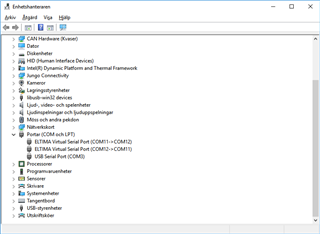
    Could it be that you are using the wrong COM port? Could you check if COM3, which you use is in fact a JLink CDC UART Port?

    And when you say you have created a private key which you used to create the zip file, is this the zip file you tried to use as the DFU package? In that case then the keys from the precompiled .hex files and this zip file does not match.

    There is nothing wrong with doing modifications with the examples found in the SDK or creating something from the ble_app_template, just remember that more and more modifications increases the difficulty of making things compatible.

    - Andreas

  • Hi again,

    I should be very surprised if it vere the wrong port. COM3 if the FTDI cable, something I have verified more than once using the ..\examples\peripheral\uart\pca10056\blank\ses and not forgetting the new bootloader which, for various reasons, can not use digital signalling to enter DFU-mode. We will use a command over the UART, which works perfectly well by now. The bootloader functionality unfortunately does not.

    What is the JLink CDC UART Port? I have never heard of this before. Isn't it just another COM port that is used by the nrfutil? In the real application we will have a gateway (Sierra Wireless FX30) and an add on card (with nRF52840) connected through the serial port. We have neither room nor economy for additional hardware!

    If I use the files found in ..\examples\dfu\secure_dfu_test_images\uart\nrf52840, the bootloader and the blinky zip file should have a matching key, right? In my own case, I use the same key for both bootloader and application zip file. Right or wrong? Should I use another different key for the zip file?

    We have now ordered a new PCA10056 card to see if that one works better. It should arrive on monday, so we will see then. Is the QIAAAA a problem?

    It would also be interesting if you could help me with the nrfutil issue. If I understand it correctly, the exe file has it's python interpreter embedded while the installed (using pip) uses the python version on the computer. I also understand that there is a big issue in the python world moving between version 2 and 3. Do you have any insights on that as well?

    Best regards

    Anders

  • Hi.

    Try this:

    Open the project found in examples\dfu\secure_bootloader\pca10056_uart_debug, in sdk_config.h line 1151, put 0 instead of 1.

    // <q> NRF_DFU_SERIAL_UART_USES_HWFC  - HWFC configuration
     
    
    #ifndef NRF_DFU_SERIAL_UART_USES_HWFC
    #define NRF_DFU_SERIAL_UART_USES_HWFC 0
    #endif

    Use the following code in dfu_public_key.c:

    /* This file was automatically generated by nrfutil on 2018-03-22 (YY-MM-DD) at 12:39:00 */
    
    #include "stdint.h"
    #include "compiler_abstraction.h"
    
    /* This file was generated with a throwaway private key, that is only inteded for a debug version of the DFU project.
      Please see https://github.com/NordicSemiconductor/pc-nrfutil/blob/master/README.md to generate a valid public key. */
    
    #ifdef NRF_DFU_DEBUG_VERSION 
    
    /** @brief Public key used to verify DFU images */
    __ALIGN(4) const uint8_t pk[64] =
    {
        0x65, 0xfc, 0x2b, 0xf8, 0x16, 0xda, 0x01, 0x9a, 0xde, 0x75, 0xd4, 0xa8, 0x47, 0x71, 0x96, 0x21, 0x1c, 0x87, 0x55, 0x69, 0x10, 0x5a, 0xbe, 0x04, 0x57, 0x8f, 0xd2, 0xb0, 0x29, 0x94, 0x56, 0xb8, 
        0xca, 0x03, 0x63, 0xd6, 0x35, 0xc6, 0x4d, 0xa7, 0x81, 0x9f, 0xef, 0xa7, 0xd2, 0xec, 0xb7, 0xf3, 0x07, 0xff, 0x80, 0xaf, 0x7a, 0x3b, 0x4c, 0x19, 0xb8, 0x91, 0xc5, 0x14, 0x3c, 0xe8, 0x76, 0x6d
    };
    
    #else
    #error "Debug public key not valid for production. Please see https://github.com/NordicSemiconductor/pc-nrfutil/blob/master/README.md to generate it"
    #endif
    

    Create a .bat file in your SDK folder (nRF5_SDK_15.0.0_a53641a) with this code inside, and run it from command prompt:

    nrfjprog --eraseall
    nrfjprog --program examples\dfu\secure_bootloader\pca10056_uart_debug\ses\Output\Release\Exe\secure_bootloader_uart_mbr_pca10056_debug.hex --chiperase
    nrfjprog --program examples\dfu\secure_dfu_test_images\uart\nrf52840\mbr.hex
    nrfjprog --reset
    
    SLEEP 2
    nrfutil dfu serial -pkg examples\dfu\secure_dfu_test_images\uart\nrf52840\blinky_mbr.zip -p COM7 -b 115200 -fc 0


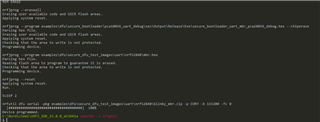
    This should now work, and you should see the following in your command prompt:

    I've now modified the examples\dfu\secure_bootloader\pca10056_uart_debug example to use no flowcontroll and a baudrate of 115200.

    The Jlink CDC UART Port is the driver for the Segger on-board debugger on the DK.

    The same key should be used for both the bootloader and the application, correct.  You should not use a different key for the zip file.

    QIAAAA should not be the problem.

    You should use Python 2.7 for nrfutil. When it comes to nrfutil for Python 3 i refer to this question.

    Hope this works for you, good luck.

    - Andreas

  • Hi Andreas,

    For some unknown reason I am not allowed to make a reply to your latest post, so I do it here instead.

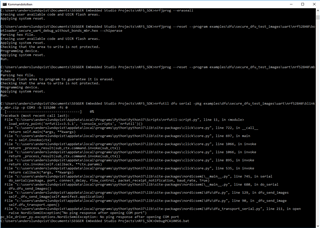
    As you can see from the image below it did not quite work as intended...

    As you pointed out, the new hardware did nothing to improve the situation but at least we have verified that which is good.

    What do we do now?

    Best regards

    Anders

  • Hi.

    Did you try to do as i said in my previous reply? That is open the project found in examples\dfu\secure_bootloader\pca10056_uart_debug, edit sdk_config.h inside the project, edit dfu_public_key.c inside the project, create a .bat file and paste the code i posted in my previous reply.

    Because it seems from the screenshot you sent that you did not program using that .bat file, and you are still programming the  nRF5_SDK_15.0.0_a53641a\examples\dfu\secure_dfu_test_images\uart\nrf52840 examples.

    I've attached it in this reply.

    REM nrfutil settings generate --family NRF52840 --application examples\dfu\secure_dfu_test_images\uart\nrf52840\bootloader_secure_uart_debug_without_bonds_mbr.hex  --application-version 3 --bootloader-version 2 --bl-settings-version 2 settingscase.hex
    
    REM ERASE
    nrfjprog --eraseall
    nrfjprog --program examples\dfu\secure_bootloader\pca10056_uart_debug\ses\Output\Release\Exe\secure_bootloader_uart_mbr_pca10056_debug.hex --chiperase
    nrfjprog --program examples\dfu\secure_dfu_test_images\uart\nrf52840\mbr.hex
    nrfjprog --reset
    
    SLEEP 2
    nrfutil dfu serial -pkg examples\dfu\secure_dfu_test_images\uart\nrf52840\blinky_mbr.zip -p COM7 -b 115200 -fc 0


    Please do as i stated above, once you have finished editing the project, compile it.

    Download the .bat file i sent you and place it in the SDK folder (nRF5_SDK_15.0.0_a53641a), and then run it.

    - Andreas

Related