This post is older than 2 years and might not be relevant anymore
More Info: Consider searching for newer posts

Updating firmware (application) from nrf Toolbox for iOS works fine (hex file), trying to do it from an Android phone does not. The messages are "Starting DFU ..." then "Disconnecting" then "Upload Failed: GATT ERROR". Is th


Updating firmware (application) from nrf Toolbox for iOS works fine (hex file), trying to do it from an Android phone does not.

The messages are "Starting DFU ..." then "Disconnecting" then "Upload Failed: GATT ERROR".

I tried different settings with different number of packets but nothing seem to work.

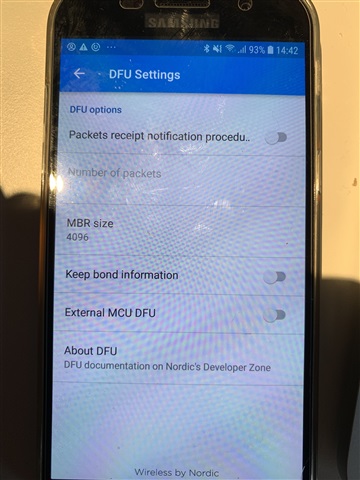
I tried enabling/disabling "External MCU DFU". Disabling this gets into a loop

"Starting bootloader..." -> "Connecting..." -> "Starting DFU..." and repeats.

My guess it should be enabled.


The device announce DFU_S130_V1.0 if that says anything.

Parents Reply
  • Hi Michel, 

    It's a pretty old softdevice and SDK. 

    If you can capture a sniffer trace when the issue appear it would be nice. 

    We have seen this issue on older Android model, and there wasn't a clear solution for it. Please search for GATT Error 133. We actually see less of this issue on more modern phone. Please try to test on other phone if possible.

    When testing, please make sure you erase bonding on the phone, and try turn off and on Bluetooth before the test. 
    Where did you find that option :  "External MCU DFU" ? Could you take a screenshot  ?

Children
Related