This post is older than 2 years and might not be relevant anymore
More Info: Consider searching for newer posts

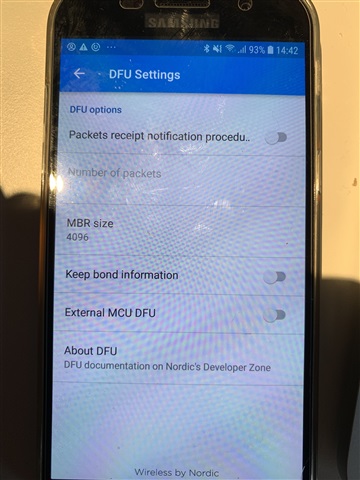
Updating firmware (application) from nrf Toolbox for iOS works fine (hex file), trying to do it from an Android phone does not. The messages are "Starting DFU ..." then "Disconnecting" then "Upload Failed: GATT ERROR". Is th


Updating firmware (application) from nrf Toolbox for iOS works fine (hex file), trying to do it from an Android phone does not.

The messages are "Starting DFU ..." then "Disconnecting" then "Upload Failed: GATT ERROR".

I tried different settings with different number of packets but nothing seem to work.

I tried enabling/disabling "External MCU DFU". Disabling this gets into a loop

"Starting bootloader..." -> "Connecting..." -> "Starting DFU..." and repeats.

My guess it should be enabled.


The device announce DFU_S130_V1.0 if that says anything.

Parents Reply
  • Hi Michel, 

    Thanks for the sniffer trace. What I can find from the trace is that the nRF52 in both case crashed (reset) after receiving the BLE write command to switch to bootloader. (Master kept sendding BLE packet but slave didn't respond) 
    I'm not sure why it worked when testing on iOS but doesn't work on Android (please take a sniffer trace with iOS DFU for comparison)

    Could you check if the device get an assert and reset or not when you start the DFU ? You may need to follow this guide. 

    If it doesn't reset or get an assertion, could you check the disconnect reason when the device get DISCONNECTED event ? 

    Could you try testing with unmodified DFU buttonless and stock DFU bootloader ? 

Children
Related