This post is older than 2 years and might not be relevant anymore
More Info: Consider searching for newer posts

Cannot debug using Segger Embedded Studio

Hi, 

Previously, I have done a board and this board have completely no problem to debug in Segger embedded studio.

I have route a new board, this board is almost everything as same previous board.

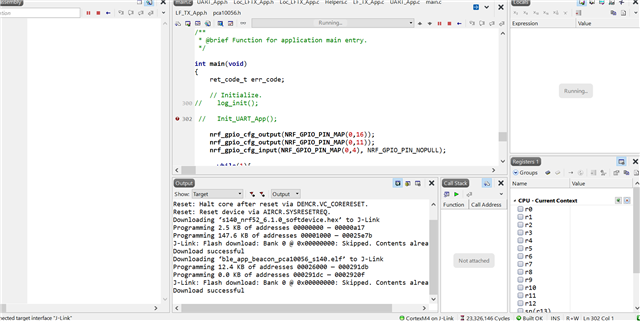
In this board, I cannot debug in Segger embedded studio.

1.  When I run in debug mode, the left panel totally empty. I have no way to set any debug point.

2. When I keep the main code small as possible, just toggle LED. The debug still cannot work. 

Do you know what general root cause of such issue ?

Please advise.
Parents
  • Hi.

    Hard to say if this is related to any changes to the code, or hardware related.

    I assume your application is based on an example from one of the latest versions of the SDK (with support for SES)?

    When I keep the main code small as possible, just toggle LED. The debug still cannot work. 

     Does your application run as expected, apart from debugging not working? Are you able to toggle the LED?

    Best regards,
    Joakim.

Reply
  • Hi.

    Hard to say if this is related to any changes to the code, or hardware related.

    I assume your application is based on an example from one of the latest versions of the SDK (with support for SES)?

    When I keep the main code small as possible, just toggle LED. The debug still cannot work. 

     Does your application run as expected, apart from debugging not working? Are you able to toggle the LED?

    Best regards,
    Joakim.

Children
No Data
Related