This post is older than 2 years and might not be relevant anymore
More Info: Consider searching for newer posts

nRF52832 and SHT11 GPIO bit bang

Hello,

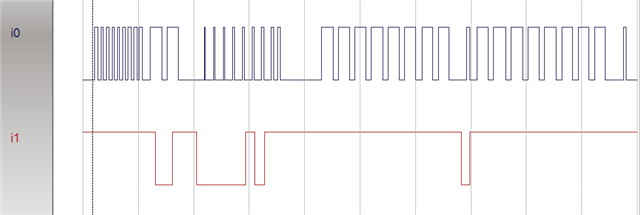
I'm trying to use this code https://github.com/kimyd/SHT1X_on_nrf51822 to communicate with an SHT11 sensor via GPIO pins.  I have a Saleae hooked up an can see the pulses and everything looks okay until the command ACK stage.  The data pin is never pulled low indicating the sensor did not receive the command.  I know the sensor is good as it works find with a RPi using python.

Is there something I need to configure on the GPIO data pin to allow it to be both input and output (I'm just going with S0S1 for the drive).

Any tips/pointers would be greatly appreciated.

Thanks.

Parents
  • Hi,

    Have you compared the logic analyzer trace with the known good sequence you get when using the RPi?

    The SHT11 need a pull up resistor on the DATA line, so you have to enable the internal pull-up resistor in the nRF (unless you have an external pull-up resistor, SHT11 spec states it should be about 10 kΩ). That said, this does not seem to be the problem if the data pin stays always high.

  • Hi Einar,

    Yes, I've compared them and the only difference I can see is that the data line never goes low after the command is entered.  I'm using a Parallax part that has a pull-up integrated (only 4.7K) and I've tried the code with both NOPULL and PULLUP on the input (no difference).  Attached is a scope trace that shows the data line not going low.

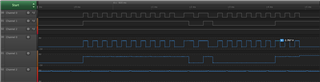
    So basically the above is clock on top and data on bottom.  There are 9 pulses with data high (reset), a transmit start sequence and then a code word (5 for humidity). the  ack pulse (9th pulse) does not result in the data line going low. so the rest of the data/clock pulses are basically garbage (all ones).

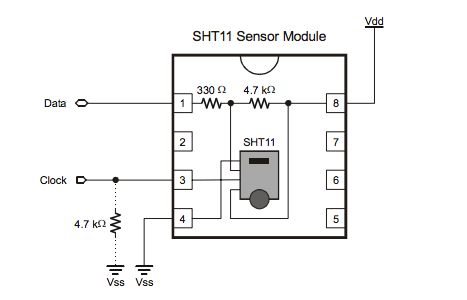
    The wire diagram shows:

    And this setup works great on a Pi + Python without any additional resistors (don't need the clock pull down).  So I think I'm basically clueless as to how the GPIO pins on the 52832 are supposed to work.  The clock pin is set to output all the time but the data pin flips between input and output.  Is there some special configuration I need to get this to work properly (i.e. is there an extra settle delay when flipping between input and output?).

    Any suggestions would be greatly appreciated.

  • Hi Einar,

    Looks like you have identified the 'smoking gun'.  Both my data and clock line are nowhere near 80% of VDD but I have no idea why.  Here are my readings:

    VDD: 4.929V (5V pin on 52832)

    Data Output: 3.436V (you can see it is higher at the end of the trace/picture after I release the data pin)

    Data Input: 2.946V

    Clock Output: 2.767V

    My calculator tells me 80% of 4.929V should be around 3.94V (which is close to data input but not quite).

    Here is a picture:

    Any ideas on how I can raise the voltage levels on Data and Clock to hit 80% VDD (short of a transistor or some kind of relay)?  Given this works on a Pi I'm thinking I need to configure the GPIO pins in some manner.

    Apologies on the code/command mix up.  I've change the code around so many times I mixed up the command order.  The attached image is a: reset, transmission start, read temp command.  

    Thanks,

    Rob.

  • Hi Einar,

    I tried using S0H1 for the output settings but that had little to no effect on the voltage levels I'm seeing (both data and clock outputs are 2.89V.  Out of interest I pulled the SHT out and tried the code which resulted in the same readings both clock and data only reach 2.89V so it's nothing to do with the SHT.

    Doh - okay (I'm a dummy/bit slow), I use VDD instead of the +5V pin and everything looks to be working.  So I guess my questions now is how to re-adjust the GPIO output levels to use +5V? 

  • Hi,

    I am glad to hear you found the issue. It all made sense in the end Slight smile

    Regarding GPIO voltage, that is always the same as VDD on nRF5 devices, so it is not configurable. I do not see a need for changing it in this case, but if it is needed for some reason, then you have to use a level shifter.

  • Thanks again for the help - I'm not sure how to mark this closed/answered.

  • Hi,

    No problem. You can make the case as answered by clicking "More" and then "Verify Answer" on the answer that helped you solve the case.

Reply Children
No Data
Related