This post is older than 2 years and might not be relevant anymore
More Info: Consider searching for newer posts

System Hangs While Sending Packets over BLE

Hello

I am using the nRF52832 with SDK 14.2, JLinkRTT Client, and SEGGER IDE.  The system simultaneously runs a soft DAC, IMU, digital potentiometer, and provides variable PWM control.  The system employs two TWI masters - one dedicated to the IMU and one for the DAC and potentiometer.

We have developed an nRF52832 based MCU and have the same failures on both systems.

Linear Accelerometer data is collected from the IMU at 20 mS intervals and transported over the BLE link with two sets of samples at a time (a packet every 40 mS).  Our custom IMU crashes after a few seconds to several minutes running the system in debug mode with the SEGGER IDE and data collected over BLE via three tools

  1. PC tool called Bluetooth LE Explorer via PC BLE

  2. Our own custom PC application via PC BLE

  3. nRF Master Control Panel over the nRF52831 Dongle

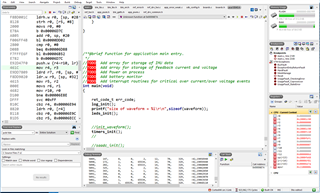
Here is what happens.  After a random time in seconds to hours, the system just hangs with an undefined function:
Parents
  • Here is a further update on the issue.

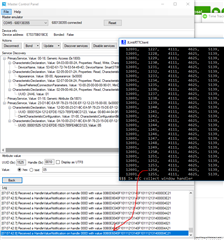
    I have run the Nordic Master Control Panel PC tool with our target MCU continuously since yesterday at about 6 pm (almost 13 hours).  This is the configuration that I have indicated running overnight on previous occasions.  The test is still running.  There must be some unique handling that the Nordic Master Control Panel uses to work well on the PC.  We need further help on this.  It may be due to the PC BLE drivers for the standard PC installation.  The Nordic Master Control Panel uses its own USB dongle for the BLE connection instead of the native PC BLE hardware.  See below the 2 traces being run showing SmartSTIM Burst 12691 and the data from sample 1254 in the MCU trace (JLinkRTTClient) correlating to the highlighted line in the Master Control Panel trace.

  • Hey Gary,

    I think the "undefined function" is just a arbritrary SoftDevice process that is common to hit if you manually stop the program execution at a random point in time. 

    Do you have some more information on the nature of your symptom itself? "After a random time in seconds to hours, the system just hangs..." is not enough information. 

    Are you missing packets, sensor samples corrupted, or something like that?

    What are your BLE connection parmeters? 

    Cheers,

    Håkon.

  • Hakon,

    Thank you for your response.

    The system is not missing any packets.  as in the diagram above, a packet is successfully sent out, the next packet is submitted to send over BLE 40 mS later and the SoftDevice just seems to be hung up.  I press stop and get the undefined function.  No ASSERT is made.

    Here are my parameters:  Most are default from the lbs example I derived my code from except for the min and max connection intervals .

    #define APP_BLE_OBSERVER_PRIO           3                                       /**< Application's BLE observer priority. You shouldn't need to modify this value. */
    #define APP_BLE_CONN_CFG_TAG            1                                       /**< A tag identifying the SoftDevice BLE configuration. */
    
    #define APP_ADV_INTERVAL                64                                      /**< The advertising interval (in units of 0.625 ms; this value corresponds to 40 ms). */
    #define APP_ADV_TIMEOUT_IN_SECONDS      BLE_GAP_ADV_TIMEOUT_GENERAL_UNLIMITED   /**< The advertising time-out (in units of seconds). When set to 0, we will never time out. */
    
    #define MIN_CONN_INTERVAL               MSEC_TO_UNITS(20, UNIT_1_25_MS)        /**< Minimum acceptable connection interval (0.5 seconds). */
    #define MAX_CONN_INTERVAL               MSEC_TO_UNITS(40, UNIT_1_25_MS)        /**< Maximum acceptable connection interval (1 second). */
    #define SLAVE_LATENCY                   0                                       /**< Slave latency. */
    #define CONN_SUP_TIMEOUT                MSEC_TO_UNITS(4000, UNIT_10_MS)         /**< Connection supervisory time-out (4 seconds). */
    
    #define FIRST_CONN_PARAMS_UPDATE_DELAY  APP_TIMER_TICKS(20000)                  /**< Time from initiating event (connect or start of notification) to first time sd_ble_gap_conn_param_update is called (15 seconds). */
    #define NEXT_CONN_PARAMS_UPDATE_DELAY   APP_TIMER_TICKS(5000)                   /**< Time between each call to sd_ble_gap_conn_param_update after the first call (5 seconds). */
    #define MAX_CONN_PARAMS_UPDATE_COUNT    3                                       /**< Number of attempts before giving up the connection parameter negotiation. */
    

    As shown in the diagram above, the last packet that contains packet 618 data is just fine.  The next packet for samples in 619 and 620 never make it.  The firmware starts to pack the samples for the next BLE transmission and the system hangs up.  Note that if I use the Nordic Master Control Panel with the nRF51 dongle, the transmissions seem to go forever - I have run tests for more than 24 hours without an issue.

    Do you have any info on PC driver issues for native BLE hardware?

    I use a while loop to avoid ERROR 19 (as derived from some other blog answers) to send the data.  Here is my code:

            //Send data packet over BLE
            while (ble_lbs_on_button_change(m_conn_handle, &m_lbs, m_stim_packet_data) == NRF_ERROR_RESOURCES);
            //err_code = ble_lbs_on_button_change(m_conn_handle, &m_lbs, m_stim_packet_data);
            //if (err_code != NRF_SUCCESS &&
            //        err_code != BLE_ERROR_INVALID_CONN_HANDLE &&
            //        err_code != NRF_ERROR_INVALID_STATE &&
            //        err_code != BLE_ERROR_GATTS_SYS_ATTR_MISSING) //&&
                    //err_code != NRF_ERROR_RESOURCES;  //resource error 
            //      {
                    //APP_ERROR_CHECK(err_code);
            //        printf("\r\n + + + + Error  %i  + + + + +",err_code);
            //      }
     

  • One other quick question:

    I came across some references that the nRF52DK runs on a 16M crystal.  I believe our target board uses a 32 M crystal - could there be an issue with the crystal setup?

  • Update - I installed nRF Connect V2.6.1 and ran our target board for 36 hours without an issue.  We ran continuous 25 BLE packets per second carrying accelerometer data at an effective rate of 50 samples per second for x, y, and z measurements.

    Is there a third party BLE dongle that we can buy that has an nRF51 or nRF52 processor and appropriate PC drivers to interface to our PC app?

Reply
  • Update - I installed nRF Connect V2.6.1 and ran our target board for 36 hours without an issue.  We ran continuous 25 BLE packets per second carrying accelerometer data at an effective rate of 50 samples per second for x, y, and z measurements.

    Is there a third party BLE dongle that we can buy that has an nRF51 or nRF52 processor and appropriate PC drivers to interface to our PC app?

Children
No Data
Related