This post is older than 2 years and might not be relevant anymore
More Info: Consider searching for newer posts

Connection to LTE network

Hi, 

I just got the nRF9160 dk and managed to register on the network following the tutorial. However, I tried to turn it on the next day and it doesn't connect to the network. I tried to check the nRF cloud dashboard to see the data usage but can't find any button on the website. There isn't a "buy more data" button as well as specified on the https://devzone.nordicsemi.com/b/nrf9160-development-status/posts/ibasis-global-access-for-things-frequently-asked-questions-faq

Please help. 

Thank you 

Best regards,

Chong 

Parents Reply Children
  • Hi,


    ctchong said:
    I managed to get it working but the connection keeps dropping. 

    Are you able to successfully run the at_client example, in combination with nRF Connect LTE Link Monitor?

    If you are able to get a link using at_client + LTE Link Monitor, then your SIM card and network connection is working properly.


    Kind regards,

    Håkon

  • Hi, 

    The link is rather unstable. I'm using the LTE_BLE_gateway sample and it rarely reaches NRF_CLOUD_EVT_READY which I found that the GPS cannot be triggered as it hasn't been initialised yet. 

    NRF_CLOUD_EVT_TRANSPORT_CONNECTED
    Orientation: 1
    Orientation: 3
    trigger alarm
    Alarm triggered !
    1] Sending FLIP data.
    0] Sending FLIP data.
    Orientation: 0
    NRF_CLOUD_EVT_TRANSPORT_DISCONNECTED
    NRF_CLOUD_EVT_TRANSPORT_CONNECTED

    The connection keeps dropping and causes a reboot. 

    ***** Booting Zephyr OS v1.13.99-ncs2 *****
    Application started
    [00:00:04.940,063] <err> bt_driver.h4_get_type: Unknown H:4 type 0x3e
    [00:00:04.940,093] <err> bt_driver.h4_get_type: Unknown H:4 type 0x29
    [00:00:04.947,174] <err> bt_driver.read_payload: Not enough space in buffer
    ASSERTION FAIL [err == 0] @ D:/NordicSDK/ncs/zephyr/subsys/bluetooth/host/hci_core.c:272
    k_sem_take failed with err -11

    I see this occasionally too.  

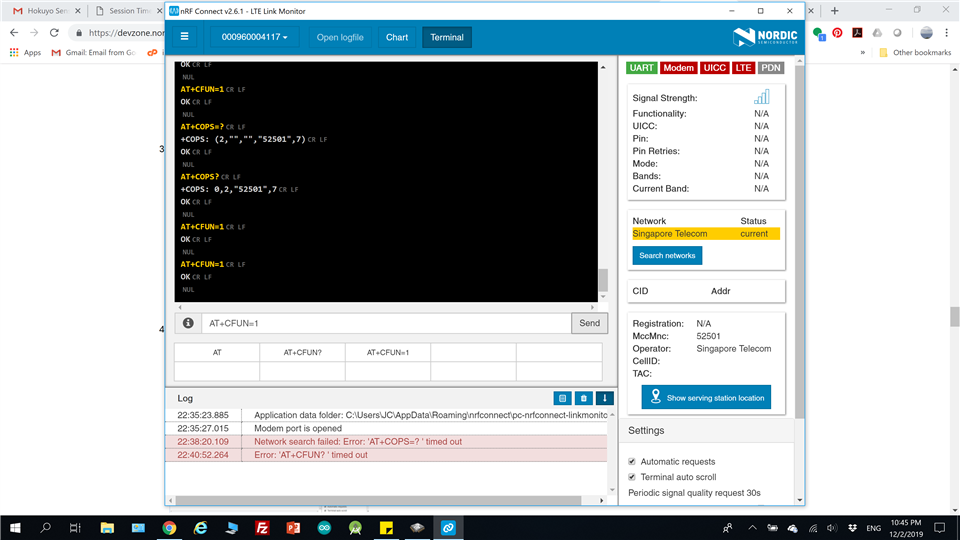
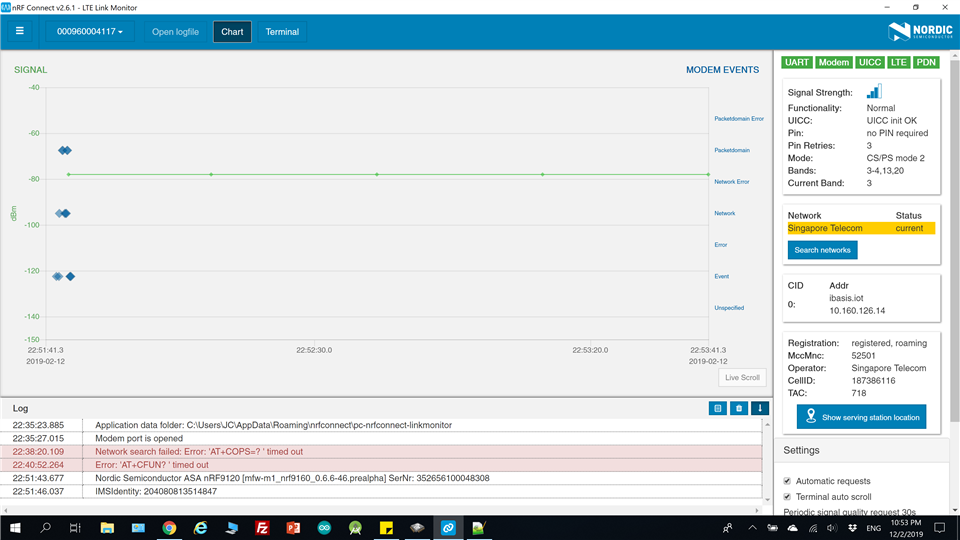
  •  Hi I tried the at_client and LTE Link monitor and it doesn't seem to work. 
    2019-02-12T14:35:23.885Z INFO Application data folder: C:\Users\JC\AppData\Roaming\nrfconnect\pc-nrfconnect-linkmonitor
    2019-02-12T14:35:23.970Z DEBUG App pc-nrfconnect-linkmonitor v0.7.0 official
    2019-02-12T14:35:23.970Z DEBUG App path: C:\Users\JC\.nrfconnect-apps\node_modules\pc-nrfconnect-linkmonitor
    2019-02-12T14:35:23.970Z DEBUG nRFConnect 2.6.1 is supported by the app (^2.4.0)
    2019-02-12T14:35:23.970Z DEBUG nRFConnect path: C:\Users\JC\AppData\Local\Programs\nrfconnect\resources\app.asar
    2019-02-12T14:35:23.970Z DEBUG HomeDir: C:\Users\JC
    2019-02-12T14:35:23.970Z DEBUG TmpDir: C:\Users\JC\AppData\Local\Temp
    2019-02-12T14:35:27.015Z INFO Modem port is opened
    2019-02-12T14:35:27.024Z DEBUG modem >> AT+CFUN?\x0D\x0A
    2019-02-12T14:35:34.982Z DEBUG modem << ***** Booting Zephyr OS v1.13.99-ncs2 *****\x0D\x0A
    2019-02-12T14:35:34.991Z DEBUG modem << Secure Boot: configure flash\x0D\x0A
    2019-02-12T14:35:35.000Z DEBUG modem << Secure Boot: SPU: set region 0 as Secure\x0D\x0A
    2019-02-12T14:35:35.002Z DEBUG modem << Secure Boot: SPU: set region 1 as Secure\x0D\x0A
    2019-02-12T14:35:35.004Z DEBUG modem << Secure Boot: SPU: set region 2 as Secure\x0D\x0A
    2019-02-12T14:35:35.005Z DEBUG modem << Secure Boot: SPU: set region 3 as Secure\x0D\x0A
    2019-02-12T14:35:35.008Z DEBUG modem << Secure Boot: SPU: set region 4 as Secure\x0D\x0A
    2019-02-12T14:35:35.016Z DEBUG modem << Secure Boot: SPU: set region 5 as Secure\x0D\x0A
    2019-02-12T14:35:35.018Z DEBUG modem << Secure Boot: SPU: set region 6 as Secure\x0D\x0A
    2019-02-12T14:35:35.020Z DEBUG modem << Secure Boot: SPU: set region 7 as Secure\x0D\x0A
    2019-02-12T14:35:35.023Z DEBUG modem << Secure Boot: SPU: set Flash region 8 as Non-Secure\x0D\x0A
    2019-02-12T14:35:35.031Z DEBUG modem << Secure Boot: SPU: set Flash region 9 as Non-Secure\x0D\x0A
    2019-02-12T14:35:35.048Z DEBUG modem << Secure Boot: SPU: set Flash region 10 as Non-Secure\x0D\x0A
    2019-02-12T14:35:35.050Z DEBUG modem << Secure Boot: SPU: set Flash region 11 as Non-Secure\x0D\x0A
    2019-02-12T14:35:35.052Z DEBUG modem << Secure Boot: SPU: set Flash region 12 as Non-Secure\x0D\x0A
    2019-02-12T14:35:35.063Z DEBUG modem << Secure Boot: SPU: set Flash region 13 as Non-Secure\x0D\x0A
    2019-02-12T14:35:35.067Z DEBUG modem << Secure Boot: SPU: set Flash region 14 as Non-Secure\x0D\x0A
    2019-02-12T14:35:35.069Z DEBUG modem << Secure Boot: SPU: set Flash region 15 as Non-Secure\x0D\x0A
    2019-02-12T14:35:35.072Z DEBUG modem << Secure Boot: SPU: set Flash region 16 as Non-Secure\x0D\x0A
    2019-02-12T14:35:35.096Z DEBUG modem << Secure Boot: SPU: set Flash region 17 as Non-Secure\x0D\x0A
    2019-02-12T14:35:35.102Z DEBUG modem << Secure Boot: SPU: set Flash region 18 as Non-Secure\x0D\x0A
    2019-02-12T14:35:35.105Z DEBUG modem << Secure Boot: SPU: set Flash region 19 as Non-Secure\x0D\x0A
    2019-02-12T14:35:35.108Z DEBUG modem << Secure Boot: SPU: set Flash region 20 as Non-Secure\x0D\x0A
    2019-02-12T14:35:35.122Z DEBUG modem << Secure Boot: SPU: set Flash region 21 as Non-Secure\x0D\x0A
    2019-02-12T14:35:35.126Z DEBUG modem << Secure Boot: SPU: set Flash region 22 as Non-Secure\x0D\x0A
    2019-02-12T14:35:35.129Z DEBUG modem << Secure Boot: SPU: set Flash region 23 as Non-Secure\x0D\x0A
    2019-02-12T14:35:35.132Z DEBUG modem << Secure Boot: SPU: set Flash region 24 as Non-Secure\x0D\x0A
    2019-02-12T14:35:35.134Z DEBUG modem << Secure Boot: SPU: set Flash region 25 as Non-Secure\x0D\x0A
    2019-02-12T14:35:35.135Z DEBUG modem << Secure Boot: SPU: set Flash region 26 as Non-Secure\x0D\x0A
    2019-02-12T14:35:35.139Z DEBUG modem << Secure Boot: SPU: set Flash region 27 as Non-Secure\x0D\x0A
    2019-02-12T14:35:35.143Z DEBUG modem << Secure Boot: SPU: set Flash region 28 as Non-Secure\x0D\x0A
    2019-02-12T14:35:35.167Z DEBUG modem << Secure Boot: SPU: set Flash region 29 as Non-Secure\x0D\x0A
    2019-02-12T14:35:35.170Z DEBUG modem << Secure Boot: SPU: set Flash region 30 as Non-Secure\x0D\x0A
    2019-02-12T14:35:35.173Z DEBUG modem << Secure Boot: SPU: set Flash region 31 as Non-Secure\x0D\x0A
    2019-02-12T14:35:35.174Z DEBUG modem << Secure Boot: configure SRAM\x0D\x0A
    2019-02-12T14:35:35.175Z DEBUG modem << Secure Boot: SPU: set SRAM region 0 as Secure\x0D\x0A
    2019-02-12T14:35:35.178Z DEBUG modem << Secure Boot: SPU: set SRAM region 1 as Secure\x0D\x0A
    2019-02-12T14:35:35.180Z DEBUG modem << Secure Boot: SPU: set SRAM region 2 as Secure\x0D\x0A
    2019-02-12T14:35:35.182Z DEBUG modem << Secure Boot: SPU: set SRAM region 3 as Secure\x0D\x0A
    2019-02-12T14:35:35.202Z DEBUG modem << Secure Boot: SPU: set SRAM region 4 as Secure\x0D\x0A
    2019-02-12T14:35:35.205Z DEBUG modem << Secure Boot: SPU: set SRAM region 5 as Secure\x0D\x0A
    2019-02-12T14:35:35.206Z DEBUG modem << Secure Boot: SPU: set SRAM region 6 as Secure\x0D\x0A
    2019-02-12T14:35:35.207Z DEBUG modem << Secure Boot: SPU: set SRAM region 7 as Secure\x0D\x0A
    2019-02-12T14:35:35.208Z DEBUG modem << Secure Boot: SPU: set SRAM region 8 as Non-Secure\x0D\x0A
    2019-02-12T14:35:35.209Z DEBUG modem << Secure Boot: SPU: set SRAM region 9 as Non-Secure\x0D\x0A
    2019-02-12T14:35:35.210Z DEBUG modem << Secure Boot: SPU: set SRAM region 10 as Non-Secure\x0D\x0A
    2019-02-12T14:35:35.212Z DEBUG modem << Secure Boot: SPU: set SRAM region 11 as Non-Secure\x0D\x0A
    2019-02-12T14:35:35.213Z DEBUG modem << Secure Boot: SPU: set SRAM region 12 as Non-Secure\x0D\x0A
    2019-02-12T14:35:35.227Z DEBUG modem << Secure Boot: SPU: set SRAM region 13 as Non-Secure\x0D\x0A
    2019-02-12T14:35:35.230Z DEBUG modem << Secure Boot: SPU: set SRAM region 14 as Non-Secure\x0D\x0A
    2019-02-12T14:35:35.232Z DEBUG modem << Secure Boot: SPU: set SRAM region 15 as Non-Secure\x0D\x0A
    2019-02-12T14:35:35.235Z DEBUG modem << Secure Boot: SPU: set SRAM region 16 as Non-Secure\x0D\x0A
    2019-02-12T14:35:35.237Z DEBUG modem << Secure Boot: SPU: set SRAM region 17 as Non-Secure\x0D\x0A
    2019-02-12T14:35:35.238Z DEBUG modem << Secure Boot: SPU: set SRAM region 18 as Non-Secure\x0D\x0A
    2019-02-12T14:35:35.240Z DEBUG modem << Secure Boot: SPU: set SRAM region 19 as Non-Secure\x0D\x0A
    2019-02-12T14:35:35.260Z DEBUG modem << Secure Boot: SPU: set SRAM region 20 as Non-Secure\x0D\x0A
    2019-02-12T14:35:35.263Z DEBUG modem << Secure Boot: SPU: set SRAM region 21 as Non-Secure\x0D\x0A
    2019-02-12T14:35:35.266Z DEBUG modem << Secure Boot: SPU: set SRAM region 22 as Non-Secure\x0D\x0A
    2019-02-12T14:35:35.268Z DEBUG modem << Secure Boot: SPU: set SRAM region 23 as Non-Secure\x0D\x0A
    2019-02-12T14:35:35.269Z DEBUG modem << Secure Boot: SPU: set SRAM region 24 as Non-Secure\x0D\x0A
    2019-02-12T14:35:35.272Z DEBUG modem << Secure Boot: SPU: set SRAM region 25 as Non-Secure\x0D\x0A
    2019-02-12T14:35:35.288Z DEBUG modem << Secure Boot: SPU: set SRAM region 26 as Non-Secure\x0D\x0A
    2019-02-12T14:35:35.292Z DEBUG modem << Secure Boot: SPU: set SRAM region 27 as Non-Secure\x0D\x0A
    2019-02-12T14:35:35.294Z DEBUG modem << Secure Boot: SPU: set SRAM region 28 as Non-Secure\x0D\x0A
    2019-02-12T14:35:35.296Z DEBUG modem << Secure Boot: SPU: set SRAM region 29 as Non-Secure\x0D\x0A
    2019-02-12T14:35:35.297Z DEBUG modem << Secure Boot: SPU: set SRAM region 30 as Non-Secure\x0D\x0A
    2019-02-12T14:35:35.298Z DEBUG modem << Secure Boot: SPU: set SRAM region 31 as Non-Secure\x0D\x0A
    2019-02-12T14:35:35.299Z DEBUG modem << Secure Boot: configure peripherals\x0D\x0A
    2019-02-12T14:35:35.301Z DEBUG modem << Secure Boot: MSP_NS 200265f0\x0D\x0A
    2019-02-12T14:35:35.325Z DEBUG modem << Secure Boot: prepare to jump to Non-Secure image\x0D\x0A
    2019-02-12T14:35:36.104Z DEBUG modem << ***** Booting Zephyr OS v1.13.99-ncs2 *****\x0D\x0A
    2019-02-12T14:35:36.124Z DEBUG modem << The AT host sample started\x0D\x0A
    2019-02-12T14:35:49.824Z DEBUG modem >> AT+CFUN?\x0D\x0A
    2019-02-12T14:35:49.836Z DEBUG modem << +CFUN: 4\x0D\x0A
    2019-02-12T14:35:49.869Z DEBUG modem << OK\x0D\x0A\x00
    2019-02-12T14:35:49.890Z DEBUG modem >> AT+CFUN=1\x0D\x0A
    2019-02-12T14:35:49.921Z DEBUG modem << OK\x0D\x0A\x00
    2019-02-12T14:37:20.055Z DEBUG modem >> AT+COPS=?\x0D\x0A
    2019-02-12T14:38:20.109Z ERROR Network search failed: Error: 'AT+COPS=?
    ' timed out

  • After a few attempts, I got the modem and other others turned on and connected. 

  • Hi Håkon,

    I believe there might be an issue with the LTE_gateway sample code which causes the link to disconnect and reset the Zephyr OS. Has anyone else experienced similar issues running this sample code ? 

    Thank you 

    Best regards,

    Chong

Related