This post is older than 2 years and might not be relevant anymore
More Info: Consider searching for newer posts

nRF9160 SES project load

Hi Team,

May I know your kind advice on the following issue when I tried to Open the SDK project in SES. I have seen some discussions on line but none of them works for me. I am using Win10 64bit OS. Thanks.

Loading solution at_client.emProject

Executing load commands

cmake -GNinja -DBOARD=nrf9160_pca10090 -DBOARD_DIR=C:/ncs/zephyr/boards/arm/nrf9160_pca10090 -DZEPHYR_TOOLCHAIN_VARIANT=gnuarmemb -DGNUARMEMB_TOOLCHAIN_PATH=C:/gnuarmemb -BC:/ncs/nrf/samples/nrf9160/at_client/build -HC:/ncs/nrf/samples/nrf9160/at_client

Project load failed

Reported error: solution load command failed (-1) 
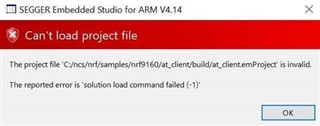
Thanks.

Parents
  • The only way I have been able to reproduce this, is if CMake is not in the PATH when launching SES.

    If launching SES from the command line, then you can easily verify that CMake is in PATH by trying to type `cmake --version`

    which should give you the version of the installed CMake.

    Another approach to ensure the correct CMake is used by SES is to specify it directly in SES.

    Go to: Tools -> Options

    Then find: `nRF Connect`

    Under executables, find `CMake Executeable`, which is probably set to `None`

    Specify the full path to your CMake executable, e.g. `/usr/local/bin/cmake` or `c:\Program Files\CMake\bin\`

    Delete the existing build folder or use a new one.

    Then try to open the project again, and see if SES is able to invoke CMake.

  • This solved my problem. I had a space in CMake executable, i.e. `/usr/local/bin/cmake `. After removing the space I can open the project.

Reply Children
No Data
Related