This post is older than 2 years and might not be relevant anymore
More Info: Consider searching for newer posts

nRF9160 SES project load

Hi Team,

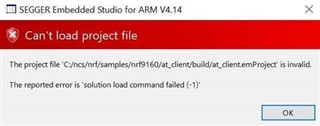
May I know your kind advice on the following issue when I tried to Open the SDK project in SES. I have seen some discussions on line but none of them works for me. I am using Win10 64bit OS. Thanks.

Loading solution at_client.emProject

Executing load commands

cmake -GNinja -DBOARD=nrf9160_pca10090 -DBOARD_DIR=C:/ncs/zephyr/boards/arm/nrf9160_pca10090 -DZEPHYR_TOOLCHAIN_VARIANT=gnuarmemb -DGNUARMEMB_TOOLCHAIN_PATH=C:/gnuarmemb -BC:/ncs/nrf/samples/nrf9160/at_client/build -HC:/ncs/nrf/samples/nrf9160/at_client

Project load failed

Reported error: solution load command failed (-1) 
Thanks.

  • Those work but what are the steps on using cmake and ninja flash? What I was able to do was load the current master into SES and it successfully opens in SES. Then I use cmd prompt and navigate to the build directory. I then send ninja and it builds the project.

    I then try to use ninja flash and that's where I'm seeing the above errors.

    I am even at the point where after I do all of that I can successfully build the project using SES since after I send ninja via command prompt. I just am unable to flash and receive a failed to write to memory error.

  • Yea that works but I am trying to figure out why ninja flash will not work.

    I am able to compile and build but unable to flash via cmd prompt.

  • I had the same problem, only to realize I missed installing ninja and some other stuff. Guess I was not paying enough attention. That didnt get me much further than a more verbose error log though. I have made no changes to the code, and have the right tags aswell, why Im very confused as to why UART_1 and UART_2 makes a fuzz here... Perhaps Bjørn has an idea what this might be?

    Loading solution hci_uart.emProject
    Executing load commands
    cmake -GNinja -DBOARD=nrf52840_pca10090 -DBOARD_DIR=C:/kod/1852/ncs/zephyr/boards/arm/nrf52840_pca10090 -DZEPHYR_TOOLCHAIN_VARIANT=gnuarmemb -DGNUARMEMB_TOOLCHAIN_PATH=C:/gnuarmemb -BC:/kod/1852/ncs/zephyr/samples/bluetooth/hci_uart/build -HC:/kod/1852/ncs/zephyr/samples/bluetooth/hci_uart -DDTC_OVERLAY_FILE=C:/kod/1852/ncs/zephyr/samples/bluetooth/hci_uart/nrf52840_pca10090.overlay
    -- Found PythonInterp: C:/Users/riw/AppData/Local/Programs/Python/Python37-32/python.exe (found suitable version "3.7.2", minimum required is "3.4")
    -- Selected BOARD nrf52840_pca10090
    Zephyr version: 1.13.99

    warning: the choice symbol UART_1 (defined at drivers\serial\Kconfig.stm32:22, ..\nrf\lib\at_host\Kconfig:24) is defined with a prompt outside the choice

    warning: the choice symbol UART_2 (defined at drivers\serial\Kconfig.stm32:31, ..\nrf\lib\at_host\Kconfig:26) is defined with a prompt outside the choice
    Parsing Kconfig tree in C:/kod/1852/ncs/zephyr/Kconfig
    Loading C:/kod/1852/ncs/zephyr/boards/arm/nrf52840_pca10090/nrf52840_pca10090_defconfig as base
    Merging nrf52840_pca10090.conf

    Error: Aborting due to non-whitelisted Kconfig warning 'warning: the choice symbol UART_1 (defined
    at drivers\serial\Kconfig.stm32:22, ..\nrf\lib\at_host\Kconfig:24) is defined with a prompt outside
    the choice'. Note: If this warning doesn't point to an actual problem, you can add it to the
    whitelist at the top of C:/kod/1852/ncs/zephyr/scripts/kconfig/kconfig.py.

    CMake Error at C:/kod/1852/ncs/zephyr/cmake/kconfig.cmake:159 (message):
    command failed with return code: 1
    Call Stack (most recent call first):
    C:/kod/1852/ncs/zephyr/cmake/app/boilerplate.cmake:282 (include)
    CMakeLists.txt:10 (include)


    -- Configuring incomplete, errors occurred!
    Project load failed
    Reported error: solution load command failed (1)

  • Could you please open a new devzone case? Thank you.

  • The only way I have been able to reproduce this, is if CMake is not in the PATH when launching SES.

    If launching SES from the command line, then you can easily verify that CMake is in PATH by trying to type `cmake --version`

    which should give you the version of the installed CMake.

    Another approach to ensure the correct CMake is used by SES is to specify it directly in SES.

    Go to: Tools -> Options

    Then find: `nRF Connect`

    Under executables, find `CMake Executeable`, which is probably set to `None`

    Specify the full path to your CMake executable, e.g. `/usr/local/bin/cmake` or `c:\Program Files\CMake\bin\`

    Delete the existing build folder or use a new one.

    Then try to open the project again, and see if SES is able to invoke CMake.

Related