This post is older than 2 years and might not be relevant anymore
More Info: Consider searching for newer posts

Simulated GPS data on nRF9160 DK Asset Tracker Example

I found lines 766 - 768

CONFIG_GPS_SIM_DEV_NAME="GPS_SIM"
CONFIG_GPS_SIM_BASE_LATITUDE=6325280
CONFIG_GPS_SIM_BASE_LONGITUDE=1026201

in \ncs\nrf\samples\nrf9160\asset_tracker\build\zephyr\.config

 

Please let me know how to change to the location in US such as Los Angeles, California for my upcoming demo

34.0522° N, 118.2437° W

Thanks.

Parents
  • Hi.

    CONFIG_GPS_SIM_BASE_LATITUDE is calculated by the following steps:

    Start-point latitude for simulated GPS data, from which the generated data will continue.
    Calculated by deg * 100000 + minutes * 1000, for example 63 deg 25.280’N will be 6325280. 
    Positive values are North, while negative values are South.

    So 32.0522° N will be 3200000 + 5220 = 3205220

    CONFIG_GPS_SIM_BASE_LONGITUDE is calculated by the following steps:

    Start-point longitude for simulated GPS data, from which the generated data will continue. 
    Calculated by deg * 100000 + minutes * 1000, for example 10 deg 26.201’E will be 1026201. 
    Positive values are East, while negative values are West.

    So 118.2437° W will be 11800000 + 2437000 = -14237000 since West are negative values.

    Best regards,

    Andreas

  • I followed your instruction to change lines 23 and 34 in file \ncs\nrf\lib\gps_sim\Kconfig

    # Kconfig - GPS data simulator
    #
    # Copyright (c) 2018 Nordic Semiconductor
    #
    # SPDX-License-Identifier: LicenseRef-BSD-5-Clause-Nordic
    #
    
    menuconfig GPS_SIM
    	bool "GPS simulator"
    	help
    	  Enable GPS simulator.
    
    if GPS_SIM
    
    config GPS_SIM_DEV_NAME
    	string "GPS simulator device name"
    	default "GPS_SIM"
    	help
    		GPS simulator device name.
    
    config GPS_SIM_BASE_LATITUDE
    	int "Base latitude for GPS data"
    #	default 6325280
        default 3405220
    	help
    		Start-point latitude for simulated GPS data,
    		from which the generated data will continue.
    		Calculated by deg * 100000 + minutes * 1000 N,
    		for example 63 deg 25.280' will be 6325280.
    
    config GPS_SIM_BASE_LONGITUDE
    	int "Base longitude for GPS data"
    #	default 1026201
    	default -14237000
    	help
    		Start-point longitude for simulated GPS data,
    		from which the generated data will continue.
    		Calculated by deg * 100000 + minutes * 1000 E,
    		for example 10 deg 26.201' will be 1026201.
    
    config GPS_SIM_BASE_TIMESTAMP
    	int "Base timestamp for GPS data"
    	default 134627
    	help
    		Timestamp at which the simulator will start counting.
    		Format is hour * 10000 + min * 100 + sec, which means that
    		13:46:27 becomes 134627.
    
    config GPS_SIM_ELLIPSOID
    	bool "Generate ellipsoid GPS path"
    	default y
    	help
    		GPS simulator will create a path that goes in an ellipsoid
    		shape.
    
    config GPS_SIM_PSEUDO_RANDOM
    	bool "Use pseudo-random values to generate GPS coordinates"
    	help
    		Enables pseudo-random GPS coordinate creation. Based on uptime
    		that's input to a sine function, which causes the otuput
    		to not be uniformally distributed, but sinusoidal.
    
    config GPS_SIM_DYNAMIC_VALUES
    	bool "GPS simulator dynamically creates data values"
    	default y
    	select NEWLIB_LIBC
    	select NEWLIB_LIBC_FLOAT_PRINTF
    	help
    		Enables dynamically created simulator otuput as opposed
    		to static values.
    
    config GPS_SIM_MAX_STEP
    	int "Maximum step size each iteration"
    	default 5
    	help
    		Sets the maximum step size that can be taken in latitude or longitude
    		for each simulation iteration. In units of 1/1000 degrees.
    
    config GPS_SIM_TRIGGER
    	bool "GPS simulator trigger"
    	help
    		Enable trigger. When enabled, it will emit 'data ready'
    		trigger event time either by button press or at specified
    		timer intervals.
    
    if GPS_SIM_TRIGGER
    
    choice
    	prompt "Trigger type"
    	depends on GPS_SIM_TRIGGER
    	default GPS_SIM_TRIGGER_USE_TIMER
    	help
    		Specify the type of trigger that will be used to emit the
    		'data ready' trigger event.
    
    config GPS_SIM_TRIGGER_USE_TIMER
    	bool "Use timer for trigger"
    	help
    		Use timer to trigger 'data ready' event.
    
    config GPS_SIM_TRIGGER_USE_BUTTON
    	bool "Use button 2 as trigger"
    	help
    		Use button 2 to trigger 'data ready' event.
    
    endchoice
    
    if GPS_SIM_TRIGGER && GPS_SIM_TRIGGER_USE_TIMER
    	config GPS_SIM_TRIGGER_TIMER_MSEC
    		int "Time between triggers, in milliseconds"
    		default 1000
    		help
    			The time interval between each 'data ready' trigger event.
    endif
    
    if GPS_SIM_TRIGGER && !GPS_SIM_TRIGGER_USE_TIMER
    	config GPS_SIM_TRIGGER_TIMER_MSEC
    		int
    		default 0
    endif
    
    config GPS_SIM_THREAD_PRIORITY
    	int "Thread priority"
    	depends on GPS_SIM_TRIGGER
    	default 10
    	help
    	  Priority of thread used by the driver to handle interrupts.
    
    config GPS_SIM_THREAD_STACK_SIZE
    	int "Trigger thread stack size"
    	depends on GPS_SIM_TRIGGER
    	default 512
    	help
    	  Stack size of thread used by the driver to handle interrupts.
    
    endif #GPS_SIM_TRIGGER
    
    module = GPS_SIM
    module-str = GPS simulator
    source "${ZEPHYR_BASE}/subsys/logging/Kconfig.template.log_config"
    
    endif #GPS_SIM
    

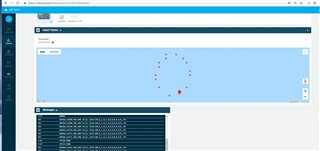
    It seems like it showed the LA lat and long in the Messages, but I lost the map


    Please let me know how to make the map shown Los Angeles, California.

    Thanks.

Reply
  • I followed your instruction to change lines 23 and 34 in file \ncs\nrf\lib\gps_sim\Kconfig

    # Kconfig - GPS data simulator
    #
    # Copyright (c) 2018 Nordic Semiconductor
    #
    # SPDX-License-Identifier: LicenseRef-BSD-5-Clause-Nordic
    #
    
    menuconfig GPS_SIM
    	bool "GPS simulator"
    	help
    	  Enable GPS simulator.
    
    if GPS_SIM
    
    config GPS_SIM_DEV_NAME
    	string "GPS simulator device name"
    	default "GPS_SIM"
    	help
    		GPS simulator device name.
    
    config GPS_SIM_BASE_LATITUDE
    	int "Base latitude for GPS data"
    #	default 6325280
        default 3405220
    	help
    		Start-point latitude for simulated GPS data,
    		from which the generated data will continue.
    		Calculated by deg * 100000 + minutes * 1000 N,
    		for example 63 deg 25.280' will be 6325280.
    
    config GPS_SIM_BASE_LONGITUDE
    	int "Base longitude for GPS data"
    #	default 1026201
    	default -14237000
    	help
    		Start-point longitude for simulated GPS data,
    		from which the generated data will continue.
    		Calculated by deg * 100000 + minutes * 1000 E,
    		for example 10 deg 26.201' will be 1026201.
    
    config GPS_SIM_BASE_TIMESTAMP
    	int "Base timestamp for GPS data"
    	default 134627
    	help
    		Timestamp at which the simulator will start counting.
    		Format is hour * 10000 + min * 100 + sec, which means that
    		13:46:27 becomes 134627.
    
    config GPS_SIM_ELLIPSOID
    	bool "Generate ellipsoid GPS path"
    	default y
    	help
    		GPS simulator will create a path that goes in an ellipsoid
    		shape.
    
    config GPS_SIM_PSEUDO_RANDOM
    	bool "Use pseudo-random values to generate GPS coordinates"
    	help
    		Enables pseudo-random GPS coordinate creation. Based on uptime
    		that's input to a sine function, which causes the otuput
    		to not be uniformally distributed, but sinusoidal.
    
    config GPS_SIM_DYNAMIC_VALUES
    	bool "GPS simulator dynamically creates data values"
    	default y
    	select NEWLIB_LIBC
    	select NEWLIB_LIBC_FLOAT_PRINTF
    	help
    		Enables dynamically created simulator otuput as opposed
    		to static values.
    
    config GPS_SIM_MAX_STEP
    	int "Maximum step size each iteration"
    	default 5
    	help
    		Sets the maximum step size that can be taken in latitude or longitude
    		for each simulation iteration. In units of 1/1000 degrees.
    
    config GPS_SIM_TRIGGER
    	bool "GPS simulator trigger"
    	help
    		Enable trigger. When enabled, it will emit 'data ready'
    		trigger event time either by button press or at specified
    		timer intervals.
    
    if GPS_SIM_TRIGGER
    
    choice
    	prompt "Trigger type"
    	depends on GPS_SIM_TRIGGER
    	default GPS_SIM_TRIGGER_USE_TIMER
    	help
    		Specify the type of trigger that will be used to emit the
    		'data ready' trigger event.
    
    config GPS_SIM_TRIGGER_USE_TIMER
    	bool "Use timer for trigger"
    	help
    		Use timer to trigger 'data ready' event.
    
    config GPS_SIM_TRIGGER_USE_BUTTON
    	bool "Use button 2 as trigger"
    	help
    		Use button 2 to trigger 'data ready' event.
    
    endchoice
    
    if GPS_SIM_TRIGGER && GPS_SIM_TRIGGER_USE_TIMER
    	config GPS_SIM_TRIGGER_TIMER_MSEC
    		int "Time between triggers, in milliseconds"
    		default 1000
    		help
    			The time interval between each 'data ready' trigger event.
    endif
    
    if GPS_SIM_TRIGGER && !GPS_SIM_TRIGGER_USE_TIMER
    	config GPS_SIM_TRIGGER_TIMER_MSEC
    		int
    		default 0
    endif
    
    config GPS_SIM_THREAD_PRIORITY
    	int "Thread priority"
    	depends on GPS_SIM_TRIGGER
    	default 10
    	help
    	  Priority of thread used by the driver to handle interrupts.
    
    config GPS_SIM_THREAD_STACK_SIZE
    	int "Trigger thread stack size"
    	depends on GPS_SIM_TRIGGER
    	default 512
    	help
    	  Stack size of thread used by the driver to handle interrupts.
    
    endif #GPS_SIM_TRIGGER
    
    module = GPS_SIM
    module-str = GPS simulator
    source "${ZEPHYR_BASE}/subsys/logging/Kconfig.template.log_config"
    
    endif #GPS_SIM
    

    It seems like it showed the LA lat and long in the Messages, but I lost the map


    Please let me know how to make the map shown Los Angeles, California.

    Thanks.

Children
Related